how to properly set the settings in real time display graph
Hi,
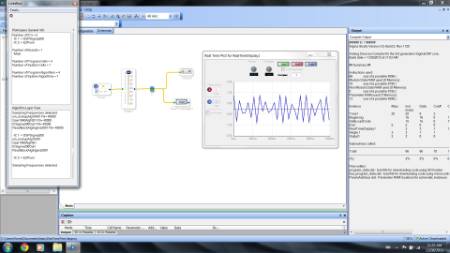
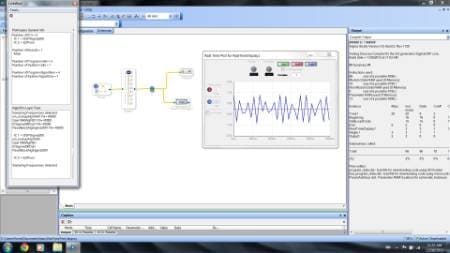
I am using real time display graph to plot sine tone freq=500hz. but I am not getting the correct output in real time display graph? I am getting spikes instead of sine wave. I just want to know what are the proper setting for realtimedisplay block. The pic of project is attached
Thanks
Hi sss36,
The display of the real time display is limited by the read/write bandwidth on the USB-to-I2C/SPI port. This makes it unsuitable for displaying signals of a frequency higher than a few 10s of Hz.
Using SPI will get you a few more data points than I2C because the data rate is higher, but it is still not suitable for high frequency signals.
The real time display was meant for monitoring slowly changing signals, such as signal envelopes (to see if they cross a threshold) or DC logic levels used in a decision-making part of the signal flow.
Hello sss36,
There's a few ways to see a waveform that's too fast for the Real-Time Display (which as Brett notes, is great for following envelopes and compressor side-chains, but not suitable for audio frequency waveforms):
Connect a spare DAC to the desired measuring point and use a physical oscilloscope to view the result.
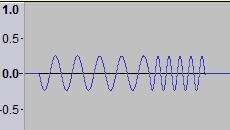
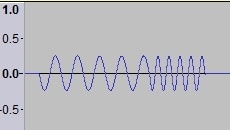
If a scope is not handy, use a sound editor (like Audacity) to record and view the waveform, like this:
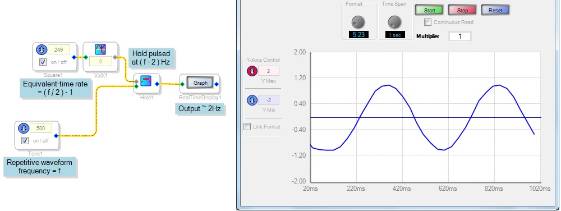
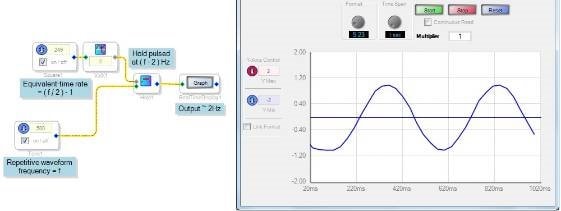
For truly repetitive waveforms you could try an equivalent-time technique, where you re-sample your test waveform at a rate just under the test waveform's frequency. Below, a 500 Hz sine wave is sampled at 498 Hz to draw a 2 Hz version of the original on the Real-Time Display:
Best regards,
Bob
Thanks Bob and Brett,
For my paper, I want to plot the signal at one Mic only. For the timing I will try using Oscilloscope to capture result in excel sheet.
Ideally I want to save the wav file from ADAU1446 evaluation board to PC. The evaluation board have lot of different options like SPDIF, Optical and I2S. But which option is cheap and best?
Thanks
The simplest way to do it is optical S/PDIF, assuming you have a sound card that can support it. That way, you'll get a direct representation of the audio signal recorded on your computer.
You can also take the direct analog output from the board into the computer, but that of course has the problem of adding an additional DAC and ADC to the signal chain, which means that you're not truly getting the same signal as what's in the DSP.
However, depending on the level of detail you need in this application, the analog approach might be good enough!
Please log in to reply.