RMS detection of 5 seconds of audio frames
Hi guys, I'm working on an ADAU1701 and I'd like to realize a RMS detector not just frame-by-frame, but taking into 5 seconds of audio data.
I think that "watch block" can help me in order to manage the time, but I don't know how to realize the RMS detection,
I thought to a loop in which accumulate RMS of each frame and at the end of 5 seconds, divide the accumulation by the counter of frame occurred in 5 seconds.
Anybody of you has some hints.
Thanks, regards,
Leo.
P.S. From a programming point of view it should be something like this:
t = 0;
count = 0;
RMS_inst = 0;
<<do it again as loop until shut down occurs>>
<<start>>
while(t<= 5 * Fs){
RMS_inst = RMS_inst + RMS(input);
count ++;
t++;
}
RMS_avg = RMS_inst/count;
t = 0;
count = 0;
RMS_inst = 0;
<<end>>
where:
- FS is the sampling frequency
- RMS() is the function which computes RMS value of input
- RMS_inst the accumulation of RMS values
- count is the frame number occurred in 5 seconds
- t is the time instant in sense of sample (or frame)
- RMS_avg is my desired output
Audio Signal Processors
SigmaDSP Audio Processors
adau1701
Hi Leo,
Unfortunately, due to a few reasons, this approach probably won't work.
The fact that memory is fixed point means that your RMS_inst value will max out within the span of a few samples (i.e. a few milliseconds).
There is no pure division function in SigmaDSP, only a division approximation that is very expensive in terms of instructions.
I would have suggested doing a time-average approach, but the limited delay memory of the chip would prevent you from doing a 5-second buffer.
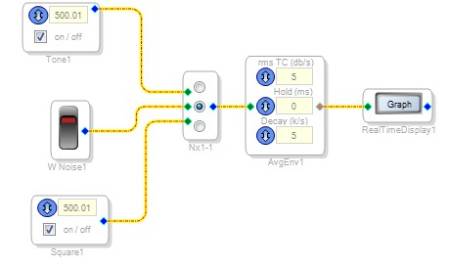
In the end, the best approach is probably the existing "Running Average" algorithm in the library. Just set the time constants very slow. I have had good success setting rmsTC (db/s) to about 5. Then, I set the Decay (k/s) to about 15. Note that the GUI doesn't allow you to set Decay to a greater value than rmsTC (I'm going to ask the software about this limitation because it seems to be arbitrary). You can manually set the Decay to any value by directly writing to its parameter in memory, using the Sequencer window.
Unfortunately the Sequence window is not yet documented on the Wiki, but you can learn about its usage here:
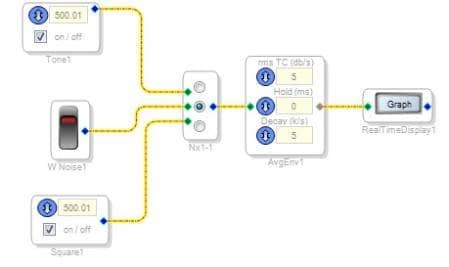
Here's a basic project where I can switch between different sources.
I use the sequence window to manually overwrite the Decay value:
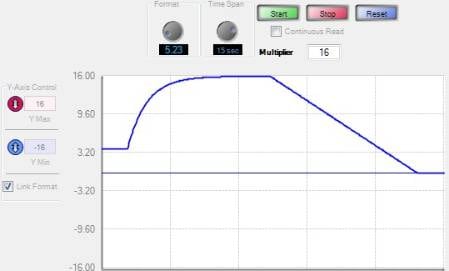
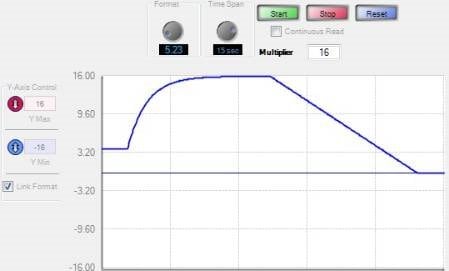
The resulting shifts in the running average take approximately 5 seconds to settle.


Thanks Brett you rock!
I'm not sure if writing Safeload Registers through "Sequencer window" is the correct way to change the decay value from 5 to 15. By the way it seems to work. Thanks.
Bye,
Leo.
Hi Brett, I wonder if there is a way to use a variable (myVar) in which update a new value every 5 seconds. I mean, I use again a programming example:
myVar = 0; // initialization
while(true){ // loop until shut down occurs
sleep(5000); // sleep for 5 seconds
myVar = RMS(input); // compute RMS of input and store it in a variable myVar
//.... other operations
}
I'd like that just input detection is performed just one time every 5 seconds, while other operations, like "Sine oscillator", continue their regular processing.
P.S.
I don't know if this scenario is feasible, if it isn't this should help me very much anyway, because I could set such a limit in my work and I should demonstrate to my supervisor that I'm not lazy!
Thanks so much! Bye
Leo.
Hi Leo,
If you just want to get a new value every 5 seconds, perhaps a good solution is to have the system host (microcontroller or some other chip) poll the RMS detector every 5 seconds?
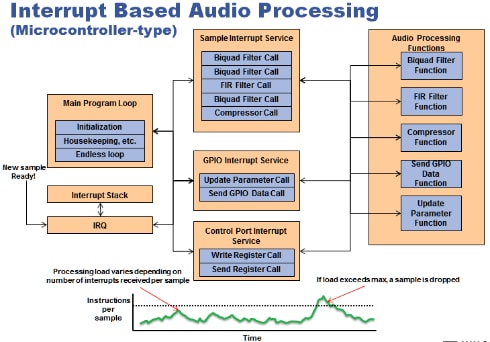
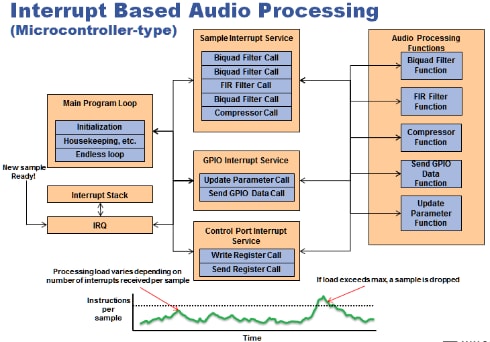
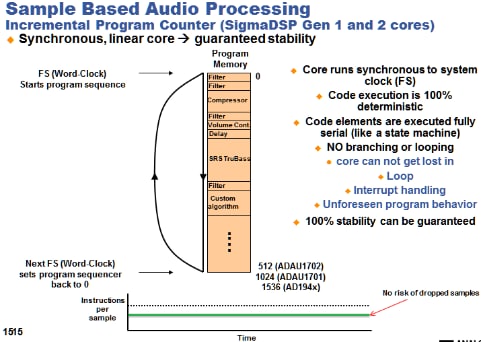
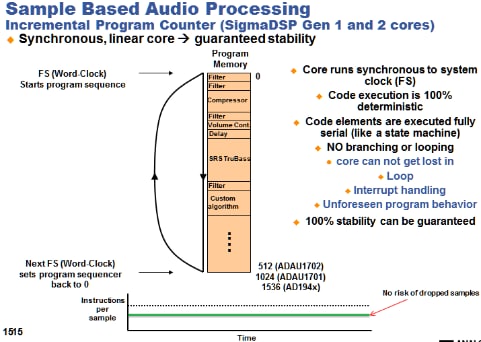
Since the SigmaDSP is stream-based, not interrupt based, there isn't really any way to have some instructions execute on some frames and others execute on other frames. Every instruction executes on every frame, no matter what.
Here's a quick graphical example showing what I mean:
Hi Leo:
What you are trying to do is also possible by using a variable that gets set and reset using 2 methods. The first one, when a counter counts 5 seconds. (you must reset the counter also when you reset the variable to zero). Also, the variable should be set when the threashold you are lookng for is exceeded (or not). Use a simple feedback cell to reset your counter and variable.
Brett is correct in pointing out the differences between the SigmaDSP architecture and a regular microcontroller however there are many other ways around that by making use of existing SigmaStudio blocks.
Regards
Miguel
Hi leonxp,
As Miguel pointed out, it is possible in SigmaDSP to RMS average an input over given intervals with a discrete update after each one. It's a bit messy, but the method below is one way to perform this.
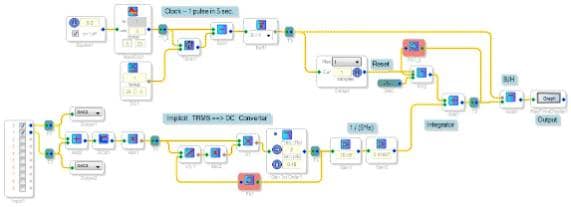
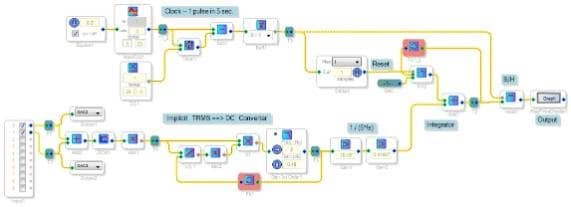
Starting at the top left, a square-wave gen provides the clock that drives the needed acquisition, hold, and reset sequence.
The audio input is measured by an implicit RMS-DC converter, described at https://ez.analog.com/thread/26624 As shown, its output reads 1.0 with a 1V DC source input, and approx. 0.71 with a 2Vp-p sine wave -- both as expected. I did have to place a tiny gain in the lowpass filter to make it accurate under both conditions, which bothers me because I don't know why it's needed. With 0dB gain the DC response remains accurate but the sine wave response reads about 3% low. Of course, you can replace this converter with anything that senses the input's level, such as a running average block.
An integrator (see https://ez.analog.com/thread/16674) adds up the RMS results during the five-second interval. At the interval's end, the clock issues a one-sample wide pulse, which captures the integrator's output with a Signal Hold block. After a one-sample delay the clock resets the integrator for the next acquisition.
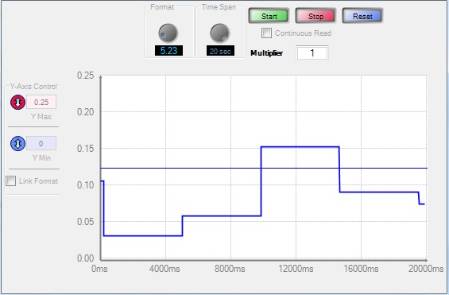
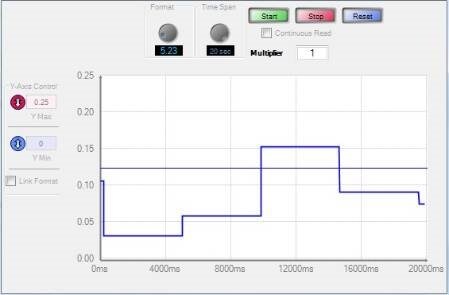
The Real-Time Display shows an update each five seconds, measuring RMS volts. A typical result using a voice podcast for input appears below:
The attached project file is for the -1701 mini board.
Best regards,
Bob
Very cool solution! Thanks, Bob!
Please log in to reply.