Question about Automatic Speaker EQ file format
Hi There!
I am working with an ADAU1701 and am looking into the Automatic Speaker EQ block.
The documentation says compatible formats include Impulse Responses with one measurement per line and Frequency responses in the MLSSA format.
My measurement tool at this time is the Dayton OmniMic system. It outputs .FRD files for frequency response. When I open one in wordpad it looks like this:
22.64709 69.42 -29.8
22.8112 69.69 -30
22.9765 69.94 -30.2
23.143 70.15 -30.4
23.3107 70.27 -30.6
23.47962 70.27 -30.8
23.64977 70.15 -31
23.82114 69.94 -31.2
23.99376 69.71 -31.4
This file does not import into the block (renamed it to have suffix .txt) but this looks to me to be one measurement per line. Am I missing something or is this just a formatting issue of some type.
Thanks in advance!
Audio Signal Processors
SigmaDSP Audio Processors
adau1701
This got me interested as i use fuzzmeasure on the mac and that out puts the same FRD file, changing it to the TXT i can see the same as you only with a header.
here is the wiki on the MLSSA import feature
as you can see it uses headers in quotes, i will see if i can get the FRD file i have here conveted to TXT to import
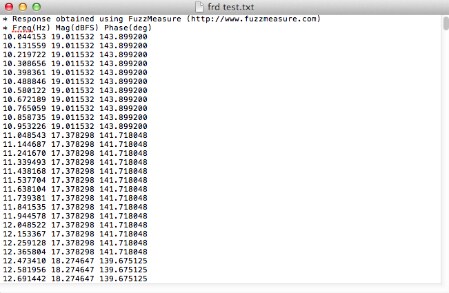
okay I have figured a work around, its a little bit time consuming but it worked on a 50 line string.
You need to add a comma after the first and second column of numbers as it looks like the MLSSA is a comma separated format. Once you have that done just copy and paste it into the example file and save.
Im going to try one of the massive FRD files to see if there is a number of lines.
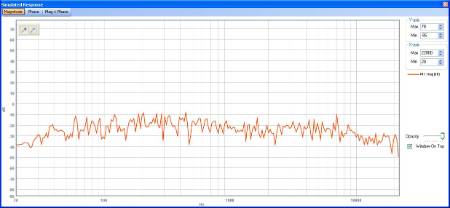
Okay, I converted a full FRD file and then pasted it into the MLSSA shell file, good news it works fine, the only down side is that you cant smooth and with the high number of data points the response looks very peaky.
I think maybe some editing of the TXT file in a spread sheet perhaps taking the average of each set of data points would produce a smoother response due to the smaller number of data points
Your file needs to look like this, all i have done is add the comma's and paste it into one of the sample MLSSA files that comes with the sigma studio
This is what you end up with
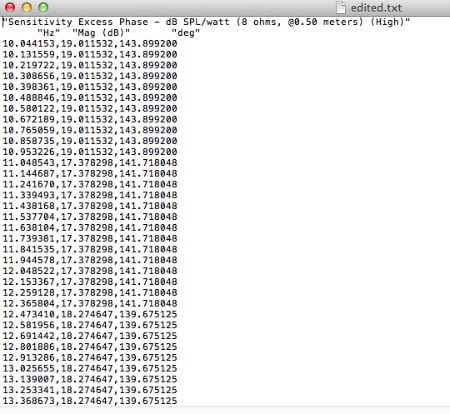
Hi Miguel
How can you use a response curve from a different speaker as a reference to another?
Graeme
Hi Miguel
The best solution i have seen to this is the JBL Synthesis system, you tell it the speaker your using and it loads up that response then auto EQ's the new measured in room response of that speaker to match the loaded response.
When i get my project up and running thats what i will be looking to replicate and the reason i had a quick go at converting the FRD file to a MLSSA format.
Im assuming the method you mentioned is valid on all sigma series DSP as im looking at using the ADAU144x family.
Im not sure what the original poster is trying to achieve, but i hope my work around helps him in his goals
Graeme
You should be able to convert the file in word or excel or even open office, i used notepad on my mac to edit, i used the find replace to insert the commas.
I will play around over the weekend and see if i can get a better response, i think i can reduce the 950 points down to around 190 by averaging the batches of 5 data points for each frequency.
Graeme
Thanks, Graeme!
I am still working on getting a file format to work.
So far I am not coming up with anything and I am wondering if it is because
I am using notepad or wordpad and as such I may not be getting a pure ASCII
output. I have put in the headers like in the MLSSA format.
I'll keep working at it.
Thanks for the help so far!
On Fri, Jul 12, 2013 at 2:59 PM, gr4eme <
HI Michael:
The attached files should open and be used as a reference for the auto eq files.
They are impulse responses (what we recommend) generated by ARTA.
http://www.artalabs.hr/screenshots.htm
Best regards
Miguel
Hi Graeme:
i would probably use the combination of the Melissa Cell and the autoEQ. I haven't given this much thought (interesting application) .
The Melissa measurment (element) allows you to inject the response of one speaker into the signal flow, the autoeq should propagates the transfer function of it's filters so a combination might do what you are looking for ( personally haven't tried).
Let us know if you were succesful
Miguel
What I'd like to be able to do is use the frequency response measurements I
have (in .frd format) and apply the inverse of them. Not sure right off
if/how this might be possible but the Automatic Speaker EQ seemed to be the
best place to start.
My only issue is getting a compatible file format using the tools I have on
hand.
I'll look into ARTA to see if that will fit my needs. I'm not opposed to
investing in another program but I'd rather not if I don't have to.
On Fri, Jul 12, 2013 at 3:57 PM, gr4eme <
I must not be holding my mouth right! I'm sure it's something in the
formatting... will keep working on it!
Thanks so much for your help!
On Fri, Jul 12, 2013 at 5:15 PM, gr4eme <
Woohoo!
Thanks all for the help! Finally got it importing! Now just got to figure
out how to get a good inversion going!
Have a great weekend all!
On Fri, Jul 12, 2013 at 5:15 PM, gr4eme <
This question has been assumed as answered either offline via email or with a multi-part answer. This question has now been closed out. If you have an inquiry related to this topic please post a new question in the applicable product forum.
Thank you,
EZ Admin
Please log in to reply.