signal comparison
Hello,
I have a ADAU1701 with 6 input audio signals.
Each signal has RMS circuit attached to it.
I need to compare signals to a threshold and read the logic result of comparison.
The ideal solution would be to combine comparison bits in one byte (or word) and read it.
The comparator with logic output (to compare rms with DC) would work fine,
but I can't find any signal comparators in the Studio toolbox.
Also it seems like there is a possibility to assign bits values to some output data
(in Zero Comparator and Buffer Gate), but it's not clear where the output data is and
how I can read it.
Is there solution for this problem?
Thank you,
Gennady Palitsky
Audio Signal Processors
SigmaDSP Audio Processors
adau1701
Hello Gennady,
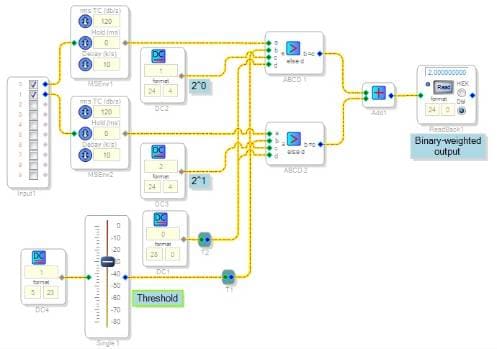
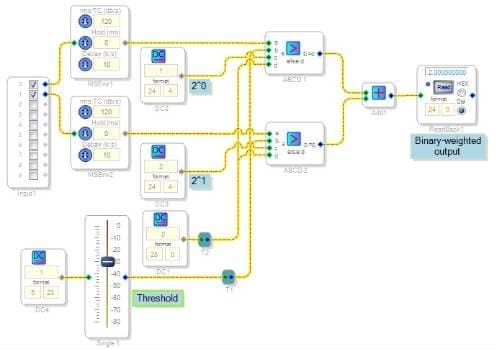
The AB in CD out Condition block (under Basic DSP / Logic) serve well as a comparator. In the circuit shown, when the RMS level ("A") exceeds the threshold ("B"), the block outputs the DC source at its "C" input. Otherwise it outputs its "D" input (zero).
The DC sources are arranged in binary (1,2,4,8...) sequence, so each comparator that's active outputs a designated bit position. The adder sums them up, then the Readback block reads this total value. The DC sources are in 24.0 format because the ADAU1701's Readback register truncates the four LSBs. To get this data from the Readback block into your uC, follow the directions at:
https://ez.analog.com/message/7669#7669
Best regards,
Bob
Thank you very much, Bob
Just got back to this project and your advice is very helpful.
Gennady
Please log in to reply.