problem of "Ctrl + wheel of mouse" to zoom in or zoom out the screen
Hello:
I find some problems when I use SigmaStudio
1: If I use “Ctrl + wheel of mouse” to zoom in or zoom out the screen , The parameter of every component can not be modified , only “rename” , “connect” , “move” can be operated. And every component displaying is not every clear,Many design tools support this function for example Coreldraw..
2: How can used a Sine Tone to generate a sine and cosine signal at same time , If used a filter , Group delay maybe occur ;If used delay unit , many RAM units are used .
3: How can I get a EvalBoard ,I am going to use ADAU1401A sigma DSP. I am in Shenzhen Guangdong P.R.C
Best regards!
Thanks!
adau1401a
Audio Signal Processors
SigmaDSP Audio Processors
Hello.
Sorry you're experiencing this trouble. Perhaps this will help:
1. Unfortunately, the block controls only work at normal (100%) zoom. For more info and a workaround, see https://ez.analog.com/message/2866#2866
2. The VCO with Quadrature Outputs (under Sources / Oscillators / Voltage Controlled) has a sine and cosine output. Instead of typing the desired frequency into the block, you feed it with a DC source that sets its frequency. The formula for calculating the needed voltage V from the desired frequency f is,
V = 2 * f / fs
3. I'll leave your last question for a ADI representative to answer.
Best regards,
Bob
3Q!!! Chinese English "Thank You",
Hello:
My Sigmastudio have no VCO with Quadrature ,Only VCO without Quadrature Outputs .
What can I do?
Best Regards!

Hello,
If within the PRC you can access the SigmaStudio download page described here:
https://ez.analog.com/message/89364#89364
then download & install version Beta 3.9. It has the quadrature VCO for ADAU1701/1401. Older versions may include the quadrature VCO for certain SigmaDSPs, but not for the -1401.
If the download page does not appear as described from your location, then contact AD locally. The should be able to help you with both the eval board and the software. Choose the less expensive ADAU1701MINIZ board to develop code for the -1401 unless your application needs features only found on the larger -1401 board.
Bob
Hi to everybody
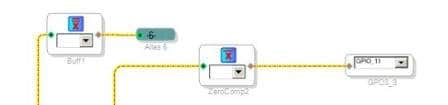
After I have effected a zoom it is not possible more to change the parameters of all the blocks.
Unfortunately I have saved the project and also closing SigmaStudio and then reopening is not
more possible to change the parameters of all the blocks.
Is there a solution to the problem or do I have to redraw the whole project?
Thanks

Thanks Bob,
Resolved the problem, we hope that the new release SgmaStudio foreseen for November doesn't have problems anymore.
You are always kind and precise.
Piero
Hi Piero,
Hit Shift+Ctrl+F6 to return the zoom to exactly normal, then you can adjust your parameters once again. Recent versions of SigmaStudio save the zoom level in the project, that's why closing and re-opening doesn't help anymore.
Bob
Please log in to reply.