how i can deal with Ram in Sigmastudio
Dears
how i can stored value in spicific register ( Ram location ) ?
how i can multiply signal in fixed number stored in specific register ( Ram location) ?
Regards
Hello ahafez,
To place a number into a SigmaDSP's RAM so you can use it in your signal flow, use a DC Source. For example, suppose a 10dB gain (multiply by 3.2) is needed. One way to do this is shown below. Note that in this way, you can supply a number to any block's input as needed:
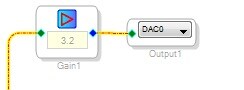
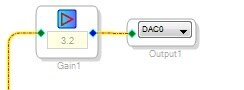
You can also use SigmaStudio's Gain block -- in this case, the needed number gets embedded inside:
But we've yet to address your larger question: How does SigmaDSP and SigmaStudio handle RAM contents? If you're curious, read on. SigmaDSPs have three RAM sections:
Instruction RAM -- Holds your program instructions. Since there's no on-board instruction ROM, SigmaDSPs are always booted externally (by your system's microcontroller or with some models, an EEPROM). You can program your microcontroller to load instruction RAM via an interface such as I2C. SigmaStudio's compiler generates all needed instructions from your signal flow, with no alternative method (i.e. no C compiler). Thus, normally you boot your SigmaDSP with exactly and only the code SigmaStudio generates.
Parameter RAM -- Contains the various constants needed by your signal flow, such as filter coefficients. The DC source value above, for example, goes into here. SigmaStudio generates the needed Parameter RAM contents. Your system microcontroller can also modify Parameter RAM, and there's good reason to do this -- for example, to let an end user adjust a EQ filter.
Data RAM -- SigmaStudio automatically allocates Data RAM to the various blocks that need it to store intermediate results or implement delays (in fact, delays are the biggest Data RAM hogs). Data RAM is not directly accessible, so your only concern is to have enough.
Once you compile a project, any parameter entries you make show in SigmaStudio's Capture window. Thus, when I typed 3.2 into the DC Source block, this listing appeared there:
You can see that SigmaStudio assigned Parameter RAM address zero (the bottom of the address space) to the DC Source. It placed the four bytes corresponding to decimal value 3.2 there. This is how the various parameters in your signal flow get into the chip's Parameter RAM. If you program your system microcontroller to send the same stuff, you can change parameters on the fly.
There's several resources to help us users learn the ins and outs of SigmaDSP:
Read the data sheet for the chip you're using -- not very entertaining, but it's worth the time.
Search this forum for topics you need help with, such as "number formats" -- try this search right now and you'll see what that "5 23" in the DC Source block means!
Check the Wiki -- http://wiki.analog.com/resources/tools-software/sigmastudio for tutorials and help with what the various blocks do and how to use them.
Ask more questions here -- both ADI support engineers and other users (like me!) are happy to help.
Best regards,
Bob




Please log in to reply.