Long delay after a low pass filter ... what are the delay limits?
Hi everybody,
I have a strange behavior in a simple workflow where, on an adau 1701 at 44100, a delay is put after a low pass filter. Nothing strange, it's a part of a more complex application, I tried to isolate the problem.
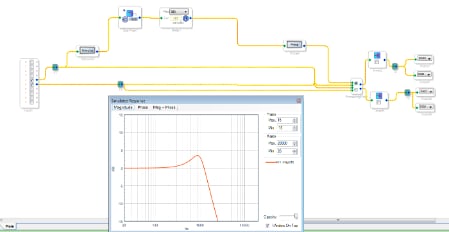
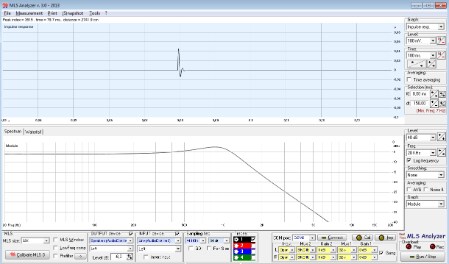
Now, what's happening is that I MEASURE the output (I have a tool that displays impulse response and frequency response in real time), and see
that when the delay is higher than a threshold the output actually disappears. I'm attaching a couple of images to explain.
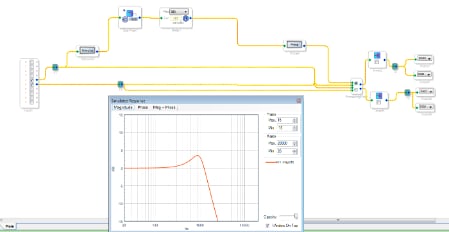
The workflow is simple. I use digital input 1 to feed data, and monitor it on the OUT 0. The tool is actually an MLS analyzer measuring in real time, and as all data is digital the responses are clean and allows to understand well what's happening. The response of the filter is OK, it's just a low pass, and from the snapshot we can't see that the samples are delayed but we can trust the system.
Now what I do is changing the delay.
As far as I understand the maximum delay is limited by the amount of memory available to store the delay lines.
In my case, with an Adau 1701, I should have 2048 locations of Data Ram. I actually use a maximum of 980 (maximum delay
in the Delay element). Some more ram is used by the other blocks, but I should be well into the limits.
This is confirmed by the "Compiler Output.txt" file that is generated by sigmastudio ....
################## Summary ########################
Number of instructions used (out of a possible 1024 ) = 45
Data RAM used (out of a possible 2048 ) = 1000
Parameter RAM used (out of a possible 1024 ) = 10
So I think I use only 1000 locations out of 2048.
Now, If I increase the actual delay, int the workflow picture above it is actually 497, what I get is that the measured signal disappears.
In the case above I noticed that 497 is the threshold: below 497 everything is OK, from 498 on the signal disappears.
In a more complex workflow that I was using this threshold was far lower, around 100 samples of delay (despite having still Data Ram available, I checked it).
What I don't understand is what is the limit of delay that I can get from a 1701. I supposed that the limit was the amount of RAM, so a theoretical
2048 minus the locations used by other blocks, but in practice I see that this is not true.
Is there a bug in the compiler when dealing with long delays? How can I estimate what is the limit?
Can anybody check this behavior (filter before or after a delay) and confirm it or find where is the fault?
Thank you.
I'm attaching the project if anybody wants to try. Modify your I/O as appropriate. One final note: don't trust the "Probe" frequency response, it's always OK. It's the actual measured behavior that changes. Maybe you can "listen" .... Message was edited by: Daniele Zingoni
A more clear example ... just use the included project.
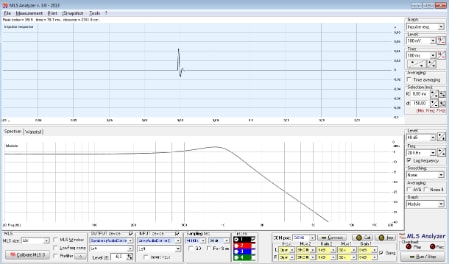
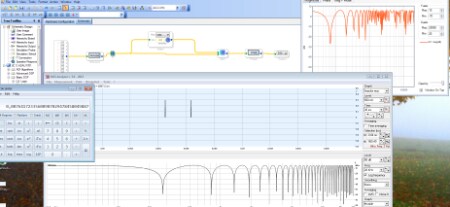
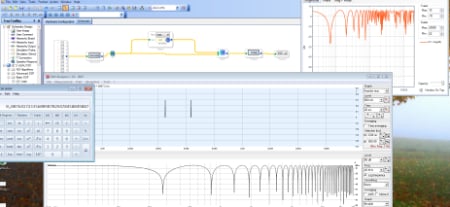
Here we have a one channel delay .... the signal is summed to itself in a delayed form. The Max delay is 1000, the actual delay changes with various results. On the right the "probe" window, at bottom the measured impulse response and freq response.
We start at delay 1, and everything is OK, measured response and "Probe" agree very well.
Now, increasing the delay, everything si fine until delay=250 .... the from 250 to 256 there is NO delayed sample, then at delay = 257 the delayed sample reappears (and so the wrinkles in the freq response ...) but .... it's like the delay is 1! It's a sort of wrap around .... we increase again and obtain much less delay than indicated!
In the picture we see, for instance, that while the delay requested is 337 samples, which at 44100 Hz is more or less 7,6 ms .... see the calculator (337 * 1/44100) in reality the delay between samples is much less ... from the subdivision in the time response display I'd say something around 2 ms ...
We can increase from 337 ... we reach a point around delay 500 where a new wrap happens and it starts all over again.... There must be something wrong in the compiler output, it should not be a problem of RAM (actually the max requested delay uses 1000 of 2048 available locations).
I remember I used long delays on a 1761 with no apparent problem (although if I remember well in the 1761 there is less RAM available). Here on the 1701 it looks like there are much smaller limits, and not directly correlated to the availability of RAM.
Can anybody explain?
I don't know much about the notch filter you're designing, but I just tested a very simple delay application and everything seemed to work properly. I am using the ADAU1701 evaluation board, which has a 12.288 MHz master clock, forcing me to use 48 kHz as my sample rate.
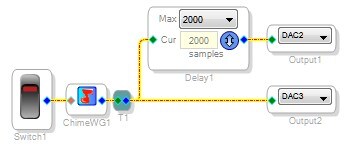
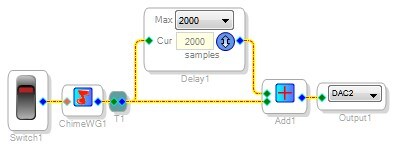
I made a simple chime generator that makes a short impulse when a switch is flipped. I send the chime directly to the right DAC, and I also send a copy of the chime through 2000 samples of delay, and send that to the left DAC.
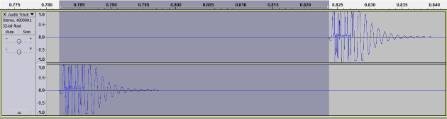
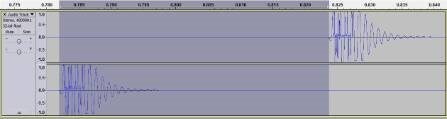
Here are the recorded results, using my computer's line input at a sample rate of 48 kHz:
If you check the calculated length of my selection (the start of the non-delayed chime to the start of the delayed chime), you can see it's 42 ms.
This makes sense because 2000 / 48000 = 41.67 ms.
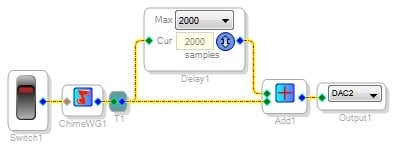
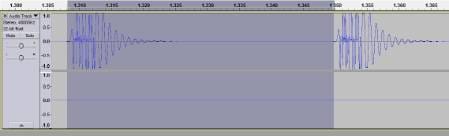
I also tried your exact signal flow, using a summing node and outputting just one channel:
The results are the same... 42 ms.
So, unfortunately I'm not able to duplicate the problem you're seeing.






Thank you Brett for the reply.
I'm happy to hear that somehow the system should work, I have two almost finished prototypes using the 1701 as (among other things) a delay line. The problem is understanding what's going on.
Just to exclude some possibilities, what version of SigmaStudio are you using? In my case it's version 3.8 at 64 bit (running on Win7_64). I tried to reinstall it just to avoid mistakes.
I will try your example to see what happens on my system.
I am using 3.9 beta, which is still in pre-release, but none of this functionality has been modified since 3.8, so the behavior should be the same.
Hi everybody,
I found the solution myself ..... The strange behavior was not caused by a bug, but by the settings of the "RAM" value in the DSP Core part of the Hardware Configuration.
Looks like I changed it while trying to check different settings, and a value of "1" caused such a strange behavior.
Setting it to "8" let the system works OK.
To be sincere I don't know which value I should use, the things I know is that at "0" the system don't work, and at "1" , as we have seen, it works partially.
What's the intended use of such "RAM" setting, and which value should I use for a project that can work at different frequencies?
The RAM modulo register is set automatically by the SigmaStudio compiler, but it should always be 8, as far as I know.
Honestly, we should remove that setting from the control window since we never want the user to modify it.
I'm glad you were able to solve the problem!
This question has been assumed as answered either offline via email or with a multi-part answer. This question has now been closed out. If you have an inquiry related to this topic please post a new question in the applicable product forum.
Thank you,
EZ Admin
Please log in to reply.