Comb filter, feedback issue
Brett (and anyone else who might have some insight.)
Several months ago, you and I had discussed a comb filter implementation. At the time, I was asking why the simulation/probe was not working properly. We assumed that this was just a simulation problem and moved on. Now we are finding that the filter does not actually work on the hardware as expected.
The equation that we want is : y(n) = x(n) - x(n - N) + alpha*y(n-N).
I have attached my implementation, and I'm not seeing what is wrong. It behaves as if the y(n-N) is not there.
Best regards,
Bob
Bob,
Perhaps the feedback needs to come from just before the probe, as this is your y(t) -- please see the attached version of your project. With this connection your alpha term acts recursively as intended.
Best regards,
Bob
Bob,
Thanks, I tried it both ways and didn't not get the results that my Matlab simulation gave me.
Best regards,
Bob
Bob,
One thing I forgot -- the red "feedback" cell is in itself, a one-sample delay. Thus, your explicit delay in the feedback path needs to be, not N samples as is your forward delay, but (N-1) samples. That's a small difference, but maybe it matters nonetheless.
Bob
Bob B,
See attached for how the filter should look depending on the magnitude (alpha) of the y(n-N) feedback term.
Bob S.
Hi Bob:
Could you post the Matlab scipt, this would help us undertand where the problem is.
Thank you
Migel
Migel,
Yes, I can do that. Thank you for your response.
I don't have it on my home PC so I will post it tomorrow from the office.
Best regards,
Bob
Hi Bob,
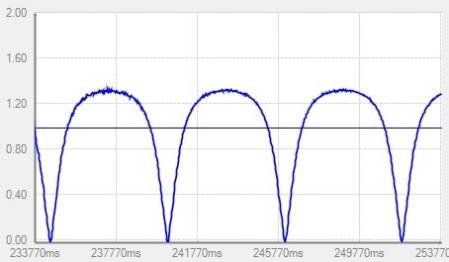
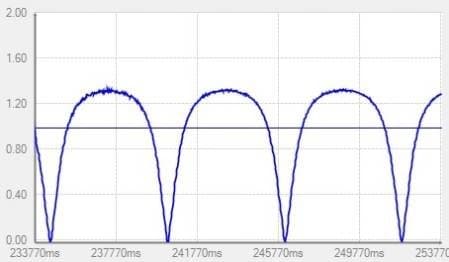
I tested the filter with the feedback taken from the sum total, and its delay set to N-1 = 399 (as it turns out, this did make a difference). To gauge its frequency response I set up a swept VCO, reading the filter output from a peak detector and Real-Time Display. Here's the results with alpha = 0.5:
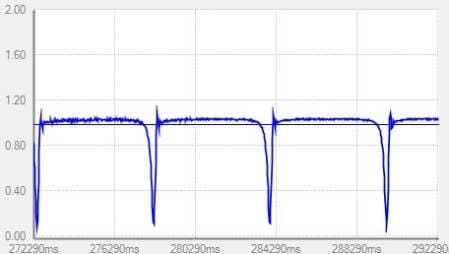
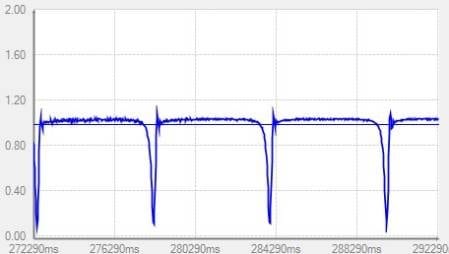
and at alpha = 0.9:
So adjusting the alpha is affecting the result as expected. This is about all I can do, perhaps we need to redirect your question to an ADI engineer (such as Brett) to handle any remaining differences between your measured result and the Matlab theory. It was fun to play with though. I always wondered how to make a comb filter. Thanks for sharing this with me!
Bob B.
Bob,
Great! So using the 'stimulus' and 'probe' does not work, but that's OK. At least now I have a tool to work with. Can you please send me your project. I have a co-worker who is taking this project over at it would be nice to arm him with the appropriate tools.
Glad you were able to gain some knowledge at the same time. Most comb filter implementations don't include the 'y(n-N)' term, but it is a nice little trick that I learned from a fellow engineer. I'll play with the 399 vs 400 issue, but I don't think it really should make much difference. Stay tuned.
Best regards and thanks to all of those who posted.
Bob
Bob,
I've attached my implementation with the 'stimulus' and 'probe' using the 399 delay instead of 400. It still does not give the results that you have. I'll just use your implementation(VCO and peak detect) for my simulations from now on. Never thought of doing it that way. Thanks!
Best regards,
Bob S
Hi Bob,
I misplaced the project (already!), so the one attached here is not necessarily identical (though it tests OK). Since I'm running it on a stock 1701 mini eval board with its 12.288 MHz crystal, I set its sample rate to 48KHz -- you can change it back to 44.1KHz to match your hardware. For more info on this, see https://ez.analog.com/docs/DOC-1431
To view the response, check the continuous-run box in the Real-Time Display. You'll see a messy glitch when the frequency flies back from max to min. Freeze the display as the glitch approaches the origin to produce a static graph. The effect of "399" vs. "400" is subtle, but increases with higher values for alpha. The sweep range is presently 100 to 600 Hz (at fs = 48000Hz).
The sweep VCO method is handy for quick experiments, though of course for critical work you'll want to do a hardware frequency response test.
,
Bob B.
KJBob,
I’ll be away from the office for the next week, but a colleague of mine will be pursuing this project. I think we are confident that the system is working as we expect at this point based on your simulations and our bench testing. Thank you for your assistance.
We now know that we need to be careful with the ‘stimulus’ and ‘probe’ functions when there is feedback involved. Wish the Analog folks would fix this! As I’ve read more posts, it seems that FB is not handled correctly.
I’ve also noticed that we cannot run a simulation without the target hardware connected. Maybe this should be obvious, but I’m used to being able to run simulations on my PC without any hardware attached (such as Labview)
Best regards,
Bob Snyder - AES
HI Bob and Bob:
This is correct, SigmaStudio is firstly a DSP programming tool, then we added additional design time help (nice to have) features. Among those added features, we have the Transfer Function calculation that is helpfull when designing NON adaptive filters and other static (non signal dependent) transfer functions. Because there is currently no way for the PC to read values from specific locations from the DSP, calculating simulation transfer response of certain elements, such as dynamic processors, is basically impossible. We understand that this might be frusrating to some users but we think this is a difficult problem that we'll try to overcome in the next couple of yeras. Unfortunately there is no easy work around even for static transfer functions made up of basic dsp elements.
Hope this helps.
Miguel
PS. Simulation (when possible) does run without target hardware NOT connected.
Please log in to reply.