General (2nd-Order) Tone Control ... is it working in SigmaStudio?
Hi eveybody,
I'm trying to use a 2nd Order filter as a "Tone Control", which is one of the possibilities in the drop down list.
Nothing complex, a simple workflow working at 44100 Hz.
What's happening is that the actual behaviour of the filter is completely strange, nothing to do with a tone control, and nothing to do with the
displayed frequency response.
In the Sigmastudio interface you get a small window with two knobs, one for Treble and one for Bass. You can set the frequencies for the bass and treble sections, and the values of boost in dB. If you look at the expected frequency response with a "probe" everything looks great ... but
has anobody tried to listen ?
Let's say I send a 100 Hz to the board ... I would expect the "Bass" knob to control the level .... instead what you get is nothing. The "treble"
knob actually controls the level.
I tried several frequencies with a generator ... the behaviour is completely wrong .. sometimes the treble knob changes both bass and high frequencies, a sort of loudness control ... in general there's no correlation to what you see in the probe and what you hear .... how can it be?
Has anybody used such filter?
Hi dzingoni:
What part are you using? Not sure what's wrong.
Miguel
Hi,
I listened to the tone control (in SigmaStudio 3.8 on a ADAU1701 at 48KHz) -- the bass control seems responsive with a 100 Hz hinge setting. I increased its range (right-click on the knob) to +/- 12dB to make its effect more noticeable with ordinary headphones plugged directly into the 1701 eval board's 1/8" jack. The funny part is I'm having more trouble with the treble control -- I had to set its hinge frequency to 3KHz to hear any change in the sound. No effect at all when set at 10KHz, even though the stimulus / probe shows a nice range as you noted. Are you using a different SigmaDSP chip such as the 144x -- these use a different compiler, which could explain our differing results. Also you may wish to attenuate the input to the tone control as I did run into some distortion at extreme settings and a full-scale input.
Best regards,
Bob
Hi MigCha,
I'm using a 1701. I investigated further, and discovered a couple of things:
1) the behaviour above happens only on some complex workflow, when the Tone Control filter is at the end of the flow. Looks like it's there but not working, or not working properly. The project compiles well, the sound comes out, but the tone control don't do anything. The strange is that if I move the tone control at the beginning of the workflow the same filter works ... let's say OK.
2) When the filter works it has some strange behaviours:
- it inverts the signal (so the formulas for computing it maybe need a "-" sign). I saw this by actually measuring the impulse response of the board
- if the filter is disabled of course the sign inversion disappears
- when both the knobs are at 0 (zero db boost) the filter response looks "flat", but the coefficients are not those of a real flat filter (b0 = 1, all the others at zero)
- the frequency response displayed by the "probe" display is not correct ... it shows a real "tone control" behaviour (boost the bass and only the bass response changes), but in practice the filter don't measure like that .... the whole response get changed, in other words you need to compensate the general "gain" of the filter in order to maintain the rest of the response at the desired level ... In other words: if you have a flat response at -10 dB and want a boost of 3 dB at bass, you will have to compensate the gain in order to maintain the rest of the response at -10 (the same level as before)
I suppose that something needs to be tweaked in the behaviour and/or the description of filter coefficient calculations ...
I gave this a try with the ADAU1442 and everything seemed fine. I made a video of it, which you can watch here: http://www.screencast.com/t/EH0NnvgU5hX
I will try to do this with the ADAU1701 tomorrow.
Hi dzingoni:
Is it possible that you are exceeding the number of instruction allowed on the 1701?
Miguel
Hi everybody,
I can confirm that the Tone Control behavior is strange, having measured it with an external tool (using digital only in/out) that displays impulse response and frequency response.
I checked this with a minimal workflow with the only tone control at 44100 on an adau 1701.
What I see from measures is:
- that the tone control, when enabled and flat (controls to zero) is inverting (while if I uncheck the filter with the green/orange circle checkbox I see that the impulse becomes positive
- that the frequency response when at "zero" settings is flat, but the impulse response shows some artifact (I can show you snapshots if needed), in other words controls at zero is not the same as bypass
- that when the controls are not zero the whole frequency response gets changed, and not only the part that should change (if I change the tone settings for highs I would expect that part of the response to get higher or lower, the remaining part being more or less stable). Probably a gain compensation is needed.
Hi dzingoni,
The first thing you are going to want to confirm is your sample rate. Even though you may have your workflow system sample rate set to 44100 Hz you also have to make sure that the core sample rate of the ADAU1701 matches. Setting one of them does not set the other. If you are using the internal oscillator then fs is automatically MCLK/256. The filter calculates the coefficients based on the sample rate you set in SigmaStudio, so you will see anamolies if they don't match.
The strange behavior you see with your complex project is likely related to the amount of instructions executed being too much for the part. If you don't mind sharing your project file here, I would be happy to take a look and help you debug.
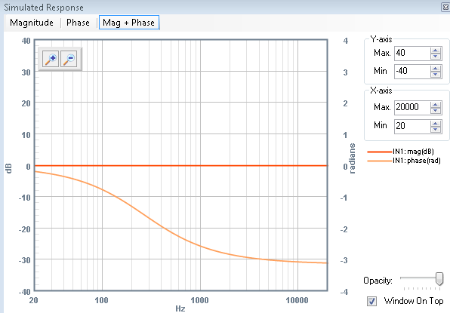
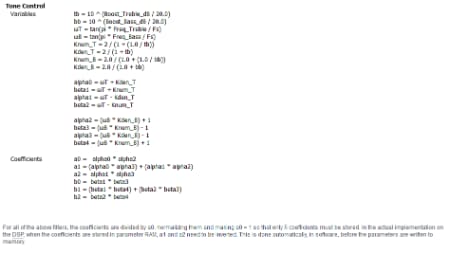
The coefficients are always calculated using the equations listed in the help file and on the wiki. This is true even for a flat frequency response (this avoids clicks and pops in the audio by having a smooth transition between coefficients when the knob is turned). This causes a non-flat phase response. In the simulator click the "Mag + Phase" button with a flat response to see what I mean. This is also the reasoning behind the impulse response you see.
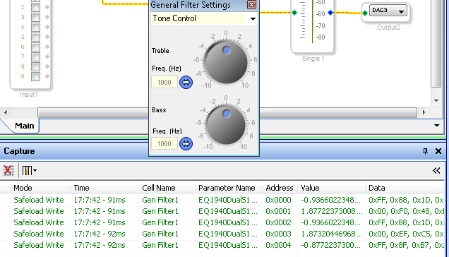
You can observe the coefficients in real-time in the Capture window of SigmaStudio. you can turn one of the knobs then change it back to flat and the last 5 write values will be the coefficients. Here is an example.
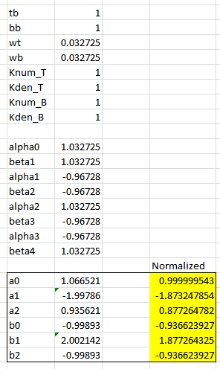
Here, you can see the coefficients for a flat response with both controls set to 1000Hz are
B0 = -0.9366
B1 = 1.87722
B2 = -0.9366
A1 = 1.8732
A2 = -0.87722
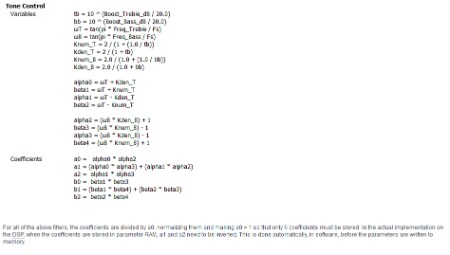
You can check these based on the equations for the algorithm. (note the statement that a1 and a2 and inverted for you)
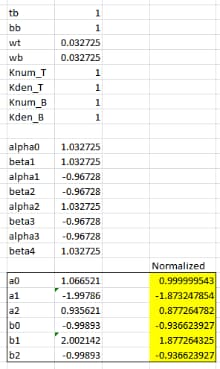
Here you can see that the coefficients match what we saw in the capture window in SigmStudio.
When you put the cell in 'bypass' mode (the little orange circle) then the coefficients are changed to b0=1 and the rest zeros. This is why you see the phase of your input signal go back to normal.
Let me know how your development is going.
Regards,
BillJ

Hi Bill,
thank you for the reply. I have partially solved the problem, there was a wrong value configured in the RAM parameter in the hardware configuration of my project (a "1" instead of a "8" which seems to work for me).
This was causing the strange behavior of the tone control and of the delay block like you can see in my other post http://ez.analog.com/message/81068#81068
Anyway, I can confirm that one of the problems is still present: the tone control filter is inverting.
If you have the controls at zero you have a flat response, but the impulse is reversed with respect to the "bypass" situation. I think a "-" is needed in the formulas for coefficients in order to get a more coherent behavior.
This question has been assumed as answered either offline via email or with a multi-part answer. This question has now been closed out. If you have an inquiry related to this topic please post a new question in the applicable product forum.
Thank you,
EZ Admin
Please log in to reply.