96khz with EVAL-ADAU1442
Hi
I just started using the EVAL-ADAU1442EBZ, could get audio through (analog in / analog out) as well as use the S/P-DIF in-out (including ASRC), but only with 48kHz - if I change the sample rate to 96kHz (in Sigma Studio and in the appropriate hardware register, as documented in the FAQs), there seems to be a problem: analog audio does not pass through. I then built a loopback for S/P-DIF with a tone generator (1kHz) and got a multiband level meter readout (in sigma studio) of 500Hz.
How can I run the EVAL board in 96kHz?
thanks
Gabe
Audio Signal Processors
96khz
adau1442
SigmaDSP Audio Processors
eval
Hello Gabe,
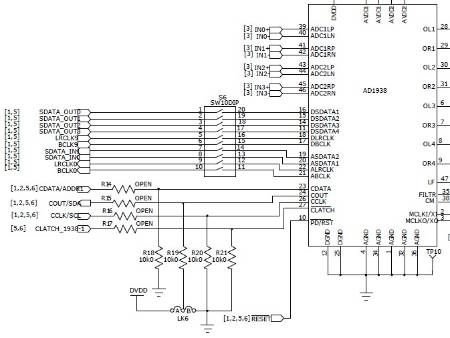
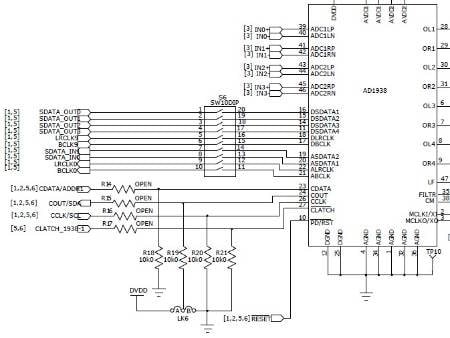
Unfortunately it requires some hardware modification in order to run the evaluation board at 96 kHz. The AD1938 codecs, which are handling the A/D and D/A conversion, are hardwired to run in 48 kHz mode. You can see in the schematic that their communications port pins are grounded, meaning that they power up in standalone 48 kHz mode.
In order to program them to run at another rate, you would have to de-solder those pull down resistors and then short out the open resistors on the SPI bus lines. Note also that the slave select line (a.k.a. latch line) is independent for each AD1938, so you would have to hack your USBi interface and run wires from its extra slave select pins to those lines in order to access the AD1938s via SPI.
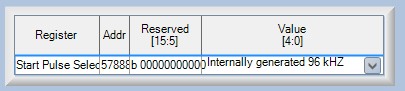
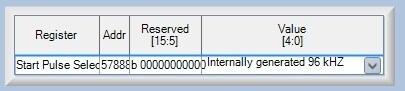
I'm really surprised that the S/PDIF loopback isn't working. Just to be clear, have you confirmed that the Start Pulse Select register (at decimal address 57888) is set to "Internally Generated 96 kHz"?
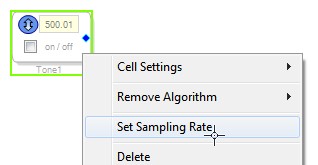
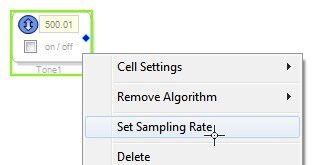
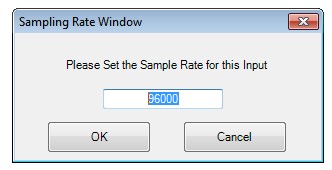
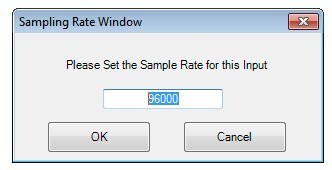
Also, have you right-clicked the sine tone generator and confirmed its sample rate.
Also, remember that in order to run at 96 kHz, your program has to utilize 1792 instructions per sample (or fewer) as shown in this FAQ: https://ez.analog.com/docs/DOC-2734
Hi Brett
Thanks a lot for your fast and elaborate response - this clarifies the issue with the analog path; however, as you say, the S/P-DIF should work - I'll run some more tests (maybe not just with the Sigma Studio Multiband Meter ;-)) and let you know. All my settings are as you state (the instructions per sample are very low, since I'm just testing the loopback).
Gabe
Hi Bret
So, i tested the S/PDIF in/out with external devices and they work just fine in 96kHz - it seems that the multiband level meter in Sigma Studio is not showing correct frequencies when working in 96kHz - possible?
Greetings,
Gabe
Hmm, that's possible. Let me get out my board and give it a shot. I will post back here with my results.
Hi Gabe,
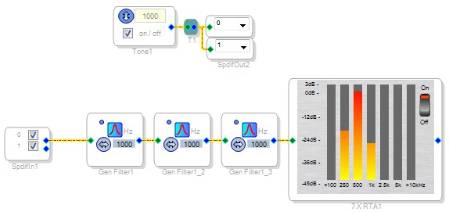
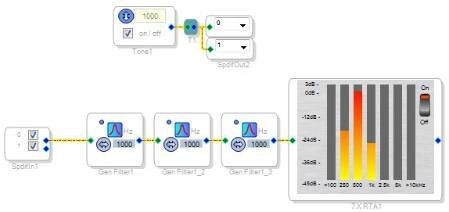
It appears to definitely be a problem with the level detector. Please take a look at this project running at 96 kHz.
I run the 1 kHz S/PDIF loopback signal through 3 cascaded bandpass filters with very narrow bandwidths, and the signal gets full at full strength, but centered at 500 Hz on the display.
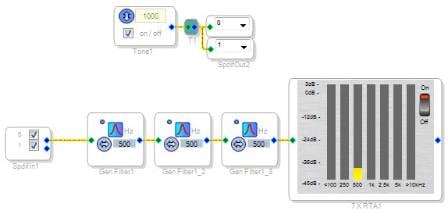
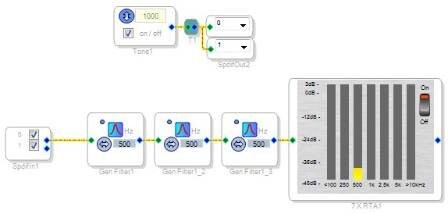
To confirm these results, I change the filter frequencies to 500 Hz, and the signal level decreases significantly.
So, this proves that the display cell has a problem, but the rest of the project is operating correctly at 96 kHz.
I will report this to the software team.
By the way, it is very, very rare that the S/PDIF Input cell can actually be used in a project. Usually, the S/PDIF signal source is external from the DSP and is asynchronous from the DSP, so an ASRC is required to use that signal in the DSP core. However, in this case, the DSP itself is generating the S/PDIF signal for the purposes of loopback, so it's synchronous by default.
So to improve sample rate from 48 to 192khz I have to program ad1938 over SPI interface?i have to use EVAL-ADUSB2EBZ and Sigma Studio?
Hello Francesco,
Yes, you have to program it over a SPI interface and using the USBi is the easiest way to do it when developing your application. Once your development work is completed and you are ready to move to your own hardware, you can use a small processor to boot up the codec. This app note details how to do it. http://www.analog.com/media/en/technical-documentation/application-notes/AN-1365.pdf
Dave T
Please log in to reply.