ADAU1701 Aux_ADC input circuit.
Hi everybody. I've got an ADAU1701, I'd like to use one of auxiliary ADC through MP pins. I read from Datasheet about input circuit to ADC Sigma-Delta but nothing about Aux ADC. Known specifications about Aux ADC full-scale input. Aux-ADC input circuit I realized, has been built with a capcitor and a resistance. Input wave is a 1KHz, 0.5 Vrms sinusoid, but the output wave I get is very damaged.
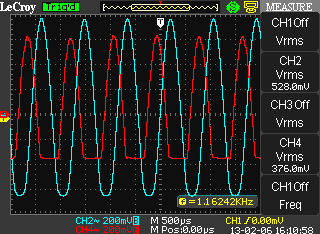
See the picture attached.
The red wave is DAC out, the blue wave is the Aux_ADC input.
Maybe the input circuit is bad or maybe the low Aux_ADC resolution originates this behavior. I'd like to know why.
Does anybody know how to make an efficient Aux ADC input circuit?
Thanks to all,
regards.
Audio Signal Processors
SigmaDSP Audio Processors
adau1701
Hi,
I've moved this discussion from the Processors and DSP community to the SigmaDSP community. Please continue the discussion here.
Regards,
Craig.
Hi,
Perhaps a voltage divider to bias the Auxiliary ADC input to halfway (1.5V) would work out for you:
Best regards,
Bob

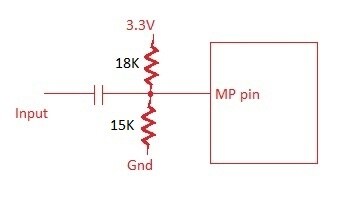
Tnx Bob I'm gonna try this solution. Nice.
Hi guys. Thanks to all for replies. I'd like to have an opinion about quality of the processed signal entered through Aux ADC.
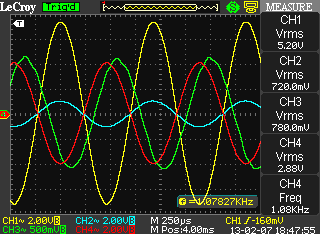
I realized the voltage divider as Bob showed to me, and everything seems to work. Taking a look to the picture I attached below, you can see that the sinusoid processed through the path Aux_ADC -> DAC0 (it's the same if I choose DAC1, DAC2 or DAC3) is noisy.
Blue: input to Aux ADC
Green: DAC0 output
I wonder if this behavior is due to the noise in the voltage divider circuit or to the low resolution of Aux ADC (it works at 8bit if I'm not wrong).
Thanks, regards.
Leo.
Hi Leo,
on the tab "Hardware configuration" you can choose some options for "Control ADC" / "Input filter".
Select "No hysteresis".
Also read in the HELP "AUX ADC Input" about setting the sampling rate. Maybe its a good idea to select the same sampling frequency as with your audio ADCs.
Hope that helps
Klaus
leonxp,
I think I know what is wrong. Sorry I didn't figure this out sooner.
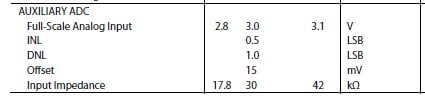
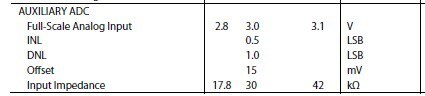
Bob's idea with the voltage divider is fine, but the top voltage should be 3.0 V (or 2.8 V), not 3.3 V. You can see in the datasheet's spec table that the typical full-scale input for the aux ADC is 3.0 V (the minimum is 2.8 V, which basically is a result of variations between different pieces of silicon). So, perhaps you should lower the top rail of the voltage divider to 2.8 V to be safe, and try again. That might get rid of the distortion you're seeing on the top edge of the waveform.
Tnx Brett, I'll try this solution.
Bye.
Please log in to reply.