Analog ADAU-1701 USBi Communication Problem
Hi
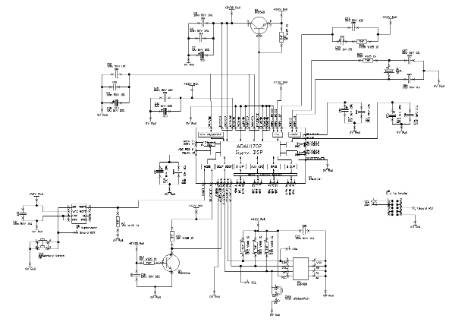
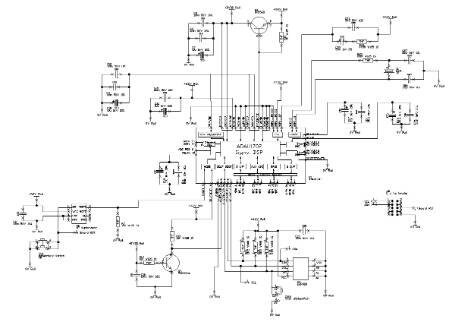
I am building a prototype circuit based on the ADAU-1701 evaluation board in order to create a self booting audio system.
I
I have left out the i/o pins and audio input / outputs in this schematic for clarity.
When I try to compile / download I get a communications error message. I have checked the board for soldering faults and cant find any as far as I can see.
My question is are there any other software settings that need to be set in order to start communication? I am using a USBi from another eval board and this is not faulty.
In the data sheet it mentions about the address of the ADD0 and ADD1 pins being set, in my circuit they are set to 0. However the data sheet also mentions the r / w pin being set. What pin or register does this relate to?
any thoughts or help would be appreciated.
Rob
Well, I can't see anything in the circuit that looks incomplete or out of place. Let's start with some simple debugging. If you probe the SDA/SCL lines when powering on the board, you should see some activity as the ADAU1702 attempts to self-boot from the EEPROM. Can you confirm that is happening? This will let us know if the chip is at least starting up properly.
Hi Brett
Thanks for the response.
I have checked the circuit this morning and found the following:-
1. good 12.28Mhz Mclk input
2. on reset button being pushed clock activity on SCL pin (no USBi board attached)
3. on reset button being pushed data activity seen on SDA pin (no USBi board attached)
4. with USBi board attached and program being downloaded clock activity seen on SCL
5. WITH USBi board attached and program being downloaded data seen on SDA.
So the chip seems to be booting and looking for devices on power up and also seems to be receiving data from the USBi.
any other settings or check that can be made?
cheers
Rob
Hi Rob,
How did you generate the self-boot EEPROM image? Did you follow the steps listed in Method 1 on this discussion?
Hi Brett
I have had a look at the link you sent. The software still has a communication error and will not allow downloads.
When the compile, link download button is pressed a dialog box is shown stating that a communications error has occurred.
So I am unable to download any data to the EEPROM until this is resolved.
Regards
Rob
Hi Rob,
Are you able to download normal project files to the board and get a green bar showing a confirmation of download? Maybe you can try downloading one of our basic example projects just to make sure everything is working OK. We have example projects here: https://wiki.analog.com/resources/tools-software/sigmastudio/tutorials#adau170x-compatible_example_projects
I would suggest the simplest example, which is called "Basic stereo audio input and output." You should be able to get audio through-put from ADC0 to DAC2 and from ADC1 to DAC3 (with audio below 250 Hz being routed to both outputs). Please try confirming basic download capability using this project.
Hi Roberts,
The pulse width difference you see is due to the different communication speeds of when self-boot is turned on or off. Both frequencies are within the acceptable I2C frequency range, so this shouldn't be an issue.
Could you possibly post a screenshot of the first few bytes of communication when in self-boot mode so we can verify whether or not there is an acknowledge bit being transmitted?
Regards,
BillJ
Hi Billj
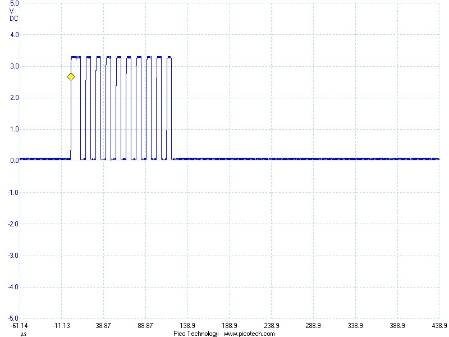
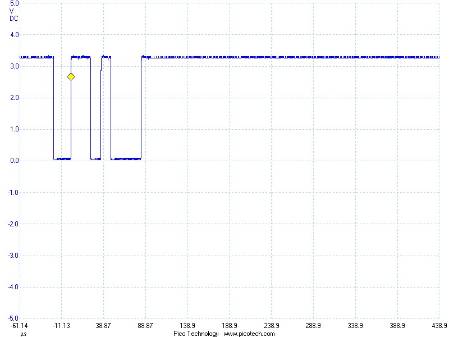
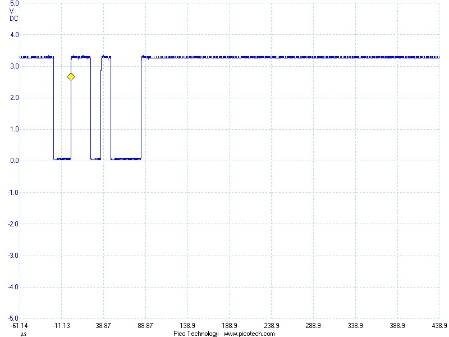
I have attached some screen shots of the DSP for you to look at and analyse hopefully.
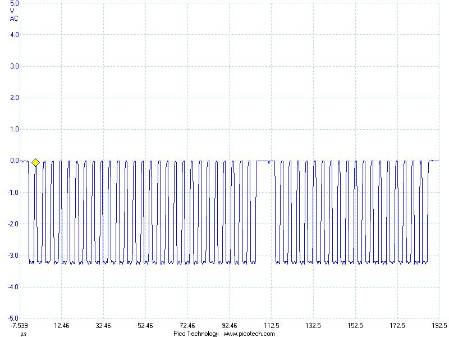
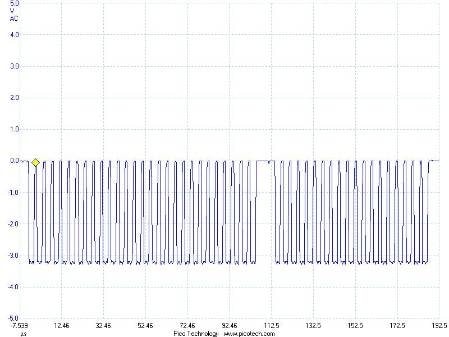
The first two files are screen shots from the clock and data lines with the USB interface disconnected and the reset button pressed.
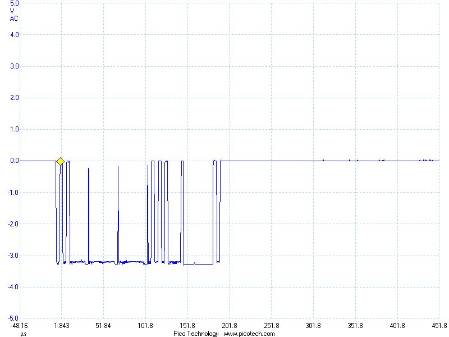
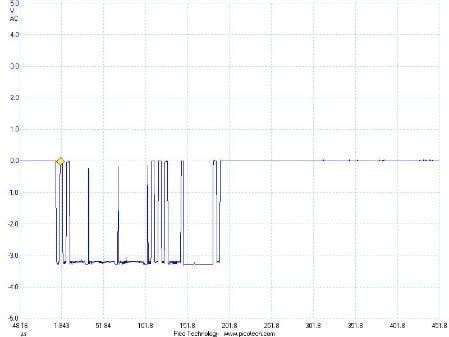
The second two files are with the USB interface connected and a link / download operation in sigma studio.
Thanks for your help, please let me know if you need any more info.
regards
Hi
Does anyone have any further ideas what the problem is, any update?
Thanks
Rob
Hi Rob,
I only saw one set of SDA/SCL scope shots. Are these showing the system in reset (USBi disconnected), or are they with the USBi connected?
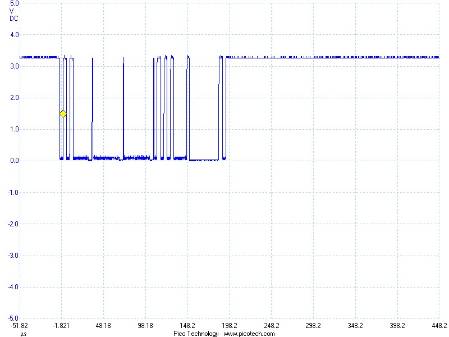
The SDA line looks suspect to me. There are three almost-high pulses in the beginning of the transaction that are extremely thin and not quite reaching the IOVDD potential. Pulses this short are probably not staying high for the full hold time required by the I2C port, and therefore they are not being latched in as valid data.
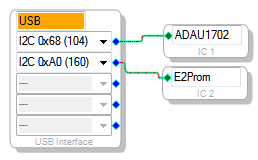
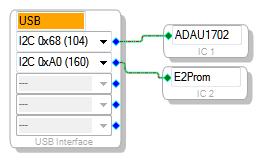
Also, one thing I noticed in the schematic... it looks like ADDR1 is being held low by default when the board powers up. Can you confirm that is correct? If so, you'll need to make sure address 0x68 is selected in SigmaStudio.
Hi Brett
I am sorry for the delay, I am back on this project now.
I have attached the four screenshots grabbed from our development board:
this screen shot is from SCL with no USB interface added, taken during a reboot.
this screen shot shows the SDA line with no USB interface added during a reboot.
I then connected the USB interface and captured a write cycle by downloading a simple circuit design as you suggested earlier
this is the screenshot of the SCL line taken during a write process using the USB interface
this is the screenshot of the SDA line using the USB interface.
one thing to look at is that the SCL pulses on the third screen shot seem to be positive pulses, whereas all other pulses are negative??
I did check that the address was set to 0x68, it was.
I would be grateful if these screenshots will shed any light onto why this is not working.
Regards
Rob Merryfield
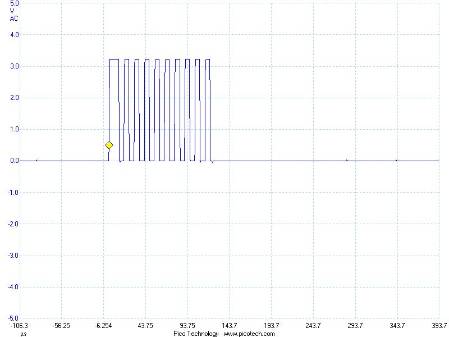
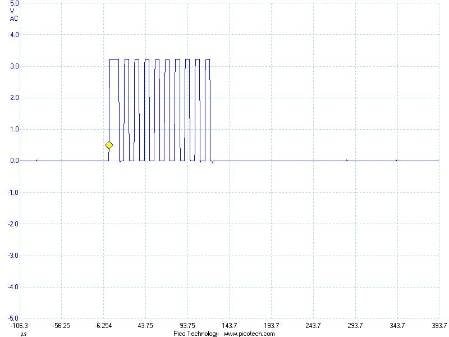
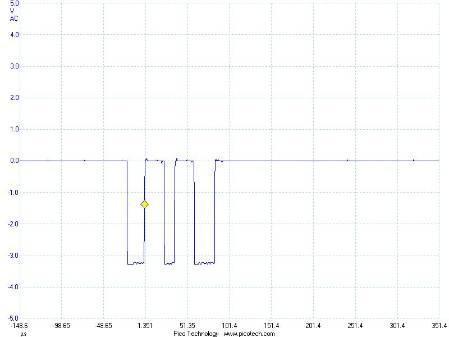
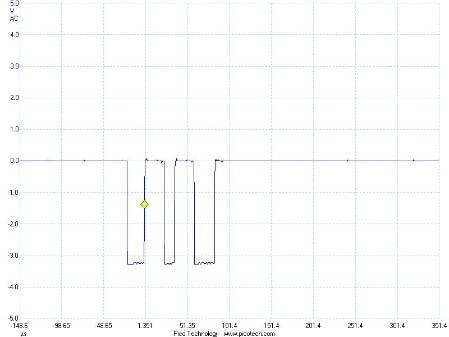
Hi Rob,
One thing I noticed is that on the screenshots for your data line, there are several places where the data line seems to have a "glitch" where it starts to go high but then goes immediately low again, much quicker than the typical duration of one clock cycle. This is a bit of a red flag.
I agree with you that the I2C lines should be pulled high at all times, but from the screenshot you showed, it almost looks like they are being pulled low.
Can you confirm by probing the ADDR0 and ADDR1 pins that they are both being held low?
Hi Brett
sorry ignore the earlier screenshots, me and the scope were having a small understanding difficulty!
I have captured the correct waveforms now:-
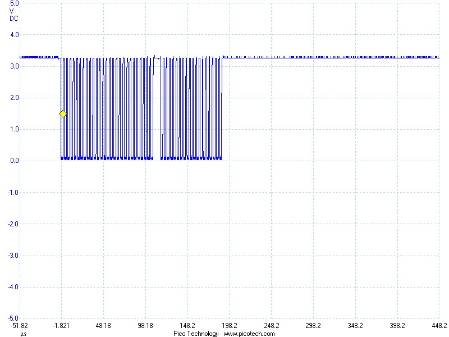
scl with no usbi connected at reset.
sda line at reset with no usbi connected
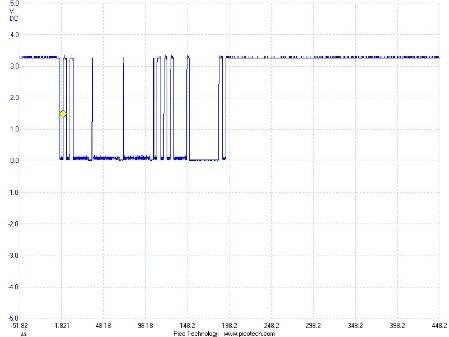
next screen shows captures with usbi connected and a write download on a simple audio program
scl with program being downloaded via usbi (note it is a positive going waveform inverted unlike others)
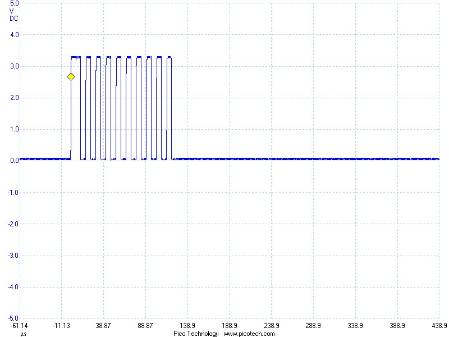
sda waveform with usbi connected (negative going waveform)
is the fact that the clock seems to be inverted on the usbi interface a problem? are there any setting / jumpers that can remedy this ?
I have checked the ADD0 + ADD1 lines and they are both held at 0v.
Thanks
Rob

Rob,
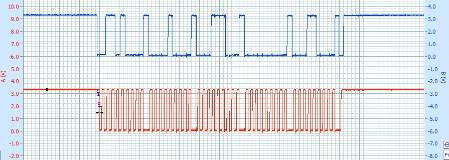
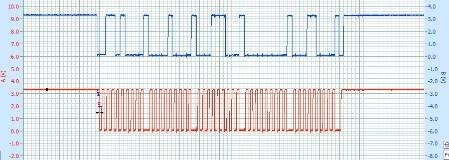
I am not able to duplicate your results. My USBi is letting the lines go (so they're being pulled high by the on-board pull-up resistors) between writes:
Are you sure that the pull-up resistors are properly placed on your prototype board?
Hi Brett
Thanks for getting back to me.
I have checked the board again and the SCL line is being held low and then goes high with clock pulses on the USBi interface.
I have disconnected the USBi from the development board and it is doing the same behaviour. The USBi interface I have is EVAL-ADUSB2Z (S16299).
Are there any settings that could affect the polarity of the clock data?
regards
Rob
Hi Rob,
That seems like a hardware problem, potentially. The SCL and SDA lines should always be held high when they are inactive. In your original pictures from Feb 22 it looks like the SCL line was being held high, but now you see it staying low when it's inactive? Can you please confirm again? If it's really staying low, then I think we might have to replace the board.
Hi Brett
I really need to get to the bottom of this, it should be simple.
I have connected up the USBi interface to my original adau1761 evaluation board and the clock lines are behaving correctly, switching low from +3.3v. Connect the USB board to my circuit and the clock is 0v switching to +3.3v.
there does not seem to be many differences in the two circuits, my pull up resistor is about 2k, the evaluation board is 10k. the clock line on my circuit goes into the adau-1701 and the eeprom, that is it.
to me there must be a fundamental setting wrong, it does not appear to be hardware related.
can you think of any register settings to look at?
thanks
Rob
Hi Rob,
The SDA lines and SCL lines by definition are held high when idle and pulled low by the internal driver when they are driving out signals. This is defined by the I2C specification and there is no option to change it. As such, there are no internal control registers, etc., that would allow you to configure these pins to behave otherwise. So, I continue to suspect that something in the hardware is holding those lines low.
Keep in mind that the ADAU1701 can optionally be operated in SPI mode, in which case the SDA pin will behave as the SPI data output pin (MISO, or COUT), and the SCL pin will behave as the SPI clock input (SCLK). However, in order to put the pins in this mode, you need to toggle the SPI slave select line (CLATCH/WP) low three times. Can you confirm that CLATCH is being held high at all times?
In order to really make sure that nothing is wrong with the hardware, I would suggest removing everything from the I2C bus except the ADAU1701's SDA and SCL pins, the pull-up resistors, and the USBi connector. In other words, perhaps you should lift the pins of the EEPROM to take it off the bus, and start by confirming that you can effectively communicate from the USBi to the ADAU1701.
I have removed the eeprom and the circuit is behaving in the same way. I notice that the SCL line is high until the USBi interface is plugged in, so it must be something on the USBi causing the problem.
The clatch pin is high at all times.
another observation is that if i reboot the USBi interface the SCL line goes high. As soon as i press the link, compile & download it goes low, which makes me suspect the usbi for some reason does not like my board.
if i connect the adau1761 eval board it does not exhibit this behaviour.
Rob, I have done a quick test and I noticed something that I never noticed before.
By default the USBi's SDA and SCL lines are held high. When you perform a successful read or write, they will still be held high. However, if you attempt to write to slave device and the attempt fails because the slave does not acknowledge the chip address byte, then the write will fail and the SDA and SCL lines will then stay low.
However, if you then perform a successful I2C write (perhaps to another device), the SDA and SCL lines go back high.
So, it appears that the SDA and SCL lines are somehow being driven low in the case that an I2C write fails. This is not really desirable behavior, so I will attempt to fix it in the firmware.
Regardless of that fact, this shows that your I2C write is probably failing due to a lack of acknowledgement from the slave.
Let me try to understand the situation again.
- In your system, SELFBOOT is held high? (based on your schematic, it is)
- Is the selfboot EEPROM programmed with a valid self-boot program?
- Does the chip address of the self-boot EEPROM match what we have on our evaluation board? (based on your schematic, it does)
- Is the ADAU1701 at the default address (both address pins tied to ground)? ...(this may or may not be true)
Actually, now that I look back at your original schematic, it looks like the selfboot pin and the address pin are going to that writeback trigger transistor, which means that the ADDR pin might be still high when the self-boot operation begins to execute. That means that, depending on the timing, the address pin could be high while the self-boot starts to execute, meaning the self-boot may fail. That could potentially make the I2C port on the ADAU1702 stop responding...
Perhaps it makes sense (for debugging purposes) to disconnect the transistor Q5 from the circuit and simply ground ADDR1/WB at all times. So you can guarantee that the address is set to the default at all times. Then you can reconnect the self-boot EEPROM, program it from SigmaStudio, and hopefully the self-boot operation will complete successfully when you re-boot the board. Then, after self-boot has completed, you should hopefully be able to access the ADAU1702 via the I2C control port using the USBi.
You can monitor the I2C bus at power up to confirm that the self-boot operation completes successfully.
By the way, have you read this application note about using the ADAU1701/ADAU1702 in self-boot systems? http://www.analog.com/static/imported-files/application_notes/AN-923.pdf
Hi Brett
I have not programmed a self-boot program into the eeprom, the communication issues prevented this.
so for clarity my circuit with the eeprom has nothing loaded, I assumed that you can connect to the ADAU and after a suitable program has been downloaded save this to eeprom. Is this assumption correct?
I will try the suggested mod to Q5.
Thanks for your help
Rob
Hi Rob,
The steps to program the self-boot EEPROM are as follows:
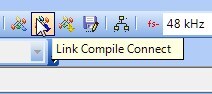
(1) Link-Compile-Connect in SigmaStudio. This will compile the project without attempting to actually download it to the hardware.
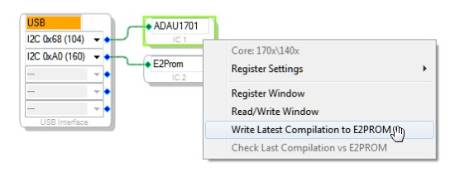
(2) In the hardware configuration tab, right click the ADAU1701 and choose "Write Latest Compilation to EEPROM".
(3) The download progress meter should be displayed when the download occurs.
(4) Now disconnect the USBi and reset the board. The self-boot operation should execute.

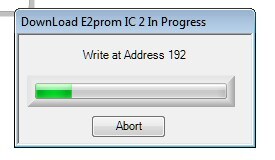
Hi Brett
I have tried this and it has not worked. I am at a loss now what is wrong, it seems to be very fundamental yet I cannot nail it down.
I think I need to reassess the design from the beginning, it really should not be this hard to get running.
Regards
Rob
I'm not sure if this will be of any help, but can you try removing the pull-down resistor (R7?) on the RESET* line? I use ADM811TARTZ in a number of my designs and the reset operation is inconsistent with a pull-down installed.
It would also be a good idea to confirm that DVDD is actually 1.8V. We ran into an issue with some badly spec'd (actually fakes) transistors that would cause this same type of com failure.
audiolab1, thanks (as always) for your input!
Rob, let us know if any of this helps! Unfortunately, I don't have additional input at the moment. I can't see, from the information you've given so far, what the source of the problem might be.
Yes
Thanks to Audiolab and Brett, it is good to have people giving their time trying to help.
I will let you know if anything has been solved.
Thanks again
Rob
This question has been assumed as answered either offline via email or with a multi-part answer. This question has now been closed out. If you have an inquiry related to this topic please post a new question in the applicable product forum.
Thank you,
EZ Admin
Please log in to reply.