Operating @ 192Khz. ADC resistor, PLL pins and Core Reg ?
According to the datasheet, for the ADC voltage-to-current input resistor, the following formula applies:
Rtotal = 20K * (48Khz / FsNew),
which originally for 48Khz Fs = 20K - 2K (internal resistor) we have the suggested 18K voltage-to-current resistor.
Ok, so for 192Khz: Rtotal = 20K * (48 / 192) = 5K. Then 5K - 2K and the voltage-to-current resistor should be 3K.
Strangely, although I was operating at 192Khz, I've got a very bad clipping sound using the 3K resistors. When I swtiched back to 18k resistors, everything seemed to be fine again. No, the input level is not too high. That was my iPhone with 1/5 of the volume.
The 192Khz Fs was set uniquely by setting the DSP Core Register to 4x (256 instructions) in SigmaStudio, as follows:
Param Name: IC 1.CoreRegister
Param Address: 0x081C
Param Data: 0x00, 0x1E
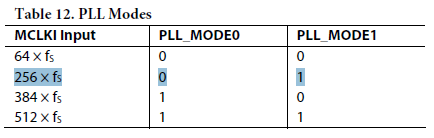
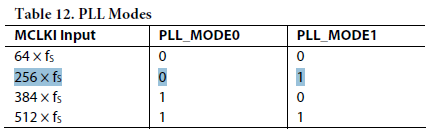
On my board, I have a jumper to set the pin 39 (PLL_MODE_1) to +3v3 or to GND. Pin 38 (PLL_MODE_0) is permanently tied to GND. According to table 12 of the datasheet, both pins must be tied to GND in order to operate @ 192Khz with a 12.288Mhz Xtal, as 12.288 / 64 = 192Khz. Strangely again, if I do that I can only hear noise, but if I set PLL_MODE_1 to VDD, it works normally.
I'm under the impression that it is working @ 48Khz, but the algorithms are all calculated to work @ 192Khz and they're working properly, which makes me believe that it IS indeed operating @ 192Khz.
I'm pretty confused. I'm afraid that if these pin configurations and voltage-to-current resistors aren't properly set, I'm subjected to phase shiftings and stuff like that. Apparently it's working fine, but I don't have readily available a proper measure equipment to make a sweep and check.
Could you please help me on this matter?
Thanks a lot!
Best,
Fernando P.
HI Fernando,
The ADAU1701 data sheet is a bit confusing here. No hardware needs to change to operate at 192KHz, only what's shown in in this FAQ:
http://ez.analog.com/docs/DOC-1431
ADC resistors only change for sample rates not a multiple of 48KHz, such as 44.1 KHz.
Bob
Hi Fernando,
Just to be clear, this question regard the ADAU1701? I want to make sure that it gets to the proper engineer.
Best regards,
Coleman
Thanks, Bob. I didn't see your response before posting my question. Cheers!
Coleman
Yes, it is regarding ADAU1701. Hey Bob, thanks a lot for your answer, the datasheet really made me confused. Now, how about pins 38 and 39? Thanksss
Hi Fernando,
Again, the "fs" in this table refers to the "base sample rate," which in your case is 48 kHz. You are simply instructing the DSP to jump to the program start 4 times as often as normal, which effectively bumps up the DSP core rate to 192 kHz. So, there are two different concepts: the base sample rate, and the DSP core sample rate.
So, since your base sample rate (fs) is 48 kHz, and your clock is 12.288 MHz, the MCLKI signal is 256 x fs, so you can use PLL_MODE0 = 0, PLL_MODE1 = 1.
I realize the concepts of base sample rate and core sample rate are not well explained in the ADAU1701 datasheet. I tried to do a better job on the ADAU1442/ADAU1445/ADAU1446 datasheet. I attached a screenshot of the relevant section of the ADAU144x datasheet. The design is pretty similar to that of the ADAU1701. Hopefully this makes it more clear.
ADAU144x datasheet:


Please log in to reply.