Toggle switch controlled multiplexer
Hello all,
I am using the ADAU1701 in a custom circuit (active speaker). The two ADC inputs are configured as a 'balanced' analog input (internally subtracted) and I have one AES/EBU receiver feeding an ASRC which then connects to SDIN0 of the DSP for digital audio.
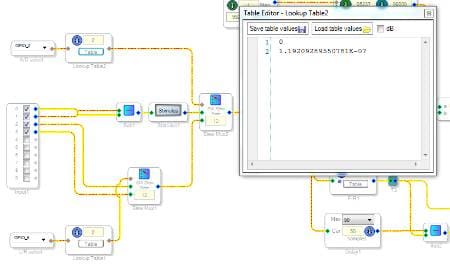
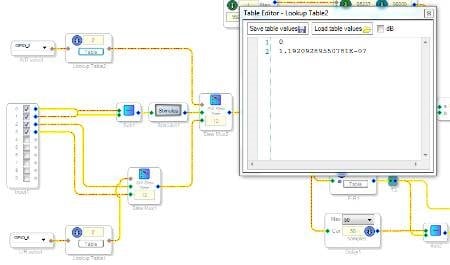
There are two toggle switches on the back of the speaker enclosure: Select analog/digital input and select digital audio channel (left/right). Here is what my Sigma Studio schematic looks like for the input selection:
The toogle switches connect to two GPIOs (configured 'GPIO input debounce'). My intention is to control the two multiplexers SlewMux1 and SlewMux2 with these GPIOs. The two LUTs are configured as shown in the table editor. Will they output the correct index values ( '0' and '1' in 5.23 format) when driven 'HIGH' (3.3V) / 'LOW' (GND) by the toggle switches? I read somewhere that 'zero' selects the lowest index and that the highest index is selected if the input index exceeds the highest index in the table? How does the DSP interpret a logic HIGH or LOW level on the GPIOs in 28.0 format?
Is there a better way to achieve the multiplexer control?
Regards,
Roman
Audio Signal Processors
SigmaDSP Audio Processors
adau1701
Hi Roman,
The multiplexer index input wants an integer number 0, 1, 2... where 1 is the LSB in 28.0 format. This is the very lowest bit in the DSP. For more info on formats, see https://ez.analog.com/message/13379#13379
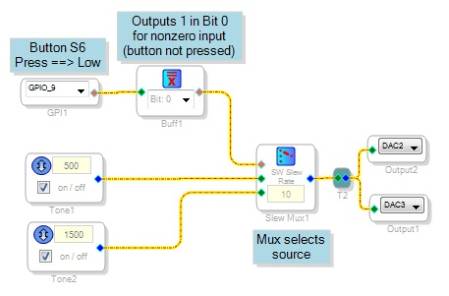
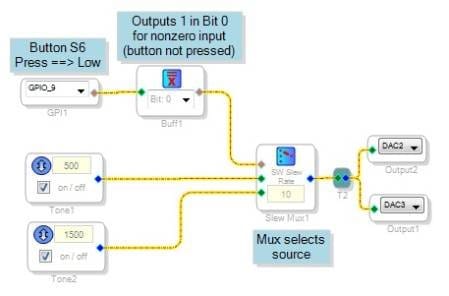
Use a Buffer Gate (Logic \ Invert section of the toolbox) to condition the GPIO input to the needed format as shown below:
What's neat about the Buffer Gate is that it converts any nonzero input to a "1" in the bit position you pick from its drop-down box. It outputs zero otherwise. In this way it acts like a two-entry LUT, except it's a whole lot easier to use.
Assuming you're using the mini-1701 eval board, you can download the attached program to try this. Pressing the middle of its three buttons adds bass boost to the sound.
Best regards,
Bob
Hi Bob,
Perfect! That's exactly what I was looking for.
Thanks for your detailed reply.
Best regards,
Roman
Thanks Bob!
Roman, more information on the Buffer Gate is available here on the wiki:
https://wiki.analog.com/resources/tools-software/sigmastudio/toolbox/basicdsp/buffergate
Please log in to reply.