ADAU1701 PUSHBUTTON
As it is possible to change the state of GPO_1 And GPO_10 through a connected button on GPI_9. to the but the state of GPO_1 has to be low and the state of GP0_10 it has to be hight, pressing the button the two signals they are had to reverse and to stay so up to when the button remains pressed, to the release of the button the two GPOs return to the preceding state.
Thanks
Audio Signal Processors
sigma_studio
SigmaDSP Audio Processors
gpio
sigmastdio
adau1701
Show More
Thanks Bob, has been very kind
Piero
Hi Piero,
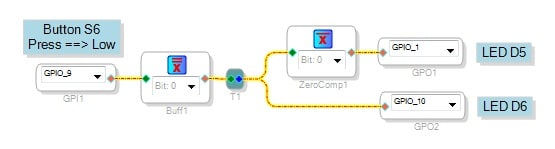
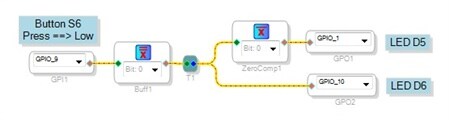
The circuit below has LED D5 (GPIO_1) normally low and D6 (GPIO_10) normally high. Press and hold button S6 (GPIO_9) to flip the outputs:
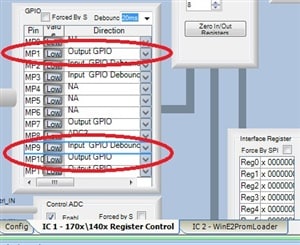
The ADAU1701's MP pins can be programmed for many functions as described in the data sheet. Out of the box, SigmaStudio sets GPIO_1 and GPIO_10 as inputs, thus they cannot drive the LEDs. Thus, in addition to drawing the schematic, you need to set the ADAU1701's control register to make these pins outputs.
To do this, click the Hardware Configuration tab atop your schematic window.
Then, choose the IC1 - 170x \ 140x Register Control tab under the window.
Next, set the drop-down box for each MP pin as shown below. These settings make all GPIOs compatible with the hardware on your ADAU1701MINZ board. The circled ones are those critical to your present project.
Once you have all this set, your button and LEDs will work as desired.
Best regards,
Bob

New problem to manage a function of the button ADAU 1701
Before every thing excused my errors of grammar
This small project ago a simple thing, the used bord is
EVAL-ADAU1701MINIZ
To the but it is present to the DAC2 a frequency of 10000 hZ and the led D5 is set in on
Pressing the pulsating S6 the led D5 is set in off and the led D6 is set in on, releasing
the button everything returns in the preceding condition.
Pressing in sequence or contemporarily the pulsating S4 and S6 the frequency changes
in exit to the DAC2 to 20000 hZ, this it becomes it happens in sequential way.
I have need to add 2 functions
1) Only pressing the pulsating S4 I have to set in off the led D5 and to set in on the led D6
and releasing the button this state has to be active for 2 minutes, then everything has to
automatically return to the precedent state.
2) If during this time he presses one any of the two buttons everything has to return to the
preceding state or led D5 on and led D6 off
I am learning to use SigmaStudio and I have some problem
Thanks
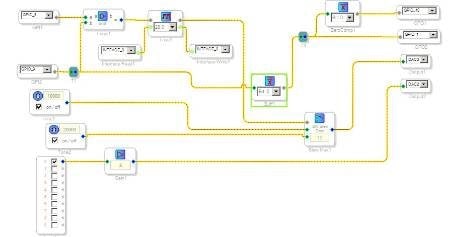
Piero,
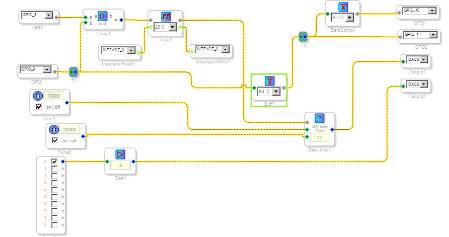
Please test the attached circuit to see if it works as desired. Select any block and press F1 for help. Presently it uses 248 of the approx. 500 instructions available when operating at 96KHz.
Best regards,
Bob
HI Bob,
Everything perfectly works, you are a genius, thanks
Piero
Please log in to reply.