Advanced 'mux' application problem
Hi All,
There is a problem in my ADAU1701 project. It paining me for several days.Please help me out...
My project is working in selfboot mode. ADC_RES connect to GND by a 18Kohm resistor.
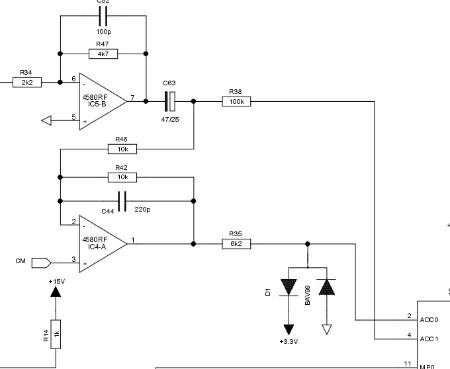
As the hardware schematic attached,there is only 1 signal come to ADC0 & scaling down the same signal
xdB to ADC1. In this way we can improve the SNR and dynamic range.That is why our design like this.
My problem is, I can't find a good way to switch from one ADC to another.
Please allow me to describe my problem in detail.
Let me assume the experiment condition below.
1)Input a sine tone(1KHz) from the hardware input path.
2)When the input level raised to 0dBV,the distortion immediately raise to 1% or higher in ADC0.
But the signal in ADC1 won't distort untill the input level raise to 20dBV.
3)The input signal level is -10dBV(small signal) & 5dBV(big signal). The signal input to hardware
path jump from one to another(-10dBV <--> 5dBV).
If this system switch the signal from one ADC to another automatically,maybe I can get a good
performance result. Right,if I could find a good way to switch them!
I have did experiment.In the end I can't find a best way.
The experiment was.
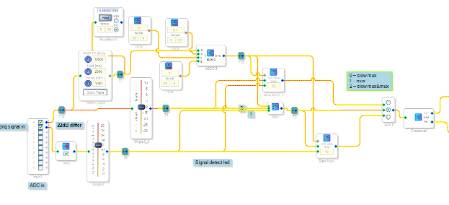
Please take a look at the Sigma code attached,there are 3 ways to switch the path in the code.
1)Using 'Slew Mux' cell. It is too slow to switch the signal. We can hear a heavy distorted signal
for a short time(about 1 second). That is come from ADC0 before switching to ADC1 complitely when
signal jump from -10dBV to 5dBV.
2)Using 'MX'(no software slew action). This cell can switch immediately,no distored signal come out.
But 'POP' noise come out clearly when switching.
3)Using 'Slew Mux'&'Mux' together. This is the better way till now I found. Please take a look at the
attached code. In this way, there is no distorted signal come out and the 'POP' noise reduce to next
to nothing to my ears. I was very happy that day. A bad feedback from our acoustic engineer the next
morning. The acoustic guy said he heard a very very little 'POP' noise when playing music. We moved a
wave sweeping equipment to do the testing. Too bad, this problem was enlarged in this equipment. I
tried to modify the parameters of RMS Table3,in the pic attached is the best ones in my experiment.
We can't accept the noise.
What can I do? There is a way to solve this problem in SigmaStudio?
Looking forware to your response.
Thank you very much!
By the way,when I use signal detection cell,it doesn't work(no any status indicating from the output
PIN) in the newest version SigmaStudio 3.7.
There is no problem in version 3.6.
Why?
Audio Signal Processors
SigmaDSP Audio Processors
adau1701
Hello,
If your application can tolerate a small delay in the signal path, the idea shown below might work. The RMS detector sees the audio ahead of the mux, allowing the mux to complete slewing before the distortion gets there. Adjust the delay and the mux's slew time accordingly. I show a 10mS delay, but that's a bit much if your purpose is live sound (where 5mS is about the max). Set the mux for a shorter slew time than the default "12"; you may need it as low as "6".
As for your read-back cell not responding -- the blocks in SigmaStudio only respond to screen input if the zoom is exactly 100%, see https://ez.analog.com/message/2866#2866. Version 3.6 and before reverts zoom to normal upon opening projects, while Version 3.7 saves the last zoom setting. Your project may have accumulated a zoom accidentally (easy if you're using a wheel mouse or zoom track-pad). Try pressing Ctrl-Shift-F6 to revert to normal zoom (see the bottom of https://ez.analog.com/thread/16225).
Best regards,
Bob
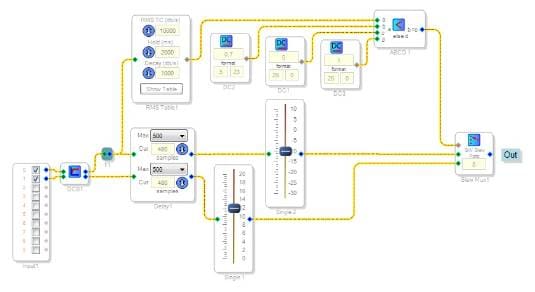
I think the pop sound is likely coming from the non-slew mux. It looks like you have 3 muxes, and one of them does not use slew. This means that the signal will change instantaneously, which causes a discontinuity, resulting in a pop sound. If you use slew muxes for all of the signals, that should help. You can also slow down the slew time by changing the value in the slew mux control, which is 12 by default. A larger value like 13 or 14 will result in a slower slew time.
Bob's suggestion with the look-ahead detection is also a good idea, if your application can tolerate a delay.
I responded to your question about the readback cell in the other thread you started.
Thanks
Brett
Hi, Eden-Chen2012,
The ADC inputs bias themselves at about 1.6V. Thus in usual (stereo) applications, a blocking cap is needed at each ADC input. You've included a blocking cap which is good, but the load of the second op-amp's input resistor R46 may pull a small DC current from the top ADC input only. Thus you may have nonidentical DC currents at each ADC input. This in turn may cause a click when switching without slew between the ADCs. To prevent this, place a DC block filter (under Filters, Misc.) at the ADCs in your signal flow (see the schematic in my previous post). This filter removes any residual DC.
As Brett recommended, if you can't use a look-ahead delay, replace the non-slew mux with a slew mux. Since that mux is the one that switches away from the distorted samples, set its slew to "6" (as fast as it will go). This may be sufficient to hide the click, while allowing an interval of distortion too short for anyone's ears to notice. The ear's insensitivity to momentary artifacts is legendary, allowing for MP3 compression and such. Keep the other mux at "12" or even increase it, as Brett suggested.
Hope this helps,
Bob
Hi Robert&BrettG,
Thank you very much!
I had taken 2 days off from my work. And sorry for my laptop,it fell down to floor and can't work now. I will try your proposal when my laptop repaired.
My speaker project is live sound speaker. 3-5ms delay is acceptable.
I will update my project status right after my laptop work.
Thank you very much.
Hi, Eden-chen2012,
Were you able to get your computer working? Did either of our ideas work out for you?
Bob
This question has been assumed as answered either offline via email or with a multi-part answer. This question has now been closed out. If you have an inquiry related to this topic please post a new question in the applicable product forum.
Thank you,
EZ Admin
Please log in to reply.