ADAU1401 : 192KHz Sampling of S/PDIF from eval board: high freq distortion?
Hi,
I'm trying to use the S/PDIF input and output on the ADAU1401A-EVAL board, running at a 192kHz Sample Rate.
I've got the system working with slower sample rates (48, and 96 kHz specifically), however when I use 192kHz I get a very strange frequency response, almost like a weird aliasing artifact.
I've attached my project and examples of the distortion. The project is setup to do just a straight passthrough from the inputs to the outputs. I've gone through and set the switches and jumpers as described in Table 7 of the Eval Guide.
20hz-96khz Freq Sweep 192khz Fs.bmp shows the output as level vs. frequency for a 20-96Khz frequency sweep. That should be a straight line (See 20hz-64khz Freq Sweep 128khz Fs.bmp for expected output).
64Khz Input Tone at 192khz Fs.bmp shows an FFT of the response to a 64 kHz input tone.
64Khz Input Tone at 128khz Fs.bmp shows an FFT of the response to an 64 kHz input tone sent by a generator running at 128 kHz Fs.
I'm using an Audio Precision to generate (and analyze) sample tones encoded as 24 bit S/PDIF over coaxial cable.
Any suggestions for ironing this out?
Thanks in advance.
Imran Khan
adau1401a
Audio Signal Processors
adau1401
s/pdif
SigmaDSP Audio Processors
adau1701
Show More
I'd like to point out that one of the issues in the 64khz input tone at 192kHz is that the input tone is somehow switched around from 64khz to 1 khz... so something is clearly "up".
I took a look at the evaluation board design, the CS8416 datasheet, and your SigmaStudio project file, and I haven't been able to find anything that stands out as an obvious problem. I think I might have to dig a bit deeper and try this out on my evaluation board.
Hi Brett,
Thanks very much. Since I’ve got the system all set up here on my desk, if there is anything you’d like me to try I’ll give it a shot.
One thing I'm most interested in seeing is the BCLK, LRCLK, MCLK, and DATA lines coming from the CS8416 receiver and being sent to the ADAU1401. If everything is working properly, you should see the following:
BCLK: 12.288 MHz clock signal
LRCLK: 192 kHz clock signal
DATA: bitstream with 12.288 MHz bit frequency
MCLK: 12.288 MHz clock signal
If those are all correct, it means the receiver is properly locking to the incoming clock and generating the correct clock frequencies.
Next, I would want to look at the same pins on the ADAU1401 - CS8406 interface. The frequencies should be the same as listed above.
Hi Brett,
Sorry for the delay. The LRCLK, Data, and BCLK all look good - but the MCLK looks 4 times too fast. See signals attached.
Second post with 8416 signals.
Note that MCLK was also probed at the input to the ADAU1401A (TP-6).
Hi,
I think I may have found it.
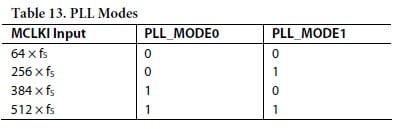
The PLL mode pins on S3 were set to create a core clock of 256 x fs (ie MODE0 = ON, MODE 1 = OFF), i've now set them both to OFF, and it seems to no longer have the noise.
However. It also seems there is some frequency shifting going on. If I create a filter with a center frequency at frequency 'X' I see a dip in the frequency response at '2X'.
Imran,
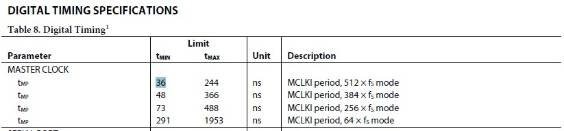
The 49.152 MHz MCLK is a problem. The ADAU1401 is only designed to handle up to a 27.7 MHz clock input to the MCLKI pin. It will not operate reliably if the MCLK signal's frequency exceeds that. You can see the related table from the datasheet here:
As you can see in the digital timing specifications table in the datasheet, the minimum period of the MCLKI pin is 36 ns. This corresponds to a frequency of 27.7 MHz. So, the 49.152 MHz clock coming from the CS8416 is not usable by the ADAU1401.
I checked the CS8416 datasheet and found this:
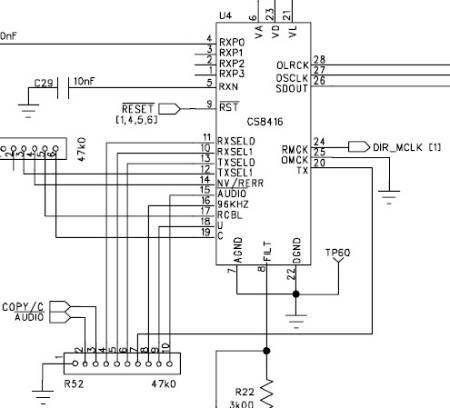
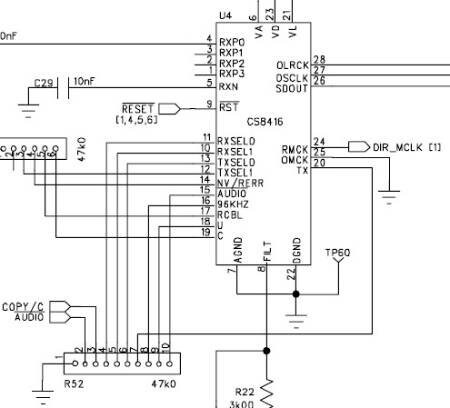
I then checked the evaluation board schematic and found this.
You can see that the U pin is tied to ground through a resistor network, which means that the CS8416 will always output 256 x Fs on the RMCLK pin. In the case of 48 kHz or 96 kHz sample rates, this means the output will be 12.288 MHz or 24.576 MHz, respectively, which is OK because it falls within the acceptable limit of the ADAU1401's MCLKI pin. However, in the case of a 192 kHz sample rate, the RMCLK will be 49.152 MHz, which is too high.
So, if you want to use 192 kHz S/PDIF input on the evaluation board, you'll need to hack the board. You basically need to lift the U pin (or cut its trace) and connect it through a resistor to the CS8416's 3.3 V supply. This will set the RMCLK pin to output 128 x Fs, which will be 24.576 MHz in the case of 192 kHz audio sample rate.
Then, you need to set the ADAU1401's PLL_MODE pins. These pins are set according to the base sample rate, not the actual audio sample rate, which is 48 kHz in this case. Since 24.576 MHz is 512 x 48 kHz, you need to set PLL_MODE0 and PLL_MODE1 to high.
Then, just make sure to set you project's sample rate (and the hardware sample rate for the ADAU1401) to 192 kHz using this FAQ as a guide: http://ez.analog.com/docs/DOC-1431
If you do that, then everything should work.
Sorry for the trouble. The evaluation board was basically set up to work "plug-and-play" at a 48 kHz sample rate, but getting it to run at other sample rates takes a bit of work.




Hi Brett,
Thanks again. I won't be cutting traces on the board for a while, as 96kHz should be good enough to avoid the risk of damaging the board.
Thanks.
Please log in to reply.