VCO troubles and a bit more
Hello again guyz! So I have just bought the 1701 mini board and just plugged it in! Wow! It is amazing. But of course some questions appear.
1. How can I find out how many instructions my project uses?
2. Does Sigmastudio have any built in virtual oscilloscope just to see what is going on.
3. I use 3.7 beta version, so could you please enlighten me a bit how does the VCO work? What does it do when the input is negative? Is it possible, to make it silent when the input drops below zero?
Just a follow up question: if I do some logic operation "if a<b then C" and I need just silence on C. So is there any "empty dongle" in Sigmastudio, I mean, all the inputs of any block must be connected to something, so is there any "nop" connection? Which does nothing, but "grounds" the input?
Hi, Skfir,
Second question first -- Use a DC source set to zero, this will work anywhere a null input is needed. It would be nice, however, if SigmaStudio had a familiar "ground" symbol like those found in schematic capture and circuit analysis programs. You can also use a "T Connection" to pacify an unused output that's complaining, although this has not been a problem in recent versions of SigmaStudio.
As you noted, for inputs less than zero or greater than one, the VCO mirrors or folds over its range. There's little built-in input testing in SigmaDSP since that would add to the block's instruction count while actually reducing versatility. The idea is, if your application is affected, add the needed input checking yourself.
For how to measure your project's size, see https://ez.analog.com/message/33252#33252
Generally a search on any particular question or problem will turn up a ready answer close enough to help.
While not quite a virtual oscilloscope yet, the Real Time Display graph feature (under Basic DSP / DSP Functions) can help. For more info on its use, see https://ez.analog.com/message/47555#47555
Bob
Great! Thank you, just as a consequence of the previous questions, if I want the VCO to run from some frequency to zero, then "shut up" for some time and repeat the same pattern, what is the best way? My early solution, since it is the first day in my life I actually use SS, is to create a sawtooth waveform, connect it and a zero DC source to a logic gate, and make it do something like "if input A<= input B (which is zero DC) then input C, which is also quiet. Will it be the optimal solution, or I missed something? Sorry for such an immature question, but it is really the first day in my life with SS.
Your question is not immature, there really isn't any "dumb" questions and you'll find the folks on this forum happy to help. Using a "AB CD" logic block as you described should work fine. In fact I don't know a better way -- anyone else?
Because the sawtooth oscillator's wave is symmetrical around zero (it goes positive and negative), you can add a DC source should you want it positive only. When I once used the sawtooth it actually went opposite to the way I expected -- it started high and ramped lower -- so I had to multiply its output with a negative gain. This might have been fixed since then. To get more info on any block you add to your schematic, select that block (so it has a green outline) and press F1 -- a handy shortcut to the help system.
Thanks, F1 turns out to be very handy. And I absolutely also vote for the appeal to add the ground symbol in next revisions of SS.
Sorry, again a question appeared. I am trying to play with the counter connected to the state machine data port and a sine wave generator connected to the state machine input port. The output is connected to an analog output. The idea is, once the counter reaches the maximum allowed value defined by the state machine, the machine switches the output off, which is exactly what I need, but the problem is, it stays off for good. So does it mean, that after the counter reaches its maximum value it sticks there and doesn't reset to count again from the beginning? If it is so, is there any way to reset the counter? Because without it the whole idea loses sense a bit. Since it means, that it will not be possible to make the state machine toggle between its states at certain time intervals. Or may be there is some other way? I can only think of controlling the state machine with a squire wave oscillator.
Hi,
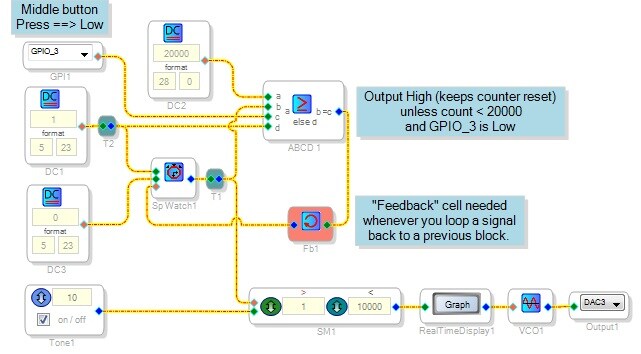
The Stopwatch counter has the desired reset pin. You could build logic to compare its count to your desired max, then feed this back to reset the counter, as shown below. This schematic also demonstrates how you can have a GPIO input control the action -- press and hold the center one of the three black buttons near the eval board's output jack to run your VCO.
Typically, when I first try out a circuit, it doesn't work as desired. Not even close. That's because I assumed that the block(s) function differently than they actually do. That forces me to think the way the blocks work, not the other way around. Working with (playing with?) circuits, even those tangential or unrelated to your final application, will help you become expert with this tool. Then you'll be answering others' questions on the forum!
Best regards,
Bob
Thanks a lot Bob, I do not know, what would I do without your help. Thank you very much, I have just started playing with this things and since it is so flexible it is difficult to figure out what exactly to do. There is one more question appeared, but since it is a different one, I will start a new topic. I would be extremely grateful if you could help me with that.
Please log in to reply.