1701's maximum ADC sampling rate.
Hello everybody, I have just run into this amazing DSP, and would like to ask a couple of question. Could someone please help me?
The idea is, I am going to build a device, which produces pulses of filtered white noise at a frequency about 50Khz, then a couple of microphones catch the reflection, then the reflection is downscaled preserving the time domain by multiplying on a 32Khz sine wave and after all that sent to the output. Could you please tell me, what is the maximum sampling rate of the 1701? The customer support told me, that "If you want to go all the way to 192 kHz and still have very good audio performance and bandwidth, then it might make sense to use one of the following ADAU1701..." So it means, that it may support at least 384Khz, right? The other question is, whether the power of this chip is enough for the task described here?
Thanks again.
Audio Signal Processors
SigmaDSP Audio Processors
adau1701
The -1701 data sheet says that, "sampling rates of up to 192KHz are supported." So the reference to 192KHz refers to max sampling rate, not the max Nyquist bandwidth which therefore is 192KHz / 2.
Thank you very much.
You're welcome, and thanks for the "correct answer" mark (my first one!). BTW -- Multipliers work really well in SigmaDSP for "mixing down frequencies" applications, so if the BW is enough for your purpose, you may find happy results. At this "X4" sampling rate you'll have 256 instructions available to build your project.
Thanks again, I need to sample the freq about 50Khz, just was a bit afraid, that even at 192Khz the ratio samples/period wouldn't be not too large, but since you said that multiplication worked fine I believe it is worth trying. Sorry I have one more question about the SigmaStudio tone generator, is it possible to generate sweeping sine function? Like from 50Khz to 30Khz with a sweep period of 10ms? Just have never tried SigmaStudio so have no idea how well tone generating is implemented there.
Yes, SigmaStudio has a sawtooth generator you can set to 100 Hz (10mS period), and a VCO whose sine wave output frequency f = Vin * fs / 2 [the max. input is 1 "volt", for a frequency of fs/2]. By scaling and offsetting the output of the ramp generator using gain and DC blocks, you can get the VCO to ramp between your two frequency limits. The schematic for such a sweep source would look something like what's shown. I can't say if the -1701 has enough "horsepower" to run your overall project, but to give you an idea: the sweep generator shown here used 38 out of the 256 available instructions at the 192KHz rate.


Thanks for helping out, KJBob!
Skfir, if you need help actually setting the sample rate in your system, please refer to this FAQ:
Thanks mate!
So most probably it will work out for me, so going to buy the board!
Thanks again everybody!
To more accurately answer your question about the maximum sample rate, and to expand on what KJBob said...
The maximum sample rate on the ADAU1701 is 192 kHz.
It's important to note that the number of instructions that can be executed per audio sample will change based on the sample rate setting.
Sample Rate
Program Instructions
48 kHz
1024 instructions per sample
96 kHz
512 instructions per sample
192 kHz
256 instructions per sample
Got it!
Sorry probably have one more question, since I am on mac now, so can not try the SigmaStudio right now, is it possible to source a "complicated" waveform? Namely a sine with say 5 harmonics. I understand that I can actually use 5 sine sources, but the thing is, I will have to make frequency sweep and need to preserve all the ratios of harmonics. For example, if I have BF 1000 with 1 harmonic at 2000, and want to sweep the whole thing 200 hz down, I need to have 800 and 1600, and not 800 and 1800, as it will happen have I just two sine sources.
We don't have a sine generator with programmable harmonics, but I will add that to the algorithm wish list.
It would be very good, thank you. By the way, is it possible to modify the design on the level of source code, or to add/modify algorithms manually?
At some point we would like to make that a possibility. Currently it is not possible.
Brett,
Another item for the VCO wishlist might be a quadrature (sine-cosine) output VCO. Presently this can be done with two VCOs in a PLL scheme, but it would be nice to just have it already made.
Skfir,
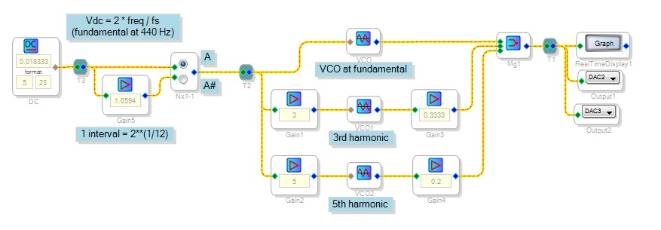
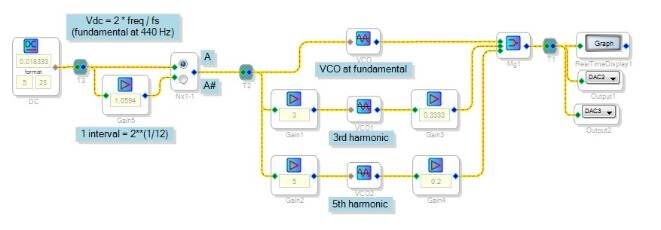
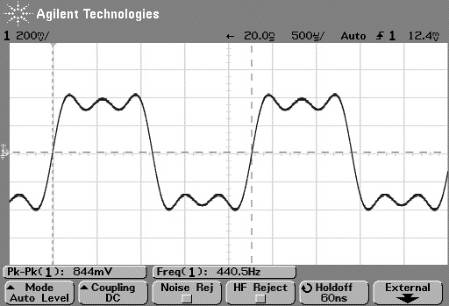
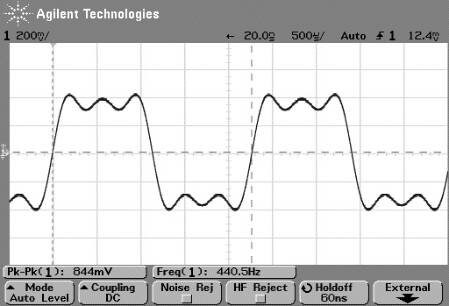
You can have several VCOs operating at tracking frequencies with a scheme like that shown below. Here the ADAU1701 is approximating a 440 Hz square wave with fundamental, 3rd and 5th harmonics (there's easier ways to make a square wave, but this just shows what can be done). The resulting waveform shown remained solid over the few minutes I ran the thing, as well as when switching between frequencies. Thus, it appears that the three VCOs do keep their phase relationship (I'll blame that on the wonderful accuracy of digital!). The project as shown uses 83 instructions, or about 1/3 of what you'll have available at your highest sample rate. I threw this together on my half-hour lunch and still had time for a sandwich, which just shows how easy it is to play with SigmaStudio and AD's small eval board. You'll have lots of fun with these even if your ultiimate project is beyond this chip's capability (and I suspect that AD might have larger / faster chips in the works!).
KJBob,
We've implemented a VCO with quadrature outputs. Documentation (limited for now) is here: https://wiki.analog.com/resources/tools-software/sigmastudio/toolbox/sources/vcowithquadratureoutputs
Great news! I haven't downloaded a new SigmaStudio in awhile. I first learned about SigmaDSP from a co-worker. Before then we have tried introductory HW + SW packages from two other vendors, and SigmaDSP is the first one and the only one that we could actually do useful work with, and develop a product around. And it keeps on getting better!
Guyz, thank you all so much for the extensive help! It is really the first time I ever use graphic programming tool in my life. And of course questions appear in abundance, sorry for annoyance, but there is one more. As I could see, SigmaStudio has lots of blocks, which have knobs, like sweep generator, and sliders like single SW volume. Since I worked a lot with sequencers and other music editing apps, when I saw all those knobs and sliders I immediately started thinking whether they can be automated. Other words, are all those sliders just for adjusting with a mouse while tuning the project, or they can be automatically "pressed" by the IC, according to some preprogrammed conditions, like for example, if the level drops below X press the button Reset on the sweep block, or if Y then move the volume slider to Z positions down etc?
Skfir,
Brett or another of the AD reps on this board can answer this better than me.
I don't know of a way for the DSP chip's program itself to "reach into" its GUI controls the way you describe. However, some SigmaStudio blocks come in both GUI -- settable and data-settable versions. Here's some examples:
Multiplexers can be switch-selectable from the GUI, or index selectable by an integer input on a control pin
There's a clipper you control by typing values in boxes, as well as a data-controlled clipper
Oscillator frequency controlled by the GUI or data ("voltage") controlled
Comparators (such as the "AB in CD out Condition" block) compare two signals, outputting a new user-chosen result to control other blocks
Instead of using a gain slider, you could multiply a signal by another variable
In addition, there's lots of material on this forum and the AD Wiki on how to have an external microcontroller tweak the GUI-controlled variables in run-time (outside of SigmaStudio). When you move a slider in SigmaStudio, its "Capture Window" (bottom of your screen) shows the data that the GUI sends to the chip to make it adjust that function. You can have your microcontroller mimic this in your final design.
Otherwise, the more you work (and play) with the GUI, the more you'll discover ways to build your own solutions.
As Brett noted, there presently is no way for users to low-level program a SigmaDSP. The same streaming architecture that optimizes SigmaDSP for audio processing and allows for the wonderful GUI also makes it less amenable to end-developer programming in C, etc. The first Sigma part was the AD1954, released in 2002. It had a fixed program of an EQ, crossover, spatializer and compressor. The GUI back then could only change the parameters, not "rewire" the program. So in ten years this platform has come a long way. For that matter, SigmaStudio 3.xx is getting long in the tooth, I can't wait to see what version 4.0 does!!!
Yes, it has come a long way indeed, Of course low level would add some flexibility. So hope it will be implemented. Just have a bit more questions guyz, if you do not kick me for that. The first one is about the state machine, for example, I need 10ms bursts of white noise, followed by 40ms of silence. So I set up a counter, connect it to the state machine, and also connect the noise generator. The question is, does the state machine have some built in slew, or built in waiting for "zero crossing"? Because if the state machine switches on while the wave is not in its zero state, it will be a click. So does the state machine have any anti-click protection?
The second question is a bit more crazy, for example on the input we have slew from 40khz to 20khz, but on the output have slew from 20 to 10khz. I.E. compression of frequency range. The only way of implementing it which I can see is to convert time domain signal into frequency spectrum, divide each waveform on some K and synthesize back. That is what I would do if I would be forced to code. The question is, whether such a task is implementable in SigmaStudio.
Changing frequency: see https://wiki.analog.com/resources/tools-software/sigmastudio/toolbox/adialgorithms/pitchmodification/pitchtransposer
To prevent clicks, have the state machine switch DC, use that output to control a slew multiplexer block that in turn gates the audio.
Thank you!!
Sorry, just one more clarification, does this pitch shift algorithm preserve the timing of the signal, or it stretches the time domain also, like some simple pitch shifters in guitar processors, which actually simply play the same data at a lower rate.
This implementation is based on a circular buffer. You set the buffer length and then that audio buffer is played back at a higher or lower speed than written. However, since the buffer is quite short, the transients in the signal remain mostly unaffected.
Yes, got it, thanks mate.
Sorry, one more question appeared: It is written, that analog inputs of the ADAU1701MINIZ board are connected to anti aliasing filter. What is the corner frequency of that filter? Will it allow me to digitize 60-70Khz?
The filter on the input of the EVAL-ADAU1701MINIZ is actually an EMI filter, not an anti-aliasing filter. No anti-aliasing filter is needed.
The EMI filter rejects RF noise well above the audio band.
The ADCs and DACs get very good frequency response out to around 96 kHz when you set the system sample rate to 192 kHz.
Thank you so much for the answer.
Please log in to reply.