Choose different EQ Presets / Filter with GPIOs
Hello,
i want to choose between different EQ Presets / Filter via GPIO Pins.
I have a ADAU1401 and he is connected to a microcontroller via I²C. 6 GPIO Pins are connected directly to the microcontroller. The signal which I want to change is delivered via I²S, input is the GPIO Pin 1 (MP1 - Input Sdata_in1) and output ist the GPIO Pin 6 (MP6 - Sdata_out0).
Is it possible to set a value for the 6 Pins (000000 - 111111 [i don't need so many options]), read that value, look, which preset it stands for and "switch this on" ? I could only find a Toggle button function for going through a list of different presets.
I hope i described my problem good enough. I never did anything before with dsp and filter etc. Would be great if somebody could help me.
Thanks.
In order to do this, you need to do two basic things:
Create a GPIO-to-Index converter.
Use an index-selectable filter cell for your presets.
GPIO-to-Index converter:
For each GPIO input pin, create the following three cells:
GPIO input
DC source
Multiply
Hook them up like this:
Fullscreen
a8a8ecd5e3c6ab157be1e03565d0d706.html
Download
<html><head><title>Jive SBS</title></head>
<body><font face="arial,helvetica,sans-serif">
<b>Error</b><br><font size="-1">
An general error occurred while processing your request.
</font></font></body></html>
This takes the 5.23 GPIO input and converts it to a 28.0 integer number. The LSB should be multiplied by 1, the next bit by 2, the next bit by 4, and so on...
You then sum up those inputs to create a single integer index number based on the binary adder for the GPIO inputs.
In my example below, I used 4 bits to create an index value that goes between 0 and 15.
Fullscreen
b7ca10f90bd213dcf784bd0f13e42760.html
Download
<html><head><title>Jive SBS</title></head>
<body><font face="arial,helvetica,sans-serif">
<b>Error</b><br><font size="-1">
An general error occurred while processing your request.
</font></font></body></html>
Now, use this as the input to an index-selectable cell that will act as your EQ. I used the IdxSelectable Indp. Multiple Band Filter. The help document attached explains the use of this cell.
Here is the finished product:
Fullscreen
cbcb5910834dfaa7d9e4c5ca8f64b846.html
Download
<html><head><title>Jive SBS</title></head>
<body><font face="arial,helvetica,sans-serif">
<b>Error</b><br><font size="-1">
An general error occurred while processing your request.
</font></font></body></html>
You can find additional help with GPIO usage here: http://www.analog.com/static/imported-files/application_notes/AN-951.pdf
You can also find example projects using GPIO here: http://wiki.analog.com/resources/tools-software/sigmastudio/tutorials
Brett
Hello Brett,
thank you very much for your fast and detailed reply. This is exactly what i need. In my case i just use the GPIO Pins 1 & 6 for Audio Input & Output.
But I think there is the problem. The audio input signal is a digital signal over I²S in I²S audio mode. The idxSelectbale MBF needs an analog signal. Is there a way to convert the signal? I could not find anything in the SigmaStudio.
One more question i have is why is the IdxSelectable Indp. Multiple Band Filter limited to 16? (it is enough for my purpose) Just want to know for understanding.
Thank you for your help in this matter.
Markus

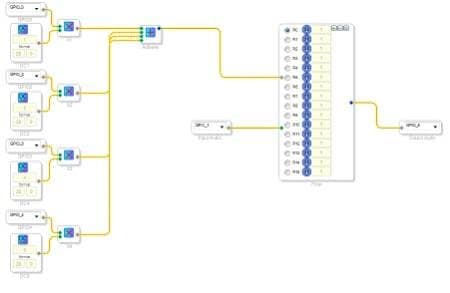
Hi Markus,
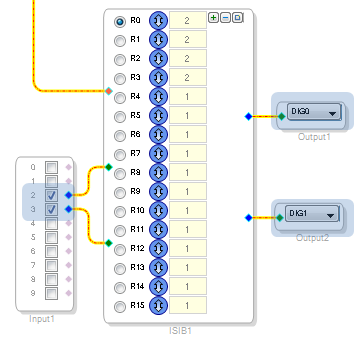
Actually, the way to access digital audio data is not to use the "GPIO Input" and "GPIO Output" cells (GPIO_1 and GPIO_6 in your project). Those cells are only used when GPIO inputs/outputs are digital control signals.
When you use the serial ports, the audio signals appear on the input cells and output cells.
Please see here for documentation:
http://wiki.analog.com/resources/tools-software/sigmastudio/toolbox/io/input
http://wiki.analog.com/resources/tools-software/sigmastudio/toolbox/io/output
(and just for reference, your project should look like this)
Hello Brett,
thank you very much for your reply. I thought i have to use the pins. Now i can start to implement my project.
Have a nice day.
Markus
how to out led for 16 program eq
how to dislay 16 led for r1 - r15 .
thank you
We need a lot more info and your question should be on a new thread.
What processor are you using?
What are you trying to do? The function?
Dave T
Please log in to reply.