Both Momentary and Latching Mute
I have the following hardware switches in my 1701 PCB: a pushbutton switch and a DIP switch.
The user can currently press the pushbutton for a momentary mute. I'm trying to figure out how to give the user the option to have the mute be momentary or latching, based on the value of a DIP switch.
DIP Switch = 0
Pushbutton is momentary mute
DIP Switch = 1
Pushbutton is latching mute
Make sense? I can figure out how to do each of these individually, but can't figure out how to get the DIP switch to control which one is used. I'm using my other DIP switches to control other parameters successfully.
Thanks!
--> freddie
mute
gpio
Hi Freddie,
Use the DIP switch to control an index-selectable mux. One input to the mux will be the direct GPIO input. The other input to the mux will be the GPIO going through a toggle cell. The output of the mux goes to a multiplier that has its other input connected to the audio stream (in other words, you're either multiplying the audio by zero or one, depending on the value of the mux output). Make sense? If not, I can try to create the project for you.
I think that will work! Thanks, I'll give it a try and let you know if I need more help.
--> freddie
Okay, it's alllmost working. I still have the momentary mute working, when the DIP is set to select momentary. But when I try setting the DIP to my latching position. The pushbutton does nothing now. I've tried changing my toggle to be 5.23 or 28.0 but it's still not working. Seems like this should work, no?
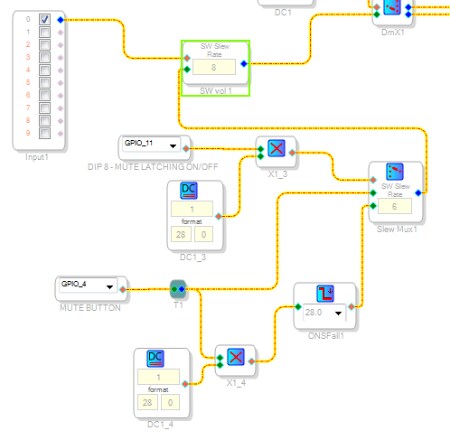
It looks like in the toggle case, you're feeding a 28.0 value to the volume control when it should be a 5.23 value instead. Try changing both DC1_4 to 5.23 format and ONSFall1 to 5.23 format and see what happens.
Still didn't work. I also tried removing that multiplier (DC1_4 and X1_4) and doing right from T1 to ONSFall1. That didn't help either.
Am I using the right toggle block? I see there's a Toggle OnOff under GPIO Conditioning. I'm using the Logic Toggle block...
Whoops, I think this is supposed to be the GPIO version. In that case, you won't need to do any format conversion on the signal. Just feed the GPIO straight into the toggle block.
WOO HOO! It works perfectly! Thanks!!
For reference, here's what I did:
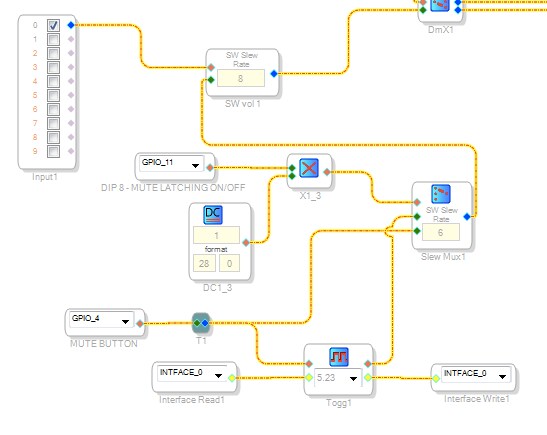
Please log in to reply.