No audio data on the output of processor AD1953
Hello,
I'm working on a project of a digital equalizer with processor AD1953. I designed my own hardware and tried to resuscitate the equipment, but there is no audio data on the outputs of AD1953, just a DC component. To be more specific a voltage 0,9 V occurs on pins VOUTL-, VOUTL+, VOUTR-, VOUTR+ and voltage 1,0 V on pins VOUTS-, VOUTS+. I measured clock rates on the corresponding pins and they seem to be right. On the MCLK0 pin there is a frequency about 12,24 MHz (256 * fS), on the BCLK pin 3,08 MHz (64 * fS) and on pin LRCLK there is frequency about 48,0 kHz (fS). Sample rate of audio is 48,0 kHz. Where could be a problem, if there is not any audio on the output?
Thank You for Your answer.
Hello,
What program is running in the AD1953?
How are you configuring the control registers?
What is communicating with the AD1953 on the SPI interface?
Before I tried to resuscitate the equipment, I hadn't changed the program in the AD1953 or the setting of SPI and control registers. I had assumed that the default setting of SPI and of the control registers ensure an audio signal on the output of the processor after getting digital audio data on the SDATA0 input.
To control the registers through the SPI interface I use the ZL1USB RS232<->USB converter (http://sklep.avt.pl/photo/_pdf/zl1usb.pdf). The CDATA pin is connected to TXD pin, the CCLK pin to the DTR pin, the CLATCH pin to the RTS pin and the COUT pin to the DSR pin. The voltage levels for logical 0 and 1 on
these pins of the RS232<->USB converter are compatible with the AD1953. In order to configure the SPI and control registers I created a program, whereby I change the voltage levels on the corresponding pins. At that I respect the SPI WRITE format. The necessary parameters and addresses for controling all functions of the AD1953 I get from the SigmaStudio software.
The AD1953 is fully supported by SigmaStudio, but SigmaStudio does not support the "default program" that is loaded into the AD1953's memory by default. You will need to create your own signal flow using the blocks in SigmaStudio.
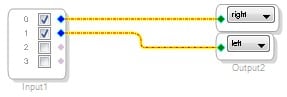
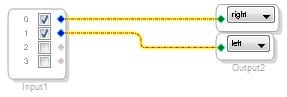
One good starter project would be to take the inputs and route them directly to the outputs. Here is a picture of how that looks in SigmaStudio:
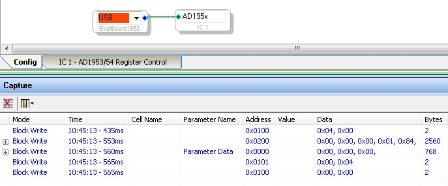
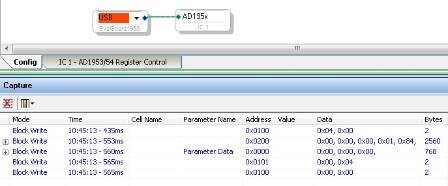
You can then use Link-Compile-Download to generate the code that will need to be downloaded to the AD1953 via the SPI port. If you perform the Link-Compile-Download operation while the EvalBoard1953 communication interface is connected to the AD1953 cell, then the generated data will appear in the capture window.
You can use this method to generate microcontroller code, using one of the following options:
For C compilers:
http://ez.analog.com/docs/DOC-1806
If no C compiler is available:
Thank You.
Please log in to reply.