Ext. det i/p on dynamic processors......what am I missing....
Hello Brett,
As per the help file both the audio and ext. detector inputs on the dynamic processors accept 'decimal-audio'
I set my schematic as shown in the attached image file.
I hear audio. I expected the audio level to change with the change in volume control slider position. However the o/p level remains constant.
The dynamic processor curve is set to flat as I wanted the o/p to track the volume control settings.
What am I doing wrong here? How would one set-up a dynamic processor to track audio input on its external input pin?
Thanks in advance,
KKSL.
Hi KKSL,
If the curve is flat, then the output volume will never change. A flat curve means that output gain = 1 at all times. Therefore, you'll never hear a change in level because it will never choose a gain other than 1.
Try your experiment again, but use a different curve - something that isn't flat. In that case, you'll hear the level change dynamically.
Still... I'm not sure what you're trying to do.
What is the end goal you are you trying to accomplish? Sorry, I'm just having trouble understanding the application.
Hello Brett,
Let me try to detail this out:
Let us consider a mono dynamic processor (dp) without external input. It has one input and one output. If X-axis represents input level and the Y-axis represents output level, then, the output changes if the input changes. The output level will be (Input-level X Y-axix-level) where the Y-axis level is the value that corresponds to the input level value on the X-axis.
Now let us consider a mono dp with external input. It has two inputs: 1. signal input that needs to be processed 2. control input that controls the signal input and one output. If the X-axis now represents the control signal level and the Y-axis the output level, then the output level will be (Input-level X Y-axix-level) where the Y-axis level is the value that corresponds to the control input level value on the X-axis.
So the difference between the two is that with dp without external detect, the output value depends on input value and the curve where as it depends on the input value, control value and the curve in the second case.
I hope that my understanding of the dp blocks is correct.
In the attached file, ch1 input is signal input, ch2 input is control input with a volume control to enable me to
force a change manually. However, any change in the volume control slider is not producing any change in the output which is = the input at all times. I feel this is not how it should be.
I have used the dp block without the external detect in my project, elsewhere, with a 'non-flat' curve and it is
behaving beautifully. I suspect it is ALL the dps with detector block (rectification & peak/ave/rms detect) that are non functional. It could be a bug or I may be interpreting the block functions wrong. So I need your help to sort this out.
Lastly, one of the applications where this is useful:
In a 5.1Ch set-up, consider the front speakers: Left, Center and Right.
In a simple decoder, during a panned effect, say the signal is panned hard left, the sound will appear from the left and partially from the center. So a phantom sound will be created between the left and the center speaker.
However with a better decoder, where the center channel is (Lt X strength of Rt + Rt X strength of Lt) then during a hard left panned effect, the center will be zero since Rt is zero and so the sound will only appear from the left. This gives better separation.
There are other applications in developing steering logic and gain riding where the product of two audio signals is useful.
If this is complex and I don't mind re-explaining all this differently if needed. But I need this feature for a lot of my work.
Sorry for keeping you busy and I hope that we can sort this out. Since I am in UTC+5:30 time zone, I will be able to respond quickly till 2:00pm your time, if needed.
Thanks,
KKSL
KKSL wrote:
Now let us consider a mono dp with external input. It has two inputs: 1. signal input that needs to be processed 2. control input that controls the signal input and one output. If the X-axis now represents the control signal level and the Y-axis the output level, then the output level will be (Input-level X Y-axix-level) where the Y-axis level is the value that corresponds to the control input level value on the X-axis.
Actually, this is not a correct understanding of how the transfer function works.
The transfer function graph represents the gain applied to the input signal based on the value of the detect signal. The Y axis does not necessarily represent the level that the output signal will be. The gain applied for any point on the curve can be calculated as the Y axis value divided the X axis value (in linear, this is division... in logarithmic (dB) scale, it's subtraction).
X axis value = Detection signal
Gain = Y axis value / X axis value
Output = Gain * Input
by substitution...
Output = (Y / Detection) * Input
In other words, in the case of external detection, this transfer function is completely independent from the input signal.
So, let's look at some examples.
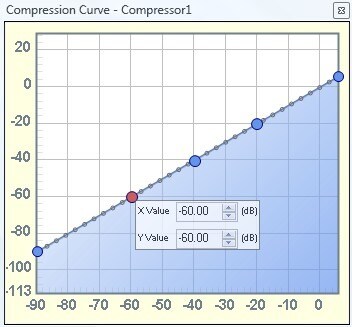
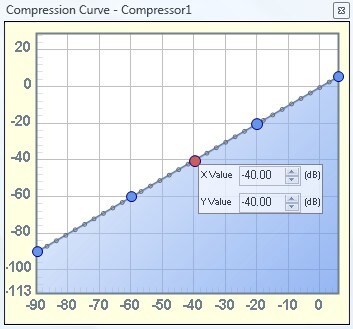
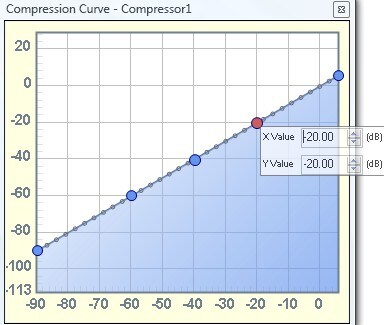
First, let's think of the case where the curve is linear:
If the detect signal is -60 dB, then the gain applied to the input signal (on the log scale) is the Y axis minus the X axis. So that is (-60 dB) - (-60 dB) = 0 dB. No gain applied. Output signal = Input signal.
If the detect signal is -40 dB, then the gain applied to the input signal is (-40 dB) - (-40 dB) = 0 dB. No gain applied. Output signal = Input signal.
If the detect signal is -20 dB, then the gain applied to the input signal is (-20 dB) - (-20 dB) = 0 dB. No gain applied. Output signal = Input signal.
So, you can see, if the curve is linear, then there will always be 0 dB of gain applied, regardless of what level is on the detection pin. In other words, in the case of a linear, 1:1 curve, Output = Input.
So, let's look at the case where there is a more interesting transfer function:
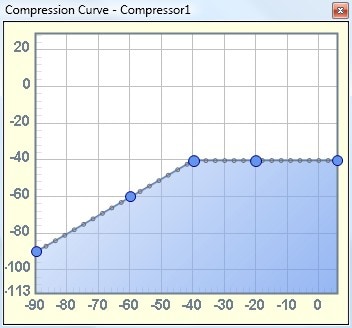
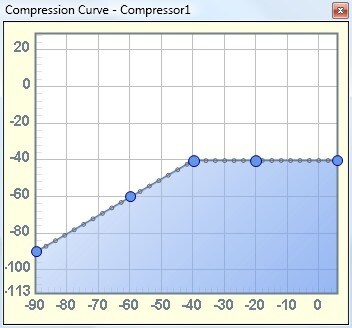
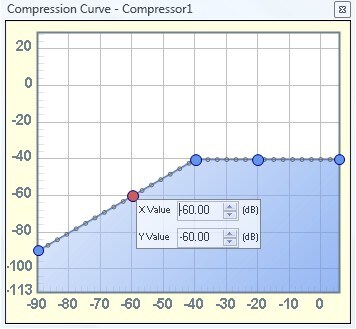
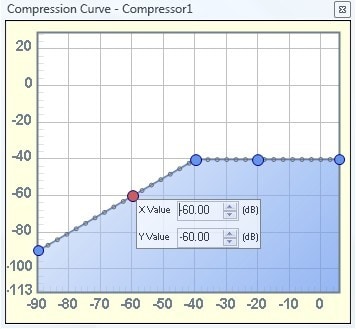
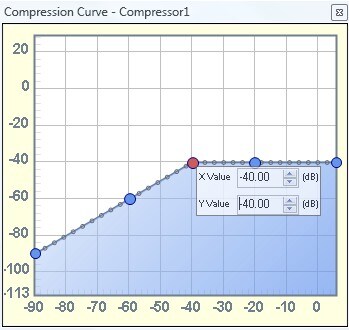
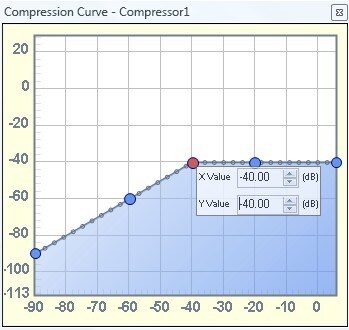
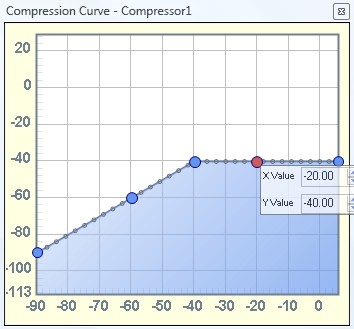
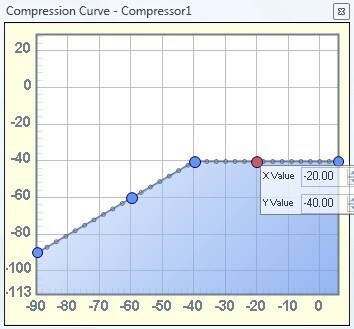
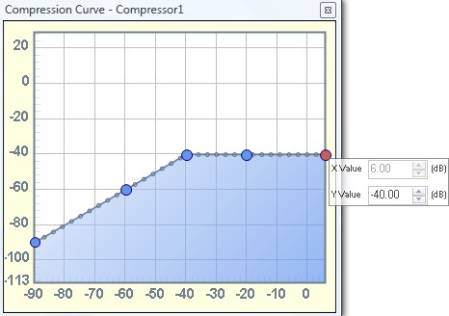
Here, we are linear up until -40 dB, and start to compress the signal after the detection input exceeds -40 dB.
If the detect signal is -60 dB, then the gain applied to the input signal is (-60 dB) - (-60 dB) = 0 dB. No gain applied. Output signal = Input signal. This is the same as the previous example.
If the detect signal is -40 dB, then the gain applied to the input signal is (-40 dB) - (-40 dB) = 0 dB. No gain applied. Output signal = Input signal. This is the same as the previous example.
If the detect signal is -20 dB, now we have a case where the X value and Y axis are not equal. We calculate the gain by taking Y-X. So, the gain applied to the input signal is (-40 dB) - (-20 dB) = -20 dB. So, the output signal is now equal to the input signal, but with -20 dB of gain applied.
Likewise, if the detection signal is +6 dB, the highest point on the table, then we calculate the output gain as (-40 dB) - (+6 dB) = -46 dB. So, in this case, the output signal is the input signal, but with -46 dB of gain applied.
Now, just think of the case where the input signal = the detection signal. In other words, a dynamics processor without an external input. You still calculate the gain the same way by subtracting Y-X (in log scale) or dividing Y/X (in linear scale). So take a look at the math again:
X = Detection
Gain = Y / X
Output = Gain * Input
by substitution...
Output = (Y / Detection) * Input
However, in this special case, Detection = Input, so...
Output = (Y / Input) * Input
Output = Y
In other words in this special case (and only in this case) when the detection signal equals the input signal, you can think of the X axis as representing the input signal level, and the Y axis representing the output signal level.
I hope that all makes sense.



Hello Brett,
Thanks for the detailed insight of the dp block.
I must admit, coming from the analog world, it does take me a while to get some things straight.
You have left me with a lot of food for tonight. I will take a while to get a hold of things, implement it (wow, no coding!!) and come back to you.
In the mean while, kindly spare some time to take a look at my PM and my requests: SR#: 0901944/ SR#: 1238464.
Thanks again!!
Hello Brett,
I now have the desired effect with the help of your lesson above on the dp block.
I could not have done this myself.
Thanks a lot again!
Please log in to reply.