Couple of questions.....
Hello,
1. Why is it that I am unable to use the nice graphical interface for the Dynamics processor blocks? What is the magic to get the 2nd window that not only has the user configurable graph but also the sliders for compressor and expander and its associated parameters? I know that this interface has a bug as stated elsewhere in the forum and is being looked into.
2. In the delay block what is the count/ samples for 1ms delay? Is it base on clock period? count = (needed delay in ms) / (clock period in ms)
3. How can I use the signal detect feature to auto select the input such that the last detected is selected? Can we do this within the sigmadsp, without relying on external intelligence?
4. Is it possible to seperate signals based on their levels? Regular filters do it based on frequency. e.g pass signals above -50db. One way to do it would be by using dynamic processors. Any other better ways?
Thanks in advance!
kksl
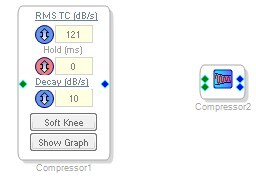
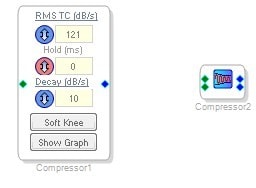
1. There are a wide array of dynamics processors in SigmaStudio, and they each have different GUIs. For most compressors (like the one on the left below), you can access the graph by clicking the "Show Graph" button. For the "Standard RMS" and "Standard Peak" compressors (like the one on the right below), just click on the blue icon in the center of the cell.
2. The delay block is in samples, so it's sample rate dependent. One sample at 48 kHz sample rate is 1 / (48000 Hz), or 20.8 microseconds.
3. It might be possible to do this with all of the logic and detection cells in SigmaStudio's basic library, and it would probably require some feedback lines, too. It's still not very easy to do state-machine implementations, but we do have a state machine cell available that might help you. Here's an example that I wrote showing how to monitor input signals: https://ez.analog.com/message/7669#7669
Here are a few other threads on similar topics:
https://ez.analog.com/message/19839#19839
https://ez.analog.com/message/12682#12682
https://ez.analog.com/message/15035#15035
4. Yes, you can do this by using a gate. However, it's impossible to separate signals in the time domain once they are mixed. Keep that in mind.
Here's an example utilizing a dynamics processor:
On #4, I should be more precise in my answer.
If two signals have overlapping frequency content, then it is impossible to separate them. So, to answer your question "Is it possible to separate two signals based on their levels?", the answer is "No, if the signals are already mixed together and they have overlapping frequency content, then it is impossible to separate them."
I'm not sure if this is what you were asking.
Hello Brett,
How can I convert an audio signal to dc equivalent of its RMS value (rms to dc).
I want to multiply two audio signals such that the result of multiplication should be the gain modified multiplicand, where the multiplier is the gain which is the dc value of the rms value of the second signal
Thanks in advance!
KKSL,
This thread shows various ways of calculating the "level" of a signal: https://ez.analog.com/message/7669#7669
We do not have a completely accurate RMS calculation because the square root operation is too intensive with regards to instruction count. However, the "Running Average" is a close approximation of RMS. In the examples on that thread, I route the output of the envelope cells to a "DSP Readback" cell so the user can read them over I2C or SPI. However, you can simply remove that DSP readback cell and route that signal (which is a DC representation of the RMS level) to a multiplication block, or whatever else you want.
It sounds like you would want to use a Running Average cell on audio signal 1, then take the output of that and put it into a 2-input Multiply cell. The second input of the Multiply cell would be audio signal 2.
Please log in to reply.