Basic Digital Input Setup
Hi Brett,
I wrote this as an email earlier, so I cut and pasted into a word doc.
Would you please review and see if you have any suggestions?
Thanks,
Tim
Hi Tim,
I attached a sample project that should work based on your setup. It's very important to make sure the serial port is in master mode, and to check the proper channel configuration based on the setting of the microphone's LR pin.
The project includes signal monitoring, as described here: http://ez.analog.com/message/7669#7669
If you right-click on the DSP Readback cell and choose "Start Continuous Readback," then the level will constantly update itself in real-time. That should be helpful for debugging.
Hi Brett,
I got side tracked by another project and now am returning to this one. I followed the setup you posted earlier.
On the ADMP441, there are the SCK, SD and WS. SD is the output to the ADAU1701 MP0-SDATA_IN
SCK and WS are the clocks expecting input from the ADAU1701 MP4 and MP5. This is how it is configured from your prior post.
Upon review of the ADAU1701 data sheet, RevB pg 46 of 52, it describes MP0 to MP5 as inputs to the 1701, and MP6 to MP11 as outputs, with
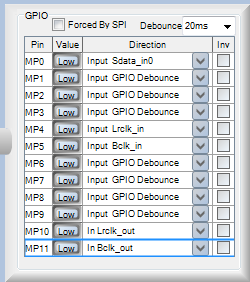
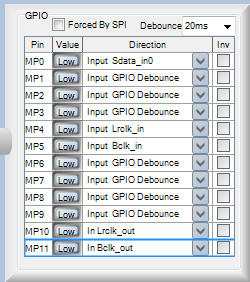
MP10 and MP11 being OUTPUT_LRCLK and OUTPUT_BCLK. Then in the Register Control, set the GPIO table for MP10 and MP11 to In Lrclk_out and In Bclk_out. By doing this I successfully turn on LED2-D6 (??) but still doesn't provide a clock to the ADMP441.
Register Control Serial Output is set to Master Mode, and the LRCLK and BCLK polarity match your post.
What is generating the LRCLK and BCLK for the ADMP441 to receive? At this time, all three lines stay static at VDD and don't change.
Any thoughts?
Thanks,
Tim
Hi Tim,
You need to make a small modification to the SigmaStudio project that Brett sent to you. You also need to set MP10 and MP11 to their clock functions, as shown here:
The serial input clock ports are always slave, so another port needs to generate the bit clock and frame clock for the I2S port. You will need to connect pin MP10 and MP11 both to MP4 and MP5 on the ADAU1701, and to the ADMP441's WS and SCK pins. I see that the "Master Mode" checkbox is already selected in this project, so once those two pins are set to the clock function they should generate the necessary I2S clocks.
Note that, for the setup as it's shown here, you'll need to set the ADMP441's L/R SELECT pin low (ground) to enable it to output its data in the right channel.
This question has been assumed as answered either offline via email or with a multi-part answer. This question has now been closed out. If you have an inquiry related to this topic please post a new question in the applicable product forum.
Thank you,
EZ Admin
Please log in to reply.