RMS Table bug?
Hi all,
I've did some more checking of both documentation and code and I might have found a bug in the RSM Table instance. I have also posted the discussion "RMS Table Problem" yesterday on the forum. I have build a dynamic processor with look ahead function in my project and also here I have found an invalid readback; I have filled the table with all 1 (5.23 format) meaning flat responce. However, when there is no input signal, the output of the RMS Table is 0. I've attached a screenshot again!
Best regards,
Guy
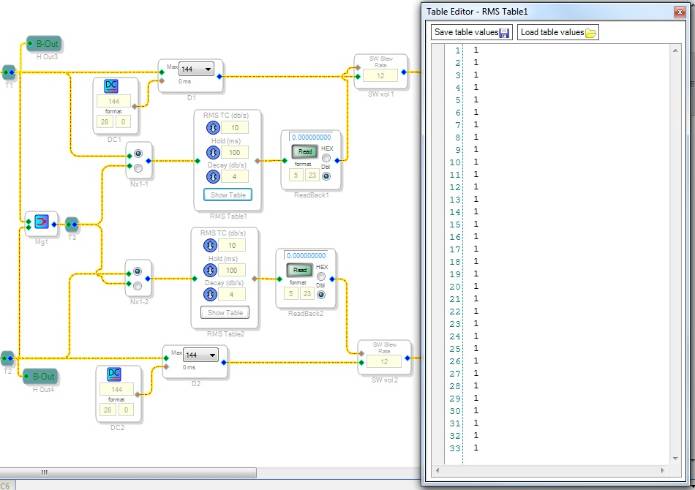
Understood. We will look into this.
Thank you very much, Brett :-) BTW I do agree that the output of the table should be stuck at the lowest number in the table if input goes below -90dBFS. This reply is to your answer on previous post but it 's the same issue!
Best regards,
Guy
Hi Brett,
Can you please keep me informed about the progress? Thanks in advance!
Best regards,
Guy
Hi Guy,
We are currently modifying the cell to work like the following pseudo-code:
Lower limit protection:
if ( inputLevel < lowerLevelLimit )
tableOutput = lowestTableValue;
Upper limit protection:
if ( inputLevel > upperLevelLimit )
tableOutput = highestTableValue;
NOTE:
lowerLevelLimit = the lowest input that corresponds to a point in the table... usually this is -90 dBFS or so.
upperLevelLimit = the highest input that corresponds to a point in the table... usually this is +3 dBFS or +6 dBFS or so.
The idea is that any input below -90 dB will get the gain value for the -90 dB point in the table, and any input above +3 dB will get the gain value for the +3 dB point in the table. It’s a simple way to extrapolate the edges of the transfer function, and it protects against the case where the input level goes outside of the table range.
This will, of course, make the algorithm a little bit bigger in terms of instructions and RAM usage.
The old cell will be made "obsolete" and the new cell will be added. This means that any existing project you have will keep the old code - its compiler output will not change. You'll need to delete the existing cell and replace it with a new cell from the library in order to get the updated code in your project.
We use this "obsoletion" approach to help users preserve code compatibility for old projects when they update SigmaStudio to a new version.
Hi again Brett,
Sounds great! Can you let me know when (or if) the new version of SigmaStudio is available or is there a place where I should check it? Thanks again!
Best regards,
Guy
I will post an announcement on the main forum page each time a new beta is available for download. You can also subscribe to the RSS feed if you'd like to get updates sent to you.
This question has been assumed as answered either offline via email or with a multi-part answer. This question has now been closed out. If you have an inquiry related to this topic please post a new question in the applicable product forum.
Thank you,
EZ Admin
Please log in to reply.