RMS Table problem
Hi all,
It seems that I have a problem with the RMS Table. I found this with Sigma Studio 3.3 and I have just upgraded to the latest (3.5) but the issue is still there!
I have the feeling that the RMS table gives the wrong value when the signal is low. I've connected the RMS Table to a lookup table and read back the value of both tables. In the RMS table, I've put value from 1 to 33 (in 28.0 format) and in the lookup table from 33 to 1. The input from the RMS Table is connected to the S/PDIF input, which is connected to an Audio Precision ATS-2. When I input 0dBFS to the SPDIF input, The output of the RMS Table is 31, which is what I expect! The output of the lookup table is 2, but I expected 3. However, I guess this is because I started numbering from 1 instead of 0. Is this assumption correct?
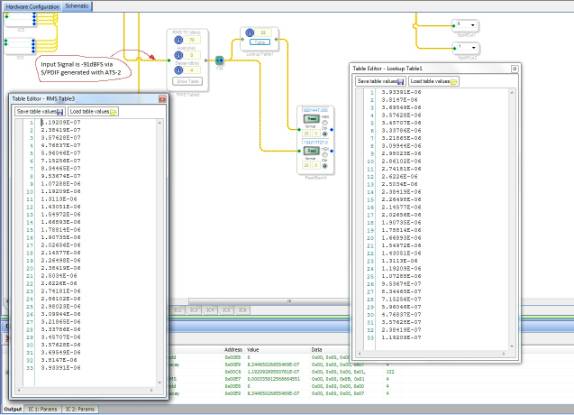
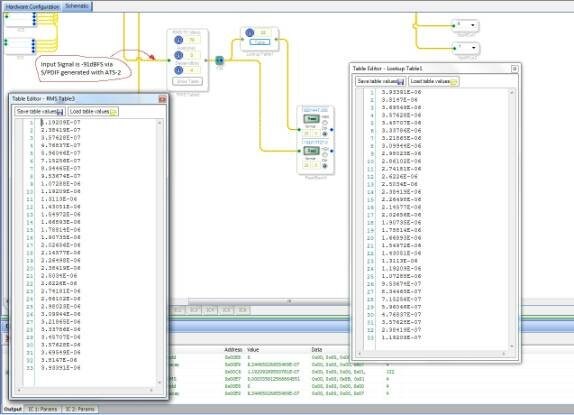
When I put -90dBFS to the input, the RMS Table output is 2 and the Lookup Table output is 31! But when I lower the input signal with 1dB (thus inputting -91dBFS), the output of the RMS Table (and of course the one of the Lookup Table) goes wild. It appears there are random numbers in any range! I've attached a picture of the screen. Is this normal? I haven't noticed this behavior on other inputs because the noise was higher than -91dB!
Any help is greatly appreciated!
Best regards,
Guy
I was pulled into several high-priority, time-critical projects at work over the past few weeks and unfortunately I had to de-prioritize my participation in the forum as a result. So, I apologize for making you wait so long for an answer. I am going to try to respond to everybody's questions within the next few days.
This certainly appears to be a bug. I know that the 'RMS' Table actually does not represent a true RMS calculation because the square root is computationally expensive, so some sort of averaging function is used, which is a little less accurate. Still, it seems like there may be a shift of one on the table itself. Also, when the input signal goes below -90 dBFS, I suppose that the output of the table should be stuck at the lowest number in the table. Do you agree?
This will require a code update. That means that once the update is completed and a new SigmaStudio version is released, you will have to delete the currently existing cell in your project and replace it with a new cell from the library. The reason for this is that the code stored in the cells in a project stays the same when SigmaStudio is updated in order to ensure that the behavior of existing projects does not change when algorithms are updated.
Hi again all,
I've noticed that the RMS table now has 41 elements (and addresses) instead of 33 in the past. In SigmaStudio, the show button table shows still 33 elements and the first element seems to be copied double while the last element is sent 8 times. I just want to make sure if this is the way how it should be done. It could also mean that the dynamic range is expanded (by 24dB; from -93 dB to 30dB) but the table in SigmaStudio is still the same. Could you please clarify? Thanks in advance!
Best regards,
Guy
One more question about this RMS table, it seems that it needs 64 MIPS now, which is about 50% more as the previous one (which had 43 MIPS). Do you know the reason for that? I guess I will need to find another solution because the number of MIPS in my project exceed 100%... Thanks again!
Best regards,
Guy
Hi Guy,
This was a bug fix in SigmaStudio 3.6.1 Beta. The previous version of the cell had a problem where it would cause problems (mapping to the wrong value). In order to fix this problem, we had to increase the range of the upper and lower limits, which also increased the number of instructions and memory requirements. So, I think this was an unfortunate but necessary update in order to guarantee stable performance of the algorithm.
Here are the updates from SigmaStudio 3.6.1 beta, for reference:
Enhancements SigmaStudio 3.6.1 BETA
Absolute Max Value, Max Value , and Min Value Algorithms added.
RMS table cell extends range from -93 to +3 dB. (Before was -93 to 0 dB).
RMS table cell has lower and upper limit. Upper limit output is mapped to the +3dB value and lower limit to the -93 dB.
Index Selectable EQ Cell enhanced its GUI: Now it only displays the row of filters that is selected. It updates the window when selecting different rows. The focus on the add, delete, and show buttons is selected as not focused after moving the mouse pointer away from them.
Read/Write and Sequencer window now updates the Register Window.
Hi Brett,
Thank you for your fast reply! I've just upgraded to the latest version to make sure we have all features and bug fixes. There are still 33 values in the RMS table, according to the help file, the range is from -90dB to +6dB but from your answer, it's from -93dB to +3dB. I guess that the help file didn't get updated. However, as in my previous question, there are 41 elements (and addresses) in the table instead of 33 in the past. SigmaStudio, uses the first value double (on first and second address) and the last value is sent 8 times, to the 8 last addresses. I just want to make sure if this is the way how it should be done. Thanks in advance!
Best regards,
Guy
This question has been assumed as answered either offline via email or with a multi-part answer. This question has now been closed out. If you have an inquiry related to this topic please post a new question in the applicable product forum.
Thank you,
EZ Admin
Please log in to reply.