Logarithmic potentiometers used in my SigmaDSP 1701 design
Hi:
I accidentally used a Log potentiometer on my 1701 design but I need to drive an Index Selectable Filter for controlling a filter. How can I scale the signal in such a way that I still get a linear value that controls my index selectable filter?
Thank you
(Note: this post refers to app note AN-951, which can be found here: http://www.analog.com/static/imported-files/application_notes/AN-951.pdf )
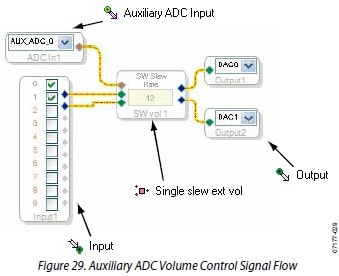
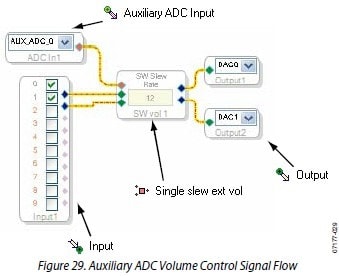
Typically, it's desired to use a logarithmic potentiometer in cases where you are controlling the volume of an audio signal directly. An example of this is shown in Figure 29 from application note AN-951:
The reason for choosing a logarithmic potentiometer in this case is because the human perception of audio volume is based on a logarithmic scale.
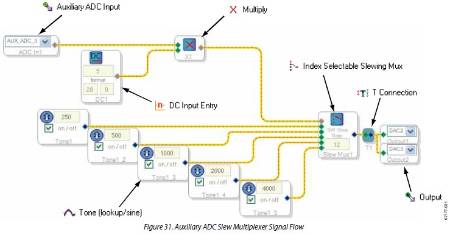
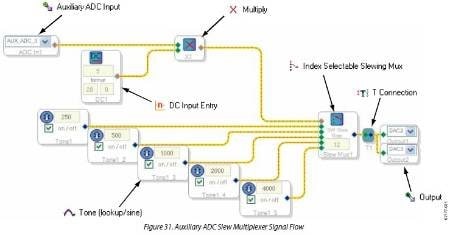
For applications that use a potentiometer to control parameters on a linear scale, such as the index value of a multiplexer (or filter), a linear potentiometer should be used. An example of this is shown in Figure 31 from application note AN-951:
The reason for choosing a linear potentiometer in this case is because we want the selection range for each setting on the potentiometer to be equal. The input range of the aux ADC is divided down into equal sections for each of the indices.
If, on the other hand, you have an application like Figure 31, but have a logarithmic potentiometer in the system, the problem becomes a bit difficult to solve. The index selection ranges on the potentiometer will be logarithmically spaced instead of linearly spaced.
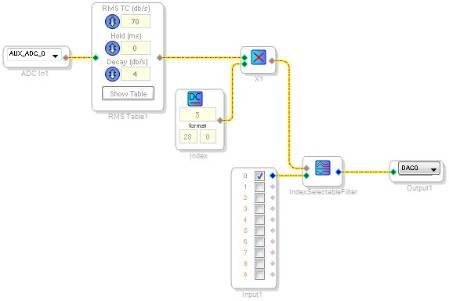
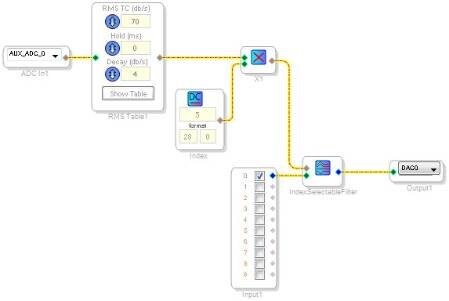
One way to solve this problem easily, albeit rather expensively with regards to RAM usage, is by using the RMS Table cell. The RMS Table cell detects the RMS value of an input signal and outputs a value based on a 33-point table stored in RAM. This is, in effect, log-to-linear conversion. The 33 point table simply needs to be a linearly spaced table of values between 0 and 1. Mathematically, this works out to an increment of 0.03125 (1/32) per table value.
The schematic looks like this:
The complete 33-point linear table is here:
0.00000
0.03125
0.06250
0.09375
0.12500
0.15625
0.18750
0.21875
0.25000
0.28125
0.31250
0.34375
0.37500
0.40625
0.43750
0.46875
0.50000
0.53125
0.56250
0.59375
0.62500
0.65625
0.68750
0.71875
0.75000
0.78125
0.81250
0.84375
0.87500
0.90625
0.93750
0.96875
1.00000
This question has been assumed as answered either offline via email or with a multi-part answer. This question has now been closed out. If you have an inquiry related to this topic please post a new question in the applicable product forum.
Thank you,
EZ Admin
Please log in to reply.