MLSSA files being normalized by SigmaStudio?
While MLSSA files are usually defined in dbSPL, it seems that SigmaStudio automatically normalizes the MLSSA data file so that the highest level in dbSPL within a particular file is referenced to 0db when plotted in SigmaStudio. Is there a work around for this? I makes dealing with multiple drivers with varying sensitivities impossible.
Thanks!
Hi audiolab1. Thanks for pointing this out. It looks like this is hardcoded in SigmaStudio so I expect it might take a software revision to fix. It was ostensibly coded in as a "feature", but it's apparently troublesome in certain situations!
I'll put a request in immediately to make this feature optional. Keep in mind that you'll need to wait until the next beta at the earliest until this is implemented.
That would be excellent Brett!
Thanks for looking into it.
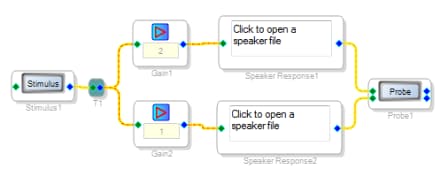
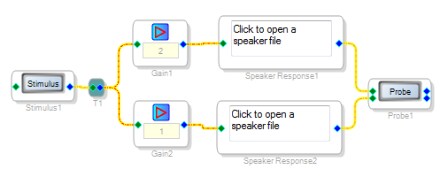
Until this is changed in SigmaStudio, you could use this work-around to properly display the speakers' different sensitivities. In the signal path you're using to display the MLSSA data, you could include a different gain in each path to show the sensitivity differences. Here's what a simple implementation of this would look like:
Note that you would not want to do this in the actual signal path that is being processed to the SigmaDSP's outputs, as this is actually applying a gain to the signal. You will just want to be sure that you have this stimulus-gain-MLSSA-probe setup in a sidechain alongside your main processing path.
Thanks, Jerad!
That's a great way to temporarily work around the issue.
Hi, I just discovered this issue using SigmaStudio 4.6. It seems that this is still the case? That the frequency response is scaled automatically to 0dB? Like the original post said, that makes designing a crossover for a loudspeaker near impossible and the workaround illustrated below isn't ideal. It's surprising that this bug is 10 years old and still not fixed.
Please log in to reply.