Sigma Studio peaking filter Q inaccurate?
I am using Sigma Studio to create bi-amp loudspeaker EQ files and am finding that Sigma Studio peaking filter response deviates from the expected theoretical filter response. For example, a simple filter with paramters F=1kHz, Ao=+6dB and Q=1 does not match a computer-generated theoretical response (from LEAP software) or the response achieved with a DSP from another manufacturer. The other DSP response matches the theoretical response exactly.
As an example, the measured bandwidth of the filter created by Sigma Studio/Sigma processor is 987.5Hz rather than the expected 1kHz. The Sigma filters are more "peaky" than theoretical. For example, if I enter Q=0.8 into Sigma Studio, I get pretty much the theoretical reponse of Q=1. The error does not appear to be linear, however; simply reducing the Q value by 20% on filters with different parameters does not get the right answer.
Plots of the aforementioned responses are attached.
Has anyone else experienced this? Does anyone at Analog Devices have any information that might be helpful?
Thanks!
Paul Hales
I'm looking into this. Could you please post the coefficient values you got using Leap? Try the same filter at Fc = 1000 Hz, Q = 1 and Gain = 6 dB.
Hi Brett,
LEAP will export coefficients derived using the following methods:
Matched-Z
Bilinear
Invariant
Convolution
And can use the following "realization forms":
Single Section, Full Order
Parallel Sections, 1st/2nd Order
Cascade Sections, 1st/2nd Order
Which combination would you like me to post?
Paul
L. Paul Hales
cid:image002.jpg@01CC2AA9.0CE7A8D0

Professional Home Cinema, LLC
dba Pro Audio Technology
5445 Oceanus Drive
Suite 110
Huntington Beach, CA 92649
Tel: 714.890.0418 x702
Tel: 800.272.6085 x702
Fax: 714.890.0536
www.proaudiotechnology.com<http://www.proaudiotechnology.com
Btw, when Sigma Studio graphs the response of the filter in the parametic EQ object, the graph on the screen matches the response you get from the processor, but not the theoretical response we want. So the software is calculating it this way.
It took a few days of looking around, but I finally figured out the reason for this anomaly.
The filters in SigmaStudio are based on Robert Bristow-Johnson's Audio EQ Cookbook, which is a fairly well-known implementation of Direct Form 1 biquad filters on fixed-point architectures. It looks like the Q is defined in the traditional electrical engineering sense for all filters except for the peaking EQ. Here's the excerpt that shows that minor deviation from the normal definition, and the reasoning for it:
Q (the EE kind of definition, except for peakingEQ in which A*Q is
the classic EE Q. That adjustment in definition was made so that
a boost of N dB followed by a cut of N dB for identical Q and
f0/Fs results in a precisely flat unity gain filter or "wire".)
What ended up happening was that the GUI designer ended up making the control for setting the Q parameter directly, but the equations that follow for computing the actual coefficients use A*Q (where A = 10^(dBgain/40)). So, this was a mistake in the GUI, not in the filter coefficient calculations themselves.
The end result is that for peaking EQ only, the Q value shown in in SigmaStudio's GUI is actually (1 / 2^0.5) times the real Q... in other words, it's 0.707 times the real Q.
The relationship is:
SigmaStudioPeakingGuiQ =
ActualQ / sqrt(2)
So, if you use a Q of 0.707 in SigmaStudio, the results will match your other software when you use a Q of 1.
If you use a Q of 1 in SigmaStudio, the results will match your other software when you use a Q of 1.414.
We're debating what to do about this issue because of the backwards compatibility issues it presents with existing customers.
Brett,
Thanks for the effort and all the information.
I checked your suggested correction factor of Q=Q/SQRT(2) and unfortunately, I don't think it is correct. It works pretty close the 1kHz, Q=1 filter, but for different frequencies and Q's there is still considerable error. The error doesn't appear to be linear.
The attached plot is an actual filter I need for a speaker program: Fo=2715Hz, Ao=-14.75dB, Q=0.914. The LEAP mathematical filter target is shown in Red. The Sigma Studio measured filter when Q=0.914/SQRT(2)=0.914/1.414=0.646 is shown in Blue. There is considerable error.
- Paul
Hi Paul,
Sorry for my very delayed response. You might have noticed that I've been inactive on the forum for a week or so. I'm actually finishing up a very time-critical PCB design and I've unfortuantely had to devote nearly all of my time to the project. I'm finishing the design this week so I will try to get back to you early next week. Sorry again for the delay.
Brett
Brett,
Understood.
I checked and if I multiply theoretical Q by your factor, 10^(gain dB/40), the Sigma Studio filters match the theoretical. Not efficient, but at least it works!
Please let me know if and when AD will change the software to employ the standard Q definition.
Paul
Brett,
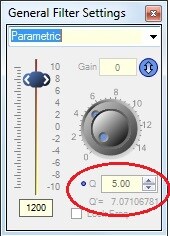
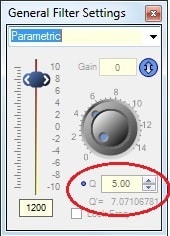
In Version 3.92, the General 2nd Order Filter's Parametric window displays a newly adjusted Q setting that appears to address the difference between the two Q methods ("classic" and DSP). Is that what this is for? Only thing, it shows up in the Parametric window, not the Peaking window. I couldn't find anything on this in the wiki.
BTW, I prefer the old help file (which can be accessed by selecting a block and hitting F1) to the wiki, which doesn't have this convenient feature. Not to mention I do a lot while off the Web.
Best regards,
Bob
Robert Blowsky wrote:
In Version 3.92, the General 2nd Order Filter's Parametric window displays a newly adjusted Q setting that appears to address the difference between the two Q methods ("classic" and DSP). Is that what this is for? Only thing, it shows up in the Parametric window, not the Peaking window. I couldn't find anything on this in the wiki.
Hi Bob,
I'm checking on this now. I think this has something to do with the difference between the "Classical EE Q" and the "DSP Q" definitions, as described in the well-known Audio EQ Cookbook by Robert Bristow Johnson. We implement the Q calculation using RBJ's method, which differs subtly from the classical EE definition. You can find the text here: http://www.musicdsp.org/files/Audio-EQ-Cookbook.txt
Robert Blowsky wrote:
BTW, I prefer the old help file (which can be accessed by selecting a block and hitting F1) to the wiki, which doesn't have this convenient feature. Not to mention I do a lot while off the Web.
In the latest version of SigmaStudio, you can highlight a cell and press F1, and it should bring you to the associated Wiki page. We haven't solved the issue of working offline yet, but that's something we're thinking about.
Hi Brett,
I'm very happy about the F1 - to - Wiki feature, but I can't get it to work yet. Are there any particular requirements? When I try it, F1 only takes me to the old help. I'm using SigmaStudio 3.92 and Firefox. I adjusted my firewall to give SigmaStudio full Internet access.
Bob
Hi Bob,
I don't think there are any specific requirements. I just click on a cell to highlight it, and then press F1. That should take you directly to the wiki. I think if you just press F1 (with no cell highlighted) it takes you to the help file. I'll confirm with the software team.
Brett
Actually, I'm incorrect. Pressing F1 in the software should take you directly to the wiki front page.
Are you using the x86 or x64 installer? I'm using x64. I wonder if that is a factor.
The Wiki has been updated, FYI.
https://wiki.analog.com/resources/tools-software/sigmastudio/toolbox/filters/general2ndorder
Brett,
I'm presently using the X64 installer as well.
Bob
This question has been assumed as answered either offline via email or with a multi-part answer. This question has now been closed out. If you have an inquiry related to this topic please post a new question in the applicable product forum.
Thank you,
EZ Admin
Please log in to reply.