ADAU1701 read problem with I2C (including pictures)
Hi everybody,
I'm working on a project where a board containing a 1701 is to be controlled by an "Arduino" Uno, a board with an Atmega368. The uc is interfaced through I2C to the evaluation board containing the 1701 (and at the same time also the usb interface is connected at the same bus).
I have interfaced the board with the Eval ADAU1701, including solving the problem of having the I2C bus at 3.3V on the evaluation board, and at 5V on the arduino board.
After a lot of tests I was able to write some data into the Parameter RAM of the ADAU1701. The Usbi interface allows me to see that I have successfully written to address 0 my data. This is the arduino code:
Wire.beginTransmission(52);
// send register address
Wire.send(0); // high byte
Wire.send(0); // low byte
Wire.send(0);
Wire.send(0);
Wire.send(0);
Wire.send(0x2A);
Wire.endTransmission();
Please note that we have to use 52 and not 104 (= 0x68) because 0x68 comprises the R/W bit. In the library for I2C that I use the address is 7 bit, and
R/W bit is added at left, while in ADAU1701 documentation they talk about 0x68 or 0x69 address for device, depending of if we write or read ... I took
a lot to realize this, but in any case now I know.
Anyway: writing to the 1701 is not a problem.
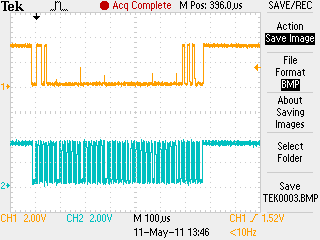
Here are the waveforms:
We see 7 bytes: the device address byte with write bit at 0, two bytes for the address, 3 bytes at 0 and 1 at 0x2A. Perfect.
Now the problem is reading.
I have tried for two days any combination, but I'm unable to get any data from the 1701, I'm unable to re-read the data that I have written.
Here is the code (I tried almost all the possible variants, and according to the oscilloscope this is the best solution:
Wire.beginTransmission(52);
// send address of register we want to read , 0x0
Wire.send(0x0); // high byte
Wire.send(0x0); // low byte
Wire.endTransmission();
Wire.requestFrom(52, 4); // 4 byte
while(Wire.available())
{
HiByte1 = Wire.receive();
}
while(Wire.available())
{
LoByte1 = Wire.receive();
}
while(Wire.available())
{
HiByte = Wire.receive();
}
while(Wire.available())
{
LoByte = Wire.receive();
}
Due to the I2C protocol oddities we have to write first indicating what memory location or register we want, and then (when the slave knows
what we want) we can ask a set of bytes.
The problem seems to be that the 1701 does not send the ACK at bit 9 when a READ is requested.
I tried to understand if I was making mistakes by seeing the sequence produced by sigmastudio when reading the same location:
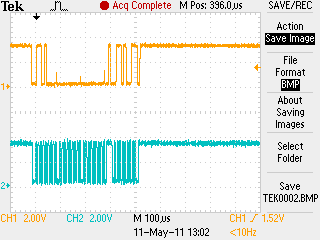
Location is 0x0. Data is read correctly:
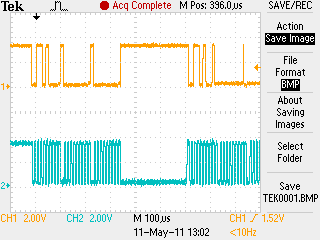
We can recognize the address of the device, 0x68 (or better, the address including the "write" bit at 0), followed by two bytes at 0 (the address of the memory location that I want to read) ... then strangely the clock is held low for some time by the usb interface, then again the device address but with the R/W bit at 1 (we read), the acnowledge by the 1701 at bit 9 and after that the bytes of data .... everything OK with USBi.
Now what happens with my code (writing with the microcontroller):
The first part is the same, OK. No delay here, I don't really know how to maintain the clock at 0 .... I have tried also with delays but nothing.
After that ... we see the address of device repeated again, with read bit (bit 8) at 1, that's OK .... but at bit 9 no acknowledge!
The 1701 refuses to understand the read command. So nothing happens.
If I compare all the images we see that: there's some delay between each byte when Sigmastudio is reading. But as writing works in my case ... this should not be an issue.
There's a large delay between the initial part of the read command, when we tell the device the address that we want, and when
the byte with read bit at 1 is sent .... moreover the clock is held low by the usb interface.
Is this neccessary? The documentation of the 1701 makes no reference to this, as well as to delays between bytes ...
Can anybody help me?
Thank you!
Audio Signal Processors
i2c
SigmaDSP Audio Processors
waveform
adau1701
Hi,
Thanks for your very detailed report. I'm sorry it took so long for me to reply. I was on vacation last week, so I didn't get a chance to look at this until today.
It's a bit hard to read your scope plots since the screenshot size is so small. However, it looks like your write sequence is correct.
There is no requirement for the clock to be held low between write bytes, as far as I know. That's just the way the the Cypress USB interface chip's hardware I2C interface works. We use other I2C interfaces like the Aardvark from Total Phase and if I recall correctly it does not hold the line low between bytes, but still works fine with all SigmaDSPs.
As a test, would you be able to insert a brief pause between bytes (emulating the USBi) to see if that makes a difference?
Hey all
I was wondering if you'd come across a solution to this problem yet?
I am having the exact same issue and have not been able to resolve this either.
As the OP, I can write to registers (I'm using a ADAU1442) and I can verify that these registers have changed using the USBi and Sigma Studio.
However, using the UNO, I also cannot get my read bit to be acknowledged.
Here is a transcribed bit stream from the USBi/Sigma Studio interface
(S is start, A is the address R is the Read/Write bit, K looks like the acknowledge and then the ____ are the subaddresses that I send to the chip)
0 0111 0000 0 1110 0010 0100 0000 00
S AAAA AAAR K ____ ____ ____ ____ __
This is followed by
0 0111 0001 0 DATASTREAM
S AAAA AAAR K
When I output the exact same bit stream from the Uno I get
0 0111 0001 0
S AAAA AAAR K
Again the only difference I can see is that the SCL line is held LOW after the first data transfer. Unfortunately, try as I might to mangle the output, the SCL line cannot be easily manually driven low when it is in I2C mode.
Any suggestions are greatly appreciated!
Hi everybody,
I finally found the solution myself.
No problem with the ADAU1701 chip, the problem lies in the I2C library normally used on Arduino boards.
This is called "Wire", and it's flawed, more specifically it does not implement fully the I2C specification regarding "time stretching",
and is unable to produce the waveforms needed by the dsp chip.
After a long search I switched to using a different library called "TwiMaster". Search on google and you will find it.
With it both read and write work fine.
The bad thing is that the problems in "Wire" are known since 2009, and a correction exists, but it was never incorporated inside
the official distribution of the Arduino IDE .... please update!
In any case TwiMaster is simpler and works OK.
Hope this helps somebody ....
Bye. Daniele.
Thanks very much for the update. I'm glad to hear that you were able to figure out the issue.
Good Day BrettG and everybody,
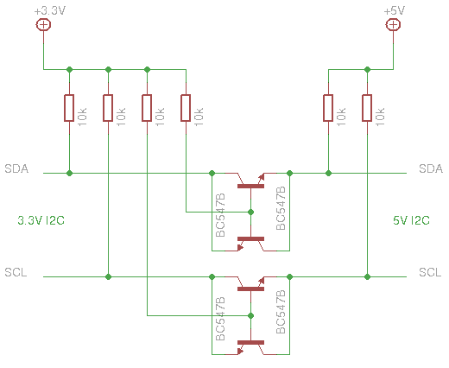
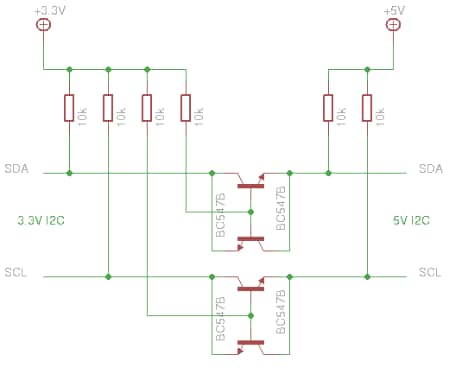
I am using EVAL-ADAU1701MINIZ Board (3.3V) and Arduino Ethernet (5V) for I2C communication. For the logic level converter I am using as circuit below. Grounding for both Board and Arduino were connected in common ground.
For the code, I am using as below available at http://playground.arduino.cc/Main/I2cScanner
#include <Wire.h>
void setup() {
Wire.begin();
Serial.begin(57600);
Serial.println("\nI2C Scanner");
}
void loop() {
byte error, address;
int nDevices;
Serial.println("Scanning...");
nDevices = 0;
for(address = 1; address < 127; address++ ) {
Serial.println("Scanning...");
// The i2c_scanner uses the return value of
// the Write.endTransmisstion to see if
// a device did acknowledge to the address.
Wire.beginTransmission(address);//7 Bit slave/ADAU1701 address
error = Wire.endTransmission();
//Serial.println(error);
if (error == 0) {
Serial.print("I2C device found at address 0x");
if (address<16)
Serial.print("0");
Serial.print(address,HEX);
Serial.println(" !");
nDevices++;
}
else if (error==4) {
Serial.print("Unknow error at address 0x");
if (address<16)
Serial.print("0");
Serial.println(address,HEX);
}
}//end for
if (nDevices == 0) {
Serial.println(error);
Serial.println("No I2C devices found\n");
}
else
Serial.println("done\n");
delay(100);
}
so, the result Wire.endTransmission() returns 2 which means received NACK on transmit of address. Serial shows “No I2C devices found”. I tried single address = 0x34 (0b110100) but not succeed. I also observe the digital signal at oscilloscope and it seems at the ninth pulse of clock, SDA always pull high (should be pulls LOW when if there is an ACK from the slave). My conclusion is, The DSP chip ADAU1701 NEVER reply or send ACK when arduino scan address from 1 to 127.
Please guide me on How should I proceed my work?
Thanks and Best Regards,
Kal
good day dzingoni
I did tried another library I2C_Rev5 as attached (http://www.dsscircuits.com/index.php/articles/66-arduino-i2c-master-library), instead of wire library on arduino. But still got the same result, "No devices found". The code as depicted below.
#include <I2C.h>
void setup()
{
I2c.begin();
Serial.begin(57600);
Serial.write("Welcome to the scanner\n");
}
void loop()
{
I2c.scan();
while(true); // halt
}
I also did check what # Wayne Truchsess 2013-07-12 12:41 http://www.dsscircuits.com/index.php/articles/66-arduino-i2c-master-library told to do.
That message pops up when the ATMega times out waiting for either the start bit to complete or waiting for the slave address to successfully transmit. In either case this is most likely due to a hardware problem or miswiring problem. If the SCL or SDA lines are being pulled to ground constantly this message will pop up. Try removing the slave device and all wiring completely and rerun the scanner. If you get the same message, then there is something wrong with the Atmega or a short on the board. If you have a meter you can check the idle voltage on the SCL and SDA lines and they should be 5 volts (or Vcc). If that test says no devices found, reconnect your slave and measure the voltage again on the SDA and SCL lines and verify they are again 5v. You can also check the voltage on the slave SCL and SDA lines without hooking the I2C (still need power though) and make sure they are not shorting to ground either.
so, the result was positive which the idle voltage of SCL & SDA of adau1701 give ~3.3V and another end of SCL & SDA of arduino give ~5V. What should I do next to get my adau1701 address found by arduino ? should I configure something on ADAU1701 using sigmastudio?
Thanks and Regards,
Kal
Hello bitmechanic
THANKS a zillion for your insight!
I have tested your attached sketch that uses the Wire library to read 3 bytes from address 0x081A in the ADAU1701 (device 0x34), and amazingly it works fine with the SDL and SCL lines on both devices were connected directly one another, without having any logic level converter (LLC) also without common ground. But yet i still need to do some verification...
FYI, I use that LLC because I read somewhere that different operational voltage of device need that. In my case, arduino Ethernet board uses 5V digital signal whereas ADAU1701 uses 3.3V digital signal.
Anyhow, you really do help me to breath again! so that I can continue to study and find out more on the i2c potential in order to finish up my research.. thanks again!!
Zillion Thanks and All Regards,
Kal
Hello,
The attached sketch uses the Wire library to read 3 bytes from address 0x081A in the ADAU1701 (device 0x34)
Change 'address' to the desired address you want to read from and give it a try. I'm not sure why you need that level translation, this works fine for me with the Arduino Uno SCL,SDA connected directly to the ADAU1701 board.
Hello Kal,
I ran your code with an Arduino Uno connected directly to the ADAU1701 board and it worked fine, see below:
I2C Scanner
Scanning...
Scanning...
Scanning...
Scanning...
Scanning...
Scanning...
Scanning...
Scanning...
Scanning...
Scanning...
Scanning...
Scanning...
Scanning...
Scanning...
Scanning...
Scanning...
Scanning...
Scanning...
Scanning...
Scanning...
Scanning...
Scanning...
Scanning...
Scanning...
Scanning...
Scanning...
Scanning...
Scanning...
Scanning...
Scanning...
Scanning...
Scanning...
Scanning...
Scanning...
Scanning...
Scanning...
Scanning...
Scanning...
Scanning...
Scanning...
Scanning...
Scanning...
Scanning...
Scanning...
Scanning...
Scanning...
Scanning...
Scanning...
Scanning...
Scanning...
Scanning...
Scanning...
Scanning...
I2C device found at address 0x34 !
Scanning...
Scanning...
Scanning...
Scanning...
Scanning...
Scanning...
Scanning...
Scanning...
Scanning...
Scanning...
Scanning...
Scanning...
Scanning...
Scanning...
Scanning...
Scanning...
Scanning...
Scanning...
Scanning...
Scanning...
Scanning...
Scanning...
Scanning...
Scanning...
Scanning...
Scanning...
Scanning...
Scanning...
I2C device found at address 0x50 !
Scanning...
I2C device found at address 0x51 !
Scanning...
Scanning...
Scanning...
Scanning...
Scanning...
Scanning...
Scanning...
Scanning...
Scanning...
Scanning...
Scanning...
Scanning...
Scanning...
Scanning...
Scanning...
Scanning...
Scanning...
Scanning...
Scanning...
Scanning...
Scanning...
Scanning...
Scanning...
Scanning...
Scanning...
Scanning...
Scanning...
Scanning...
Scanning...
Scanning...
Scanning...
Scanning...
Scanning...
Scanning...
Scanning...
Scanning...
Scanning...
Scanning...
Scanning...
Scanning...
Scanning...
Scanning...
Scanning...
Scanning...
Scanning...
done
Good day bitmechanic and everyone,
Thanks again for the explanation...
Anyway, right now, the SDA, SCL, and GND of both device were connected directly in my development circuit. Is it compulsory to add the pullup resistors of 4.7k/10k on both SDA and SCL line? what are the backwash if somehow i keep work on it without any external pullup resistor is added? since the arduino program (ADIRead.zip) is doing just fine. But, may I ask another question, -- How do I verified that what I read (3bytes) from ADAU1701 is actually the same as Read Result in capture window below of readback in sigmastudio? because I cant find any data value read by arduino match with the Read Result even in the code, the frequency to read is more faster then Read Result. And where in the code shall I treat the data of 0x00, 0x2A of Read Init? what do these data mean?
thanks and regards,
kal
my code: a bit modification of ADIRead.zip => ADIReadkal as attached
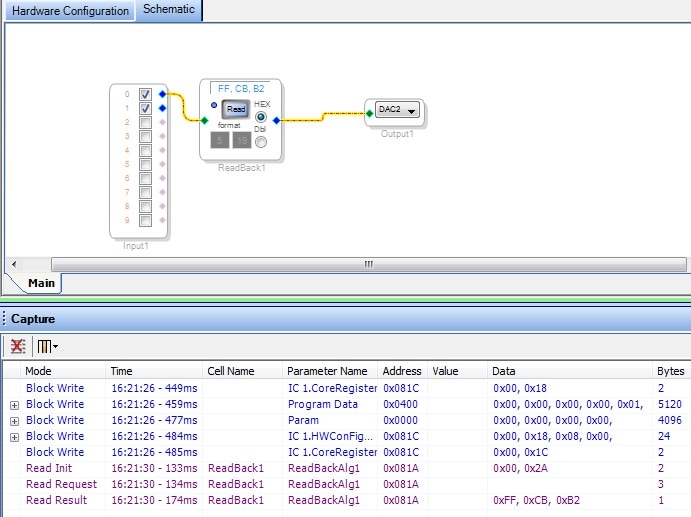
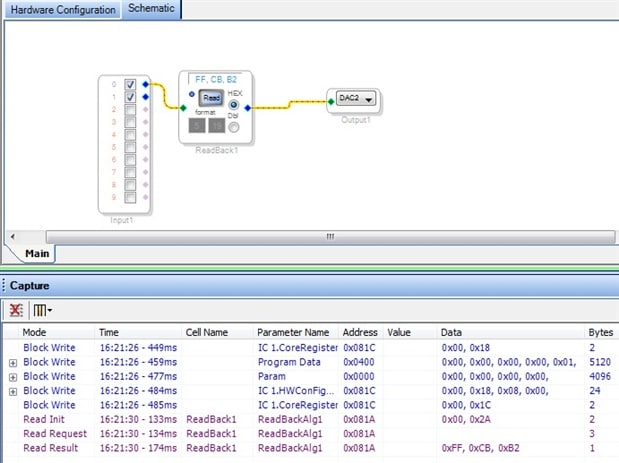
Hello,
I'm glad you had success. Note I2C drivers are open drain, so you don't need level translators as long as the supply voltages are good. In that case you only need pullup resistors to 3.3V. The Atmel microcontroller with Vcc = 5V requires 0.6*Vcc = 3.0V for a logic high, so it works, but there is only 0.3V of margin. Suppose the Atmel Vcc is high by 10% so Vcc = 5.5V and suppose the ADAU1701 Vdd is low by 10% so Vdd = 3.0V. Now the Atmel requires 0.6*5.5 = 3.3V for a logic high but since Vdd is only 3.0V its too low. So, you need tight tolerance on the power supplies to guarantee proper operation.
Hi,
Each section of the I2C path needs pullups; the level translator acts as a master in the same way that a data source would. Depending on the devices involved, trace lengths, layer count, 10k pullups might not be a strong enough pullup. The spec is 2k, and our experience is that signal integrity issues can be improved by bringing the value below 4.7k.
Regards,
Coleman
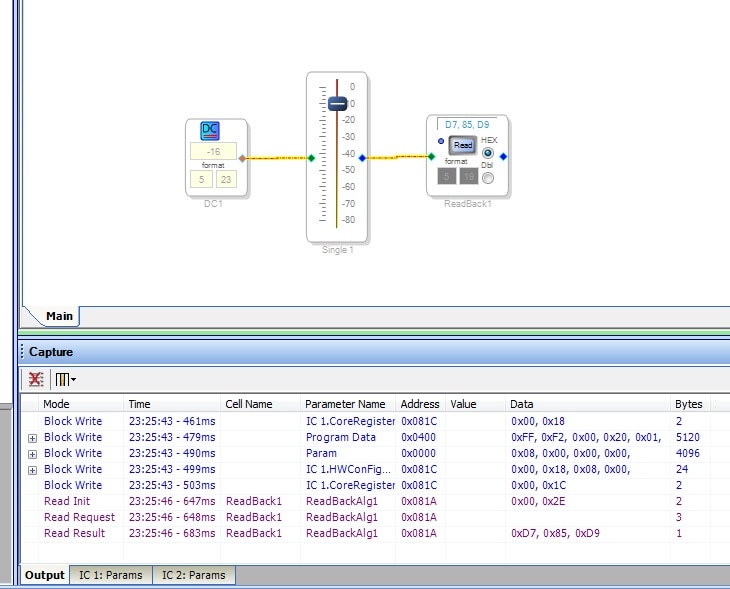
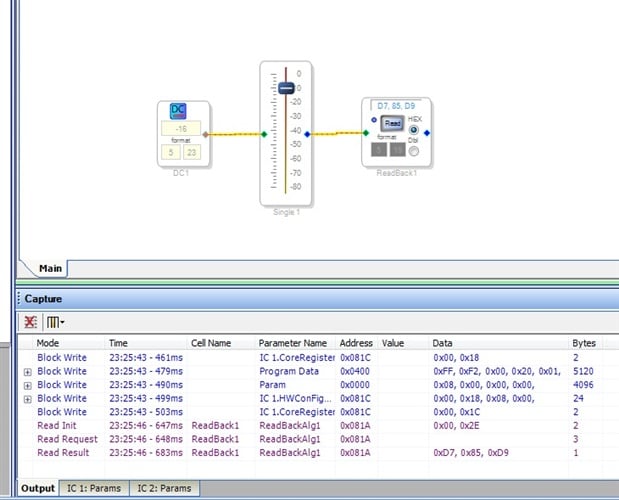
Here's a screenshot of the attached readback.dspproj
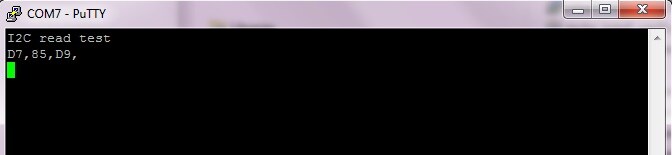
I've attached an Arduino sketch, readback.ino, that implements the readback code , here you can see the result matches SigmaStudio
hello bitmechanic,
what does -16 in dc input means? where you get that value?
thanks,
kal
Thanks ColemanR,
My circuit design is by connecting 3 pins which are SDA pin,SCL pin, (both with 2k resistor to 3.3V pull up and a ground pin. All those three line I connect them directly in between two devices of I2C port and the ground. And the circuit works great.
Thanks bitmechanicbitmechanic,
I manage to do exactly what you write at the post by using an amazing source you did gave me/us.
And my thanks extended to ChristopherH
I got completely (I think) the message that you are trying to explain to me/us. True, the important thing here is that my readback value from Arduino matches the readback value in SigmaStudio. The reading is always matches when I try to change the “any value” in the DC box and also the slider of volume control.
Thanks again everybody!
Best Regards,
kal
Hello,
The -16 is just the most negative number in 5.23 format. It has no significance you can use any value. Also, the volume slider is not necessary. its just an easy way to change the readback value instead of typing in a number in DC1. The import thing here is that the readback value from Arduino matches the readback value in SigmaStudio.
Chris
Please log in to reply.