How to view the output of Signal Envelope cell?
Is there a AGC algorithm for ADAU1701?
Is there a way to see the output of Dynamic Processors -> Signal Envelope cell (calculate RMS).
Regards,
Shyam Nallabolu
Audio Signal Processors
envelope
agc
SigmaDSP Audio Processors
adau1701
signal
Show More
Hy Shyam,
Please see my post here for more information about monitoring signal levels.
There is no AGC algorithm currently available for the ADAU1701. I'll check if we're planning/able to port that code to the ADAU1701 core. However, in the meantime I think you could build something up from the already existing cells to make your own AGC function.
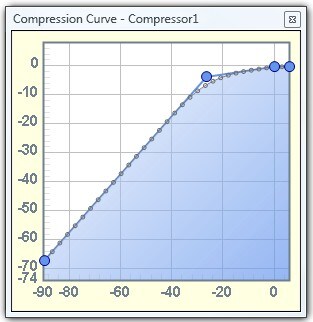
The simplest option would be to use an RMS dynamics processor with very slow time constants. By setting the transfer function appropriately, you could have low-level signals get a large boost, while high-level signals are kept at a pretty constant level. Due to the slow time constants, the level would change pretty gradually. The curve might look something like this:
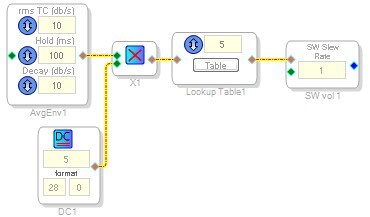
Another possibility would be to use a signal envelope monitor like I described before and have that feed into an index table that changes the gain of an "External Control Slew Volume" cell, and set the slew speed to be very slow.
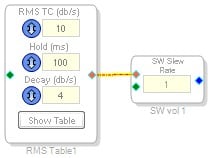
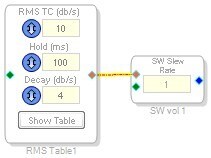
Yet another possibility is the same idea but with an RMS Index Table:
Or you could even use logic cells to implement something similar. There are a lot of possibilities! I guess it depends on exactly what functionality you want.

This question has been assumed as answered either offline via email or with a multi-part answer. This question has now been closed out. If you have an inquiry related to this topic please post a new question in the applicable product forum.
Thank you,
EZ Admin
Please log in to reply.