Sigma 3.4 install issues
When I run the install I receive the error
"Could not access network location
\\netname\Users\myname\My Documents\Analog Devices\sigmaStudio 3.4\Projects\Sample Schematics\AD1940\\."
canceling this operation only causes a repeat of the error and then the only option is "OK". The installer then indicates
"SigmaStudio Setup Wizard ended prematurely"
FYI - Our IT department has the "My Documents" folder mapped to a network location.
Any idea how to get the software installed?
I think an option to pick the location where samples files are installed would work best for me.
thanks
I'm pretty sure the installer tries to put sample projects in the My Documents folder. If it can't access that folder, it might be failing. I'll forward this post to the software team to see if they have an idea of how to workaround the issue.
According to the software team, you might not have adequate permission for the installer to access the networked My Documents folder. Are you an administrator on your computer with full rights for writing and installing software? Also, do you have full administrative write priviliges to the network drive? If not, then the installer will not be able to write all files and it ends up aborting the process.
Thanks for getting back to me.
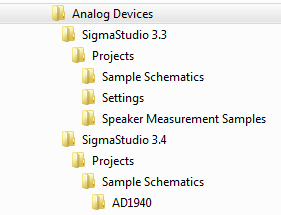
I am an administrator on my machine and can install software. I do have full access to the “My Documents” folder. SigmaStudio 3.3 was able to write the sample files into the “My Documents” folder successfully. SigmaStudio 3.4 created the folders for the sample files before failing.
Did the software team notice the double slash “\\” at the end of the path shown in the error box?
"\\netname\Users\myname\My Documents\Analog Devices\sigmaStudio 3.4\Projects\Sample Schematics\AD1940\\."
Picture of folders in "My Documents"

Here's a workaround that did it for me: Copy your SigmaStudio install file to C:\Temp. Log out from the network (which has your documents folder mapped), log in to your local machine. Install SigmaStudio from C:\Temp. When done, move the resulting Analog Devices folders and sample files from the local MyDocuments directory to C:\Temp. Then log out from the local machine, log into your network the usual way and copy the Analog Devices sample files and folders from your C:\Temp to your mapped MyDocuments folder.
This question has been assumed as answered either offline via email or with a multi-part answer. This question has now been closed out. If you have an inquiry related to this topic please post a new question in the applicable product forum.
Thank you,
EZ Admin
Please log in to reply.