State Variable filter bug.
In SigmaStudio, lets say I have a filter in place, lets say it's a 2nd order IIR high pass filter with a Q of 1 and a frequency of 1khz and also that the system sampling frequency is set to 48khz. I have a probe and stimulus in place that lets me view how the filter is performing and I can verify that the filter is doing what it's supposed to do.
Now say I want to increase the system sampling frequency up to 192khz. First of all I change the sampling frequency in the "New Item Sample Rate" drop down box, then I click on the "Set System Sampling Rate" button. When this happens the frequency response in the probe window shifts down showing how the frequency response would look using the old filter coeffients, but at the higher sampling frequency. This is nice to see but isn't very useful so I click on the button labled "Propagate Sampling Rate". This in turn updates the filter blocks to the new sampling frequency of 192khz and all the filter coefficients update as a direct result. Now the frequency response is back where it is supposed to be, great, fantastic.
The same does not occur however when using the state varible filter.
If I have the system sampling frequency set @ 48 khz and use a state variable filter instead, everything works in the same way right until I push the "Propagate Sampling Rate" button. When using the IIR filters this will update the filter coefficients for the new sampling frequency, however it will not update the state variable filter. If I then choose to alter the state variable filter parameters manually, changing the Q works predictably, but changing the frequency does not, in other words the filter reads 250hz, but the probe shows 100hz.
There isn't any way around this as far as I can see. The only way to make the state variable filter work at the new sampling rate of 192khz, is to delete every filter, replace them and manually input all the filter parameters again. Naturally you have to go through this process every time you want to change the sampling frequency to something else.
Is this a bug and can it be fixed? Or is this something unique about the way the state variable filters work?
Thanks for reporting this. I haven't seen it before, so I'm not sure if it's a bug or just a quirk about how that algorithm works. I will talk with the software team about this to see if I can get some answers for you.
Hi MadMatt,
I had some other priorities this week so I haven't been able to test this yet. I'm going to try it in the lab today.
How did that go?
I have to say that I only tested the error within SigmaStudio itself, it is possible that this is only a graphical error within SigmaStudio and that when connected to, or programming a DSP, the problem isn't present
Sorry, this one slipped by unfortunately. I will do my best to get it done on Monday.
Good news. The problem is just in the probe window. I did 4 tests.
Bypass @ 48 kHz
BP Filter enabled @ 48 kHz
Bypass @ 192 kHz
BP Filter enabled @ 192 kHz
You can see that both filters have the same response when an FFT is taken.
The problem must just be in the probe window. I'll report it.
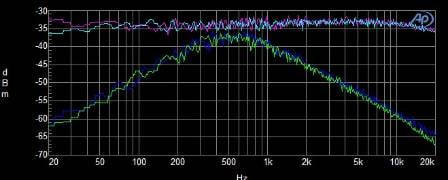
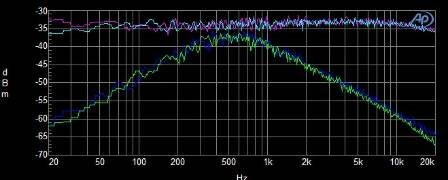
Excellent, I also tested this with my DSP implementation and arrived at exactly the same findings, see attached image. I'd imagine that this should be a fairly simple fix
Thank you for your help on this.
Please log in to reply.