How to configure register on adau1702 ?
We use the adau1702 to get audio effect. adau1702 is at analog input and analog output,
Total system has three audio channels, Right channel is at DAC0, Left channel is at DAC1,
subwoofer_channel is at DAC2. At powe up, the MCU load down the dsp code and parameter list,
then set dsp core control register(0x081c) at 0x001c. dac set register(0x0827) is at 0x0001.
we can only get R_channel at DAC0, and L_channel is at DAC1, but DAC2 has not audio to output.
I don't know. what is wrong?
Audio Signal Processors
adau1702
SigmaDSP Audio Processors
david.liu wrote:
dsp core control register(0x081c) at 0x001c. dac set register(0x0827) is at 0x0001.
The DAC control register is actually 0x0822. It looks like you write to the wrong address. Here's the correct sequence:


Hello, Brettg,
I have done it just like you tell me, but the DAC2 till hasn't got audio.
I configured the DAC SETUP register(0x0827) at 0x0001 or I didn't do it.
it is same, i didn't understand.
Can you help me to read adau1702 initialize function?
Thanks a lot!
I Forget adau1702 schematic !
I will be on vacation Monday the 14th and Tuesday the 15th. I won't be able to participate in EngineerZone discussions until I return on Wenesday the 16th. I will continue to support your request at that time.
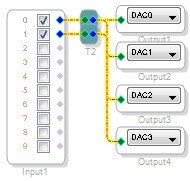
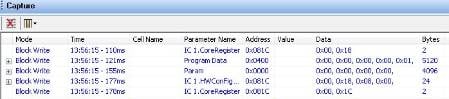
I haven't gotten a chance to look at this in detail yet, but have you tried copying the contents of the capture window exactly? I did a quick example here where I take the ADC inputs and copy them to the DAC outputs. When I press Link-Compile-Download I get all of the download information shown in the Capture Window. I can click the Export System Files button in the toolbar to get C-compatible header files that contain all initialization information. I attached my project and reference files here.
Create schematic:
Link Compile Download:
See initialization sequence in Capture Window:
Export System Files:





This question has been assumed as answered either offline via email or with a multi-part answer. This question has now been closed out. If you have an inquiry related to this topic please post a new question in the applicable product forum.
Thank you,
EZ Admin
Please log in to reply.