HOW TO USE ADC/DAC WITH EVAL-ADAU1701MINIZ
i'm using two eval-adau1701minizs to make a adc/dac converter.
I made some external cables from a eval-kit(for ADC) to connect with the other eval-kit(for ADC).
pin16 of adau1701 - LRClk
pin19 - BClk
pin22 - Sdataout
pin32 - Mclk
And I connected those new cables to the other eval-kit for DAC
LRclk from ADC-kit is connected with LR pin of J7 of DAC-kit
BClk from ADC-kit is connected with B pin of J7 of DAC-kit
Sdataout from ADC-kit is connected with DATA pin of J7 of DAC-kit
Mclk from ADC-kit is connected with MCLK pin of J7 of DAC-kit
K-1.jpg is the Hardware configuration of DAC
K-2.jpg is the schematic diagram of DAC
K-3.png is the hardware configuration of ADC
K-4.png is the schematic diagram of ADC
After testing with those settings, i expected to linste some music from DAC with speakers which is attached with the evaluation kit for DAC.
But there was no sound
In the schematic diagram of DAC, I checked only pin2,pin3 because i'm using only Sdata0.
i'm not sure about how to draw the schematic diagram and set up hardware configuration
i've spent a lot of time to figure out the problem with datasheet, but i'm still confused how to do it.
Audio Signal Processors
SigmaDSP Audio Processors
adau1701
Hello Mankyu,
The SDATA pins are not bi-directional. There are seperate pins for input data (data going to the DAC, labeled SDATA_IN) and output data (data coming from the ADC, labeled SDATA_OUT). On the EVAL-ADAU1701MINIBZ board, there is access to the DAC input, but not to the ADC output. This is described in more detail in this post:
https://ez.analog.com/message/19893#19893
If you want to access the ADC output (SDATA_OUT0), you'll need to make hardware modifications to the board, including lifting pins off the PCB pads. You'll have to do this for the SDATA_OUT0, LRCLK_OUT, and BCLK_OUT pins, and then use fly-wires to connect those pins between the two boards.
Well i have done the some , i have hacked the hardware and takeout the out pins for ADC as you can see in the four different pictures, you look into my design and description then you will observer that I have used hardware hacked output pins to ADC output and in the other codec I have used the given input digital port that is j7 , please review my post and give me the suitable answer thanks
Sorry, I missed that part of your earlier post.
Right now I see a potential issue in your register settings. The ADC board is a master on the serial output port and it's clocking BCLK on a rising edge.
However the DAC's slave serial input port is clocking BCLK on a falling edge:
Try flipping the BCLK polarity on the serial output port and see if that fixes the problem.
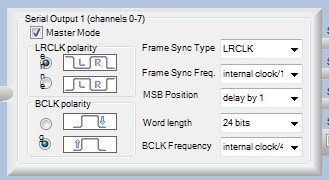
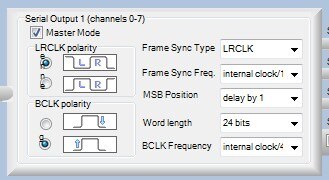
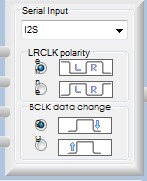
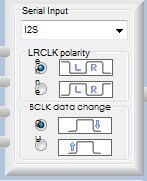
Thank you for your suggestion. But, it still doesn't work.
i have made all the setting according to ur last instructions , but still not getting the output on my speakers
I think everything is quite going well except SigmaStudio setting.
I will very appreciate if you reply me with helpful information. Your suggestion is always really helpful for me.
Do you have an oscilloscope available so you can check each wire going from one board to the other? It would be good to make sure you see a 48 kHz clock on the LRCLK line, a 3.072 MHz clock on the BCLK line, and a 12.288 MHz clock on the MCLK line. Also, one board should be set to XTAL MCLK mode (switch S1 is to the right) on the other board should be set as EXT MCLK mode (switch S2 to the left).
Actually, the ADAU1701's XTALO pin was not designed to drive the MCLK signal to another IC (this is explained in the datasheet), so it's possible you won't be able to drive that 12.288 MHZ master clock signal over the wire. The best bet might be to use an external 12.288 MHz clock source and set both boards to EXT MCLK mode, and route the same clock to both boards MCLK headers.
This question has been assumed as answered either offline via email or with a multi-part answer. This question has now been closed out. If you have an inquiry related to this topic please post a new question in the applicable product forum.
Thank you,
EZ Admin
Please log in to reply.