Limiter Values
Sigma Studo Help does not explicitly define the valid range of values for the Limiter Threshold Parameter (the example graph shows a curve that only reaches 0dB).
-What is the valid range of values?
-What is the resolution?
-If the valid range extends to +24dB does the limiter function as a limiter over the entire range? (e.g. some compressors stop compressing when the input is greater than 6dB).
-What is the valid range of values?
The Threshold can be set anywhere from -24 dB to +24 dB.
-What is the resolution?
The resolution is 0.01 dB or possibly less. In my tests I saw a distinct change in level by altering the threshold in steps of 0.01 dB. I didn't test with steps lower than that.
-If the valid range extends to +24dB does the limiter function as a limiter over the entire range? (e.g. some compressors stop compressing when the input is greater than 6dB).
Yes. You can input any signal up to +24 dB and it will limit properly. For example, you could even set the threshold at +22 dB and input a +24 dB square wave, and the output will limit at +22 dB within the core. Of course, the DACs and serial ports will clip the signal at 0 dB.
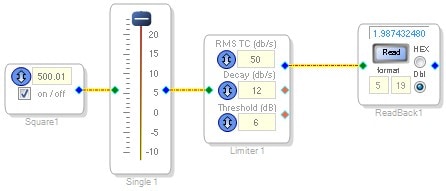
By the way, a good signal flow you could use to play around with the limiter is shown here:
Follow up to Limiter Values Question:
Comparing the limiter function block to that of a compressor function block, it appears that the RMS TC values are caclulated using the same formulas, since SigmaStudio generates the same values for the same RMS TC entry. However, for identical decay values entered into compressor and limiter function blocks, Sigma Studio generates different values written to the DSP. Formulas for the compressor function block have been discussed elsewhere and do seem to result in the same values that Sigma Studio generates. So:
1. What is the formula for generating the Limiter Decay values?
2. What is the valud range of decay values? Sigma Studio appears limited from 5 to 23.
1) There are two parameter values in the Limiter that are used decay:
decay and decaycomplement
They are calculated like this: (where val = value from the GUI control)
decay = 2 ^ (-val)
decaycomplement = 1 - 2 ^ (-1*(23 - val))
The carat symbol (^) indicates a power, i.e. x ^ y = x to the y power.
2) Those ranges are imposed by the GUI, but we could lower the lower limit on the GUI to 1 (you could also do this in your uC code). However, it cannot go above 23, because the complement value becomes zero when the decay = 23.
Message was edited by: BrettG - Correct formula
hello,
I've just come to a point about this thanks to various posts from the analog guys on the forum.
I think there is a minor mistake in this formula, isn't delaycomplement = 1 - (2 ^ (-1*(23 - val)))?
then, regarding the 23 dB/s limit, I believe it is so because of the multiplication per 2^23 that is necessary for converting decimal non integer values into hex's.
since the first operation is 2 ^ -val, once val is > 23 it will always be equal to 0.0 at the end of the conversion.
does this make sense?
cheers
tom
Hi Tom,
Yes, that looks right. I guess I forgot the " 1 - " part. I'll go back and edit my post to avoid confusion for anybody who checks this thread.
I don't understand how the decay value is "dB/s". In my experiments, if this value is larger, the gain takes longer to return to normal after the signal reduces. With a value of 23, the gain is permanently reduced by a large signal, and never increases back to normal.
I would think that "dB/s" means the slope at which it returns to normal, so larger values would be a steeper slope and would return to normal more quickly, and having a fixed reduction that never recovers would be "0 dB/s". Am I misunderstanding?
Also, if you hover the mouse over the red outputs, I think the tooltips are wrong. The middle output is "Limter Ratio" while the lower one is "Limiter Active Flag", but the actual functions are the opposite.
Hi J3627,
Your understanding is in fact correct. Usually in SigmaStudio, "dB/s" is just that -- thus a higher number should mean a faster speed. The limiter's "decay" control, although labeled as "dB/s", doesn't work the same way as similar controls on other blocks such as the Running Average Dynamics Processor. As you noted, the higher the "decay" number, the slower the limiter recovers. So its labeling as dB/s is inconsistent with its behavior. As you suspected, a dynamic block's "dB/s" number should instead be directly related to speed and inversely related to its time constant.
This relation between time constant and dB/s is: T = 8.7 / (dB/s)
Best regards,
Bob
Hi BrettG,
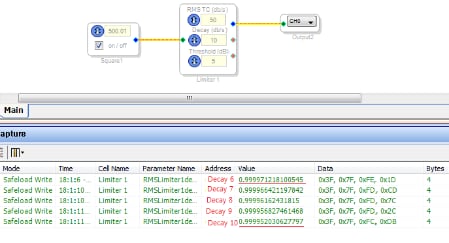
Decalycomplement values calculated with the expression 1-(2^(-1*(23-val))) does not match values from capture window of SigmaStudio for SHARC. For example, decay 6 and 10 are 0.999971218100545 and 0.999952030627797 from capture windows, respectively. However the calculated values using the expression are 0.999992370605468 and 0.9998779296875. I think that SigmaStudio for SHARC seems to use a different expression for decaycomplement. Could you let me know the exact expression when using SigmaStudio for SHARC?
Best Regards,
Mack
Hi Mack,
SigmaStudio for SHARC uses the expression:
Decay = 10 ^ (-Val / (10*FS))
where Val = value from the GUI control
FS = Sampling Frequency
Decaycomplement is not used in the SigmaStudio for SHARC implementation of RMS Limiter.
Best Regards,
John
Hi Mack:
One more note, the SigmaStudio for Sharc implementation needed to be different because of the floating point nature of the DSP.
Hope this helps.
Miguel
Thanks John and Miguel.
Bset Regards,
Mack
Hi Miguel and John,
For SigmaStudio for SHARC, is there any change for RMS TC (dB/s) value calucation in RMS limiter? if it is, what is the expression? thanks!
best regards,
Sue
Hi Sue,
There is no difference in RMS TC value calculation.
Best Regards,
John
This question has been assumed as answered either offline via email or with a multi-part answer. This question has now been closed out. If you have an inquiry related to this topic please post a new question in the applicable product forum.
Thank you,
EZ Admin
Please log in to reply.