ADAU1701 volume control confuse
Dear:
First I apologize, My English is poor.
I use stm32f103 communication with ADAU1701 by I2C bus in my project. I calculated coefficients adjusting parameter by this method in real time. Now EQ parameter is OK with capture window and HPF, LPF is Ok, But I don't konw how do calculate volume parameter.
I use "sigle SW slew vol" cell in my project. in capture window, what's mean about target and step? what relation they are follow in help file?
How do i calculate tartget and step?
Audio Signal Processors
SigmaDSP Audio Processors
adau1701

It is a slew volume so when you change from one volume to the next it automatically changes to several volumes between them so it is a gradual change. More steps means it's more gradual and therefore easier on the ears. There is a slew rate (how fast to go between steps) and how many steps. For most purposes the default slew will work fine so you only need to use your I2C connection to write the gain (volume) setting which looks like it may be address 149 in that picture.
sorry,
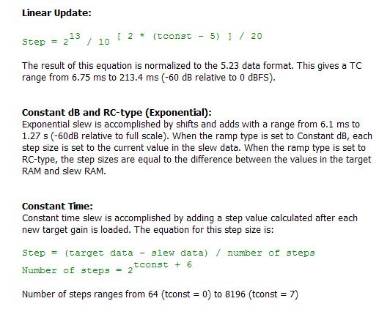
My Mean is how to calculating parameter by formula?
how to calculating target and step in capture window by formula? what mean tconst and target data and slew data in formula?
Target = The value you would like to set the volume control to. It is in 5.23 format. See this thread for more information about number formats.
For example, if you would like to set the volume to zero dB, then Target = 0000 1000 0000 0000 0000 0000 0000 (binary) or 0x08000000 (hex).
Tconst = TC = The time constant, which determines the speed of the transition between the starting volume and the target volume. This value is mapped to the step parameter, which is actually stored in RAM.
Step = The amount by which the volume increases in a given amount of time. It can range from very large (which means the volume changes quickly) or very small (which means the volume changes slowly). It is also stored in 5.23 format. I suggest you change the "SW Slew Rate" control in SigmaStudio and listen to the volume transition to decide which speed you like best. Then check the Capture Window to see what value that corresponds to, and use that as the fixed step value in your project. I personally like the default setting (SW Slew Rate = 12), which corresponds to SWGain1940DBAlg1step = 0x00, 0x00, 0x80, 0x00.
Dear BrettG:
thanks a lot! I see now.
This question has been assumed as answered either offline via email or with a multi-part answer. This question has now been closed out. If you have an inquiry related to this topic please post a new question in the applicable product forum.
Thank you,
EZ Admin
Please log in to reply.