Gain control application in sigma studio software
Dear sir,
I am Suprovo Roy,working in Sonodyne Electronics. I am using ADAU1701 dsp ic for my two way active monitor projects.I have a problem regarding gain control which is to be varied from +6 dB to -6 dB . It is always set to 0dB in a normal position. How is it configured in software, sigma dsp and what is circuit required for controling it externaly? Please give me some way.
with regards,
Suprovo Roy
Technical Executive
Sonodyne.
Audio Signal Processors
SigmaDSP Audio Processors
adau1701
Hi Suprovo,
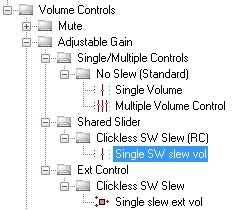
If the gain can be changed at run-time (in other words, not just a static gain setting), you probably want to use the Clickless Software Slew volume control. You can see it in SigmaStudio's cell library here:
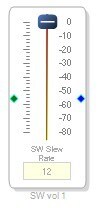
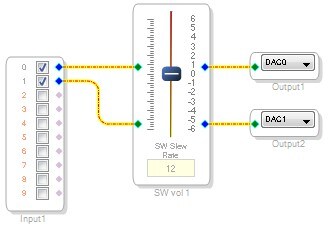
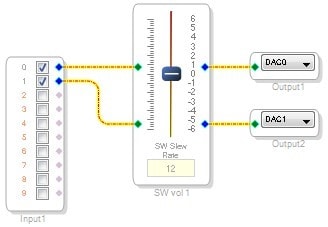
When you add it to the project, it looks like this:
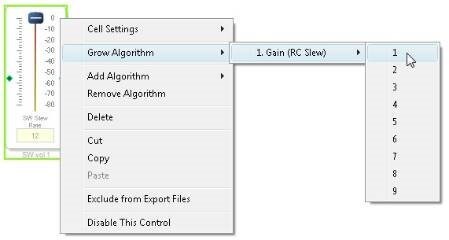
You can add channels by selecting the "Grow" option in the right-click menu:
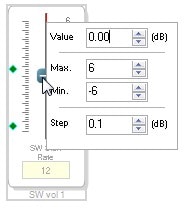
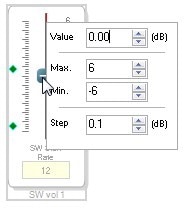
If you right-click on the slider itself, you can set the max, min, current, and step gain values:
So here I have a stereo I/O project with a -6 dB to +6 dB gain control, with gain steps of 0.1 dB.
That example project is attached.


This question has been assumed as answered either offline via email or with a multi-part answer. This question has now been closed out. If you have an inquiry related to this topic please post a new question in the applicable product forum.
Thank you,
EZ Admin
Please log in to reply.