LIMITER
Friends, I have two problems, first problem
I'm doing a graphical user interface with LCD display for ADAU1701 and need to convert the scale of the Limiter db / S for the unit of time as in mS common audioprocessors and the second problem would be how I can reach 300dB /S Release Processor DBX works?
Thanks
Cleber
Audio Signal Processors
SigmaDSP Audio Processors
adau1701
JeradL ????? BrettG ??
Help Me Please!!!
To "convert" dB/s to just a time in ms, you'll need to determine the dB range over which you're defining the rms time constant and decay. There's not a direct conversion to say that one number in dB/s is equivalent to another setting in ms.
The maximum setting for the decay parameter on the cell in SigmaStudio is 120 dB/s. However, you could write larger values directly to that paramter in your design if you need up to 300 dB/s. See the SigmaStudio capture window for the decay parameter's address and value. A 120 dB/s decay time is set in the parameter RAM with 0x00 0x00 0x00 0xDA. If you write values larger than this, you can implement a faster decay time.
JeradL,
perfect, what is the formula to convert the dB / S in mS using 20dB of attack or decay as a base?.
my, sigma studio version 3.3 can only up to 23 dB / s Decay
as it can go up to 120 dB / s?
Hugs
Cleber
I just checked and The limiter works with up to 23dB/s Decay all other cells to work with Decay envelope or Running Average even 120 dB / s or more. What should I do now?
The implementation of the decay in the limiter cell requires two parameters to be saved: limiterAlg1decay and limiterAlg1decaycomplement. You'll note that with a minimum setting of 5 dB/s, the values shown in the capture window are:
At a setting of 23 dB/s, the values are:
So, you can see that at a setting of 23 dB/s, the limiterAlg1decay parameter is only 1 LSB, and limiterAlg1decaycomplement has gone all the way to zero. Basically, we've hit the lower limits of the numbers that can be stored in the DSP. That's why you can't go any faster than this.
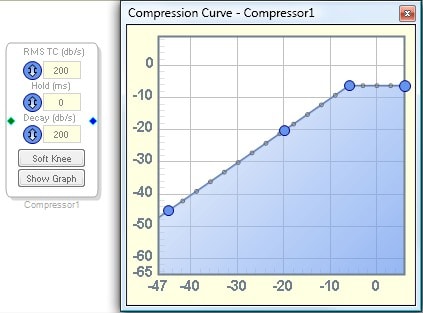
You can always use a standard dynamics processor and program a limiting curve, then set the time constants as you wish:
We're hoping to create a look-ahead, zero-cross peak limiter sometime soon for SigmaStudio, since it has been requested by many customers using SigmaDSP in their products.





This question has been assumed as answered either offline via email or with a multi-part answer. This question has now been closed out. If you have an inquiry related to this topic please post a new question in the applicable product forum.
Thank you,
EZ Admin
Please log in to reply.