Conflicting export data when using 2 projects
I'm working on something that is using two SigmaDSP ADAU144x chips which is controlled by a single processor. I can make a C/C++ project that can deal with them one at a time but when I combine them there are lots of overlap in the generated .h export files that cause compiling errors due to conflicting constant values. Luckily I'm using two similar ADAU144x chips so most of the overlap matches perfectly but since they're configured differently some of the config values conflict while the addresses do not.
1) Is there a way to make a single Sigma Studio project that can take advantage of naming the second DSP export code as _IC2. I can add another IC2 (were an EEPROM would go) but they share the same schematic and same single DSP resources.
2) The two Sigma projects are running at two different speeds, does that cause problems in a single project?
3) Some export fields are not named _IC1 and therefor will still conflict, is there a way around that? Example: "PROGRAM_SIZE" and "R14_DSP_REGS_Default[]" have different values.
4) Functions like "default_download()" are common but with different data, is there a way around that? default_download_IC2() maybe?
I use a solution like:
namespace dsp1 {
#include "../dsp/par_dsp1_IC_1.h"
}
namespace dsp2 {
#include "../dsp/par_dsp2_IC_1.h"
}
That allow me to use the defined data and functions from both files, but cannot relay to the #define parts.
Also a lot of warnings are produced.
We always have included the ability to have multiple ICs running at multiple sample rates in the same project file, but up until this point I don't know of many people who have used it. Sometimes this flexibility is a bit confusing for SigmaStudio users, but it's nice to see somebody putting it to use!
SigmaStudio has the flexibility to allow multiple sample rates in the same project, and it's not all that complicated. Sample rate information is stored in SigmaStudio on the cell level, not on the project level.
To have a multi-sample-rate project, you basically need to add the second IC to an existing project and then change the "New Item Sample Rate" drop down box to the new sample rate you want to use. Just be sure to not click the "Set System Sample Rate" button to the right of that menu, as it will change the sample rate for ALL cells in the project (including those for IC1, which you don't want to change).
Now you can add cells to the project for IC2 freely and the sample rate value for those cell should be set automatically to the new rate.
An alternate method is to just design the entire signal flow for IC2 and then when you are finished change the sample rate on ALL of the Input cells and Source cells in the project. So, that would include Input, GPIO inputs, DC sources, Sine tone generators, etc. Basically, anything that does not have an input pin. When your right click on each of those cells, there is a menu option called "Set Sample Rate." Type in the desired sample rate. After you have done this for ALL input and source cells for IC2, click the "Propagate Sample Rate" button in the menu to send that sample rate information to all cells linked to those inputs and sources.
Either of these methods should allow you to have different sample rates for IC1 and IC2.
Now, you'll need to make sure all cells have a unique name and you'll be able to take advantage of the _IC1 and _IC2 labels in the output files.
Like I said, I think you may be one of the first people to try out this functionality in a real system so far, so if you hit any bumps along the road, please contact us and we will be glad to help you.
SigmaStudio will always have only schematic page. The tool doesn't build separate schematic pages when multiple ICs are used in a project. You can use that single schematic page to build a project with multiple ICs, though. When you build a project with multiple ICs, the files will be saved separately with the appropriate *_IC_1 or *_IC_2 in the file name. Below is a screen shot of a folder where I've saved a single SigmaStudio project, example.dspproj, which includes two ADAU144x ICs.
I've compiled this program and it's put the compiler output files into folders IC 1_example and IC 2_example. I also did a system files export with the name "export" and again you'll see that those files are properly tagged with IC 1 and IC 2. Is this what you need?
The hardware configuration window in my SigmaStudio project is simply set up as shown below.

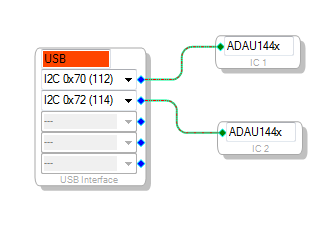
My problem wasn't really related to sample rates, I was using that as an example of how "different" the systems were in a single project - sorry if I mislead you. I see the separate ADAU144x system registers that can be set independently but the problem I have is related to exporting and schematic page. Regardless of how many DSPs are in the project I could only get a single schematic page making it impossible to separate the work (and samplerates) and therefor separate the export files. Single schematic meant single _IC1 export dump.
I guess the secret I'm missing is how to get multiple schematics for different DSPs in a single project - everything should fall into place after that.
When you place two ICs in your design, your library will have two different trees - one for IC1 and one for IC2. Blocks placed from the IC1 library can only be connected to each other, and likewise for IC2 blocks. The connections between these blocks will be different colors so that you can easily see on which DSP the signal is running.
That screenshot is straight out of Windows Vista. We'll be sure to post an update here when Windows 7 is supported.
Getting closers, now consider I have inputs from two different chips. Both use IN0 and IN. You're not allowed to use more than one SOURCE->INPUT module on a single schematic because of resource restrictions. Obviously you have 2 DPSs so you have 2 input module resources available but I can't find how to specify that on the schematic. How do we ensure that audio path data from one DSP stays on that one DSP so the hex file is generated correctly? Notice how you only have a single hex file? I'm not using an EEPROM so I don't care but wouldn't that mess things up on boot?
Also, won't export_IC1.h and export_IC2.h both have "#define PROGRAM_SIZE xxxx" but with different sizes and "ADI_REG_TYPE Program_Data[PROGRAM_SIZE]" with different data? That will cause compiling errors which require find/replace.
Also, I couldn't help noticing that your screenshot was very Win7-ish. Do you have an "unsupported" SigmaStudio version that works in Win7x64 that you're hiding from us?
I feel like an idiot. I JUST realized that there are two separate IC1 and IC2 module trees on the schematic page. I guess every time I tried doing this my screen was either too small or the IC2 tree was collapsed so I didn't notice it. I've only been seeing IC1 modules, hence my confusion. Thanks for the great ADI support, you guys are great!
Blocks placed from the IC1 library can only be connected to each other, and likewise for IC2 blocks. The connections between these blocks will be different colors so that you can easily see on which DSP the signal is running.
Here's a photo and a project that lets me do it
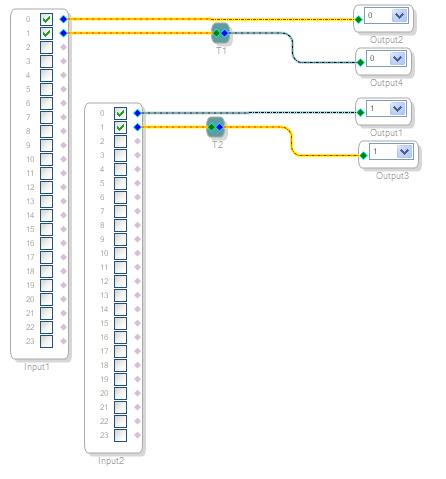
Just a note: If you happen to use the "non-tree" toolbox view, then every time you add an algorithm in a project with multiple ICs, the cell will first appear as a blank placeholder. You then can right-click the placeholder and choose the IC and algorithm type.
Is it possible to prefix a design in place of IC1, IC2, etc. to distinguish between different design files that are to be kept in the same memory but will be loaded to the DSP at different times, e.g. a collection of DSP programs that are loaded by the user via the micro...
Right now, all my exported design files reference IC1 (single DSP with USBi). It like them to be PGM1, PGM2, PGM3....etc. instead.
What would you advise?
This question has been closed by the EZ team and is assumed answered.
Please log in to reply.