How to read meters on the RMS dynamics Processor
Hi.
I am using the RMS compressor with the 2 meters (gain reduction, and input level)
I want to read these 2 meters out to the microcontroller at run time.
Below are the parameters
Safeload Write
Time: 18:11:46 - 634ms
Cell Name: PROC_WB_Comp
Param Name: TwoChannelSingleDetectAlg51
Param Address: 60
Param Value: 3.61073040962219
Bytes: 136
Param Data:
0x01, 0xCE, 0x2C, 0x6A,
0x01, 0xCE, 0x2C, 0x6A,
0x02, 0x0C, 0x24, 0xF8,
0x02, 0x52, 0x6C, 0x99,
0x02, 0xA2, 0x20, 0xC9,
0x02, 0xFC, 0x84, 0xCD,
0x03, 0x63, 0x07, 0x8C,
0x03, 0xD7, 0x49, 0x2D,
0x04, 0x5B, 0x21, 0x4B,
0x04, 0xEE, 0xC0, 0xE0,
0x05, 0x84, 0xCD, 0x97,
0x06, 0x0B, 0x2E, 0x19,
0x06, 0x74, 0xCF, 0xFC,
0x06, 0xBB, 0x4A, 0xD0,
0x06, 0xE0, 0x9B, 0x13,
0x06, 0xEB, 0x54, 0x82,
0x06, 0xE5, 0xC6, 0x9B,
0x06, 0x30, 0xCB, 0x00,
0x05, 0x9E, 0x5D, 0xB8,
0x04, 0xF4, 0x3E, 0x65,
0x04, 0x43, 0xC1, 0xAD,
0x03, 0x9A, 0x06, 0xB1,
0x03, 0x00, 0x26, 0x3F,
0x02, 0x7B, 0x24, 0x69,
0x01, 0xFB, 0x7F, 0x12,
0x01, 0x99, 0x59, 0xF4,
0x01, 0x47, 0xE6, 0xAD,
0x01, 0x04, 0xF0, 0xB2,
0x00, 0xCE, 0x75, 0x30,
0x00, 0xA2, 0x99, 0x7F,
0x00, 0x7F, 0xAA, 0x1D,
0x00, 0x64, 0x1C, 0xF9,
0x00, 0x4E, 0x80, 0xAE,
0x00, 0x3D, 0x8E, 0x98
Safeload Write
Time: 18:11:46 - 634ms
Cell Name: PROC_WB_Comp
Param Name: TwoChannelSingleDetectAlg51RMS_disp
Param Address: 94
Param Value: 0.000479817390441895
Bytes: 4
Param Data:
0x00, 0x00, 0x0F, 0xB9
Safeload Write
Time: 18:11:46 - 634ms
Cell Name: PROC_WB_Comp
Param Name: TwoChannelSingleDetectAlg51RMS
Param Address: 95
Param Value: 0.000575780868530273
Bytes: 4
Param Data:
0x00, 0x00, 0x12, 0xDE
Safeload Write
Time: 18:11:46 - 634ms
Cell Name: PROC_WB_Comp
Param Name: TwoChannelSingleDetectAlg51post_gain
Param Address: 96
Param Value: 1
Bytes: 4
Param Data:
0x00, 0x80, 0x00, 0x00
Safeload Write
Time: 18:11:46 - 634ms
Cell Name: PROC_WB_Comp
Param Name: TwoChannelSingleDetectAlg51hold
Param Address: 97
Param Value: 0
Bytes: 4
Param Data:
0x00, 0x00, 0x00, 0x00
Safeload Write
Time: 18:11:46 - 634ms
Cell Name: PROC_WB_Comp
Param Name: TwoChannelSingleDetectAlg51decay
Param Address: 98
Param Value: 0
Bytes: 4
Param Data:
0x00, 0x00, 0x00, 0x00
is the
Param Name: TwoChannelSingleDetectAlg51RMS_disp
the METER? and if So should there be 2 . One for the Input Meter and One for the Gain Reduction meter?
Thanks
Brett
To read my RMS dynamic processor I used interface registers.
I tapped the input signal before the RMS compressor with a T-connection and i sent it to INT_REG0, then I tapped also the output RMS compressor signal in same way and sent it to INT_REG1.
In this way, you know the input signal and knowing output signal you can also compute the gain reduction.
To read the interface registers from your uc, you shall use the writeback function (see the manual of your DSP); remember that if you want to read continously these register you must activate the multiple writeback option.
You can't activate this option from SigmaStudio, so you must add the 0x04 muliple writeback command before the 0x06 boot sequence end command.
You can add this byte modifying the .hex DSP image file with a binary editor (i.e. Ultraedit) or tricking the image on EEPROM with your uc executable.
Bye
Stefano Rossi
The TwoChannelSingleDetectAlg51RMS_disp parameter is an internal parameter that is used as part of the calculation for the RMS envelope that is displayed in the GUI. However, it is important to note that the majority of the calculations for the input / output / gain reduction displays are being done in the PC - this is not being calculated in the SigmaDSP itself. This is similar to the operation of the level meters in the SigmaStudio library.
In order to readback signal levels, I would suggest using the methods described in this post: https://ez.analog.com/message/7669#7669.
The help documentation will be updated soon so that all of the parameters stored in RAM are given a full description.
Oh,
Surely there must be a way to read these Meters Via i2c as the Sigma studio does via i2c
I am prepared to do any additional calculations in the Mircoprocessor to make the returned values meaningful.
I dont have enough resources left on the DSP chip to add extra function blocks as you suggest. AS I have some 30+ Meter reading objects.
Thoughts
Brett
I expect the signals of interest are stored somewhere in data RAM, but I will have to contact the algorithm developer to see what those signals actually represent and what calculations will be necessary on the PC side (or in your case, the microcontroller side) in order to make them meaningful. I expect this might take a few days, but I'll post back here when I have some information.
Hi all.
Is there any followup answer to this.?
Also The Pin4 "Compression amount Signal Analog" of this "Standard Res->LowerGain->PostGain->Stereo->No Ext Detector->RMS Detect {display}
is fed to a readback cell. It works fine on a AD1941 Dev board and the Sigmastudio IDE. But the readback cell does read the data "appears always 0" on my Target Board with a microcontroller
All my other readbacks on this Project work Fine.
Is this a case that this does not work on a Target and ONLY in the SigmaStudio IDE?
Hello,
Sorry to keep you waiting on this request. The algorithm designer just returned to the office, so I hope to have this information for you very soon.
Hi Brett
is there any Update to this answer with me having to I2C debug the data comms.
?
Thanks
Brett
Sorry for the delay... this question slipped off my radar.
I just checked this using a Beagle I2C/SPI sniffer from TotalPhase. I found that there are two parameter RAM locations assigned to the compressor cell that are not appearing in the exported files from SigmaStudio. The first parameter displays the detected RMS input level and the second parameter shows the instantaneous gain applied to the signal.
If you choose the export system files command in SigmaStudio, you'll find a file called project.params (you can define the name of "project" when you execute the export). The last two parameters you see in that file for the compressor are Hold and Decay, which look something like this:
Cell Name = Compressor1
Parameter Name = TwoChannelSingleDetectAlgS200New1hold
Parameter Address = 45
Parameter Value = 0
Parameter Data :
0X00 , 0X00 , 0X00 , 0X00 ,
Cell Name = Compressor1
Parameter Name = TwoChannelSingleDetectAlgS200New1decay
Parameter Address = 46
Parameter Value = 2.14576721191406E-06
Parameter Data :
0X00 , 0X00 , 0X00 , 0X12 ,
In my project, you can see that the parameter addresses for these two parameters were 45 and 46.
When I enable the meters in my project, I saw activity on addresses 47 and 48, which did not appear in the exported parameter definitions.
Address 47, immediately following the decay parameter, stored the measured RMS input level of the compressor.
Address 48, which followed that, stored the instantaneous gain applied on the compressor outputs.
You can simply read these parameters at any time to check those two values. I attached an example project (in this case I used an ADAU1781, but it should work for any SigmaDSP).
I'll request to the software team that those two parameters are "un-hidden" so they appear in the output files in future SigmaStudio releases.
Hi Brett.
Thanks for your help.
My project has 2 x compressors
and as such the second compressor adress begins immeadaitly after the first.
As you can see I cant read the 2 params after
Cell Name = PROC_LB_Comp
Parameter Name = TwoChannelSingleDetectAlg52hold
Parameter Address = 176
Parameter Value = 48
Parameter Data :
0X00 , 0X00 , 0X00 , 0X30 ,
Cell Name = PROC_LB_Comp
Parameter Name = TwoChannelSingleDetectAlg52decay
Parameter Address = 177
Parameter Value = 1.08480453491211E-05
Parameter Data :
0X00 , 0X00 , 0X00 , 0X5B ,
Cell Name = PROC_HB_Comp
Parameter Name = TwoChannelSingleDetectAlg53
Parameter Address = 178
As yoiu can see PROC_HB_Comp starts at 178
Can you expalin what these are for
Cell Name = PROC_LB_Comp
Parameter Name = TwoChannelSingleDetectAlg52RMS_disp
Parameter Address = 173
Parameter Value = 0.000479817390441895
Parameter Data :
0X00 , 0X00 , 0X0F , 0XB9 ,
Cell Name = PROC_LB_Comp
Parameter Name = TwoChannelSingleDetectAlg52RMS
Parameter Address = 174
Parameter Value = 0.000259041786193848
Parameter Data :
0X00 , 0X00 , 0X08 , 0X7D ,
Thanks
I will be on vacation Monday the 14th and Tuesday the 15th. I won't be able to participate in EngineerZone discussions until I return on Wenesday the 16th. I will continue to support your request at that time.
Hey, Brett: sure hope you are having a good time on your days off. Please don't do anything daring and dangerous; many of us would be seriously inconvenienced by your unexpected demise.
One way to read gain reduction is to use the n-channel RMS compressor. Put your audio through two channels, and apply a DC source of "1" to a third channel. The output of that channel can go to a Readback module for an accurate measure of actual gain reduction, regardless of the shape of the compression curve... no complex calculation involving the input level required. The "1" coming out can drive a front-panel indicator to full-scale, yielding a traditional downward-reading G/R meter. Annotation can be either a quasi-VU-meter scaling on a linear display, or a linear-DB reading with a simple lookup table.
I'm back from my trip to Iceland, which included spelunking in an ice cave. No broken bones, so I'm back to work.
The idea of using the N-channel compressor as a GR meter is great. Thanks, electrojim. I created an example project that illustrates that approach.

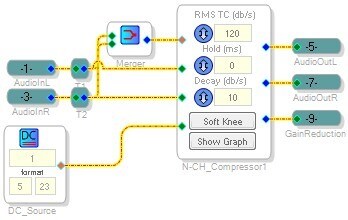
Thanks everyone for all your suggestions and work on this.
Its just a pity that the Dynamics Block that HAS the Gain Reduction ammount PIN does Not actaully send any thing out said pin .
I hope that this is something that can be fixed in future versions
regards
Brett
I just wanted to add that the "Standard RMS Compressor" and "Standard Peak Compressor" algorithms have PC-side gain reduction calculation and display. It's nice for debugging and tuning the system when the PC is connected to the hardware, but doesn't provide these features when the hardware is running standalone.
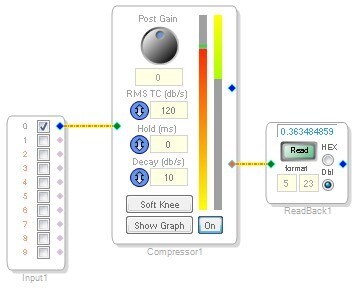
You have the IN/OUT/COMP meters on the right side, plus a little green ball that tracks the I/O levels on the graph itself. Due to attack/hold/release times, the green ball sometimes jumps off the graph itself to represent the actual instantaneous levels.


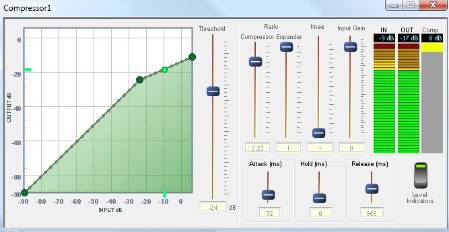
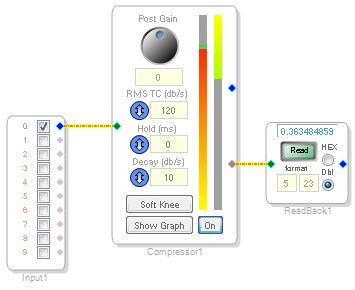
Oh, and Brett, I don't know if you realized this, but the red pin on that compressor with meters actually does send out useful information. It's the instantaneous gain being applied by the compressor. If you connect a DSP readback cell, you can read back that data and make use of it. Sorry if I've already mentioned this before.
Hi Brett.
Unfortunatly this RMS compressor is not availiable for the AD1941.
Which is what I am using on this design.
Do you think they can make it availiable?
Or provide the same style of user interface to all dynamic processors. Its a great interface.
Thanks
Brett
Hi Brett. Unfortuanly it only works in Sigma Studio.
The Pin does Not output anything in standalone.
Could you check with your dev team on this.
Thanks
Brett
Hi Brett,
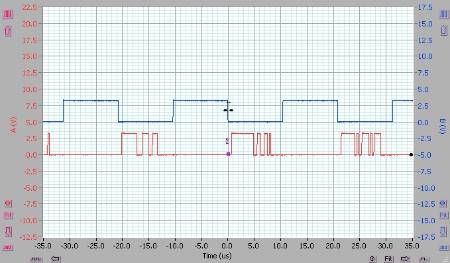
I just tried this out with the evaluation board, and I'm definitely seeing an output on that pin even when the board is running standalone. If you connect the red output pin to say, digital output 0, then program in a compression or limiting curve (such that the gain reduction will change over time), then input audio, you'll clearly see the level on the output changing. I used a cheap little USB scope to do this, so the bandwidth wasn't big enough to show the individual bits on the I2S stream, but you can see the activity on the digital output here:
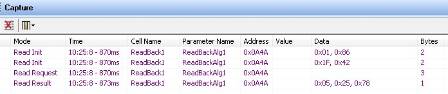
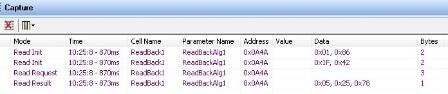
Also, the DSP readback cell I explained earlier will work in standalone operation. You just need to know how to use the data capture registers in the AD1940. A data capture operation on the AD1940 requires two writes and a read. Create a project and connect the red output pin to a DSP readback cell. After compilation, click the read button. You'll see something in the capture window like this:
This means that in standalone operation, I would have to make my microcontroller write 0x01, 0x86 to address 0x0A4A, then write 0x1F, 0x42 to address 0x0A4A, then read 3 bytes from address 0x0A4A and I will get a 5.19 representation of the instantaneous gain applied to the compressor's outputs. I tested this using an Aardvark I2C/SPI interface (SigmaStudio was not running at all) and it worked fine.
Try one of these methods and you should be able to get the data you need.
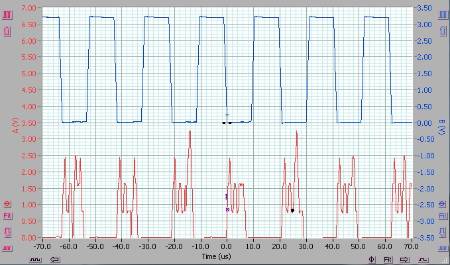
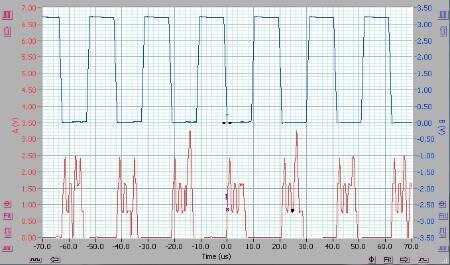
I realized it wasn't a bandwidth problem; I had filtering enabled.
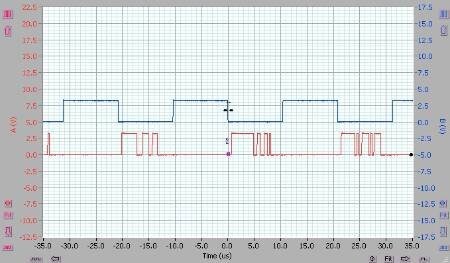
Here's what it should look like:
Interesting.
I was reading the readback cellvia the data capture register. Like all the other readback cells on my project.
I wonder if its been fixed inthis version of sigmastudi as this project was compilied in 3.2
i Will test later
Thanks
This question has been assumed as answered either offline via email or with a multi-part answer. This question has now been closed out. If you have an inquiry related to this topic please post a new question in the applicable product forum.
Thank you,
EZ Admin
Please log in to reply.