1701 how to make tone volume dependent on input level
I am using the 1701 evaluation card. I would like to adjust the volume/level of a sine wave tone such that it would be dependent on the RMS input level of the audio.
For example if the RMS input level falls below -12dB and stays that way for over 60 seconds then the tone level needs to change to half it’s full volume. When the input level goes above –12dB then the tone level needs to change to full volume.
Is something like this possible in Sigma Studio?
Audio Signal Processors
level
SigmaDSP Audio Processors
tone
adau1701
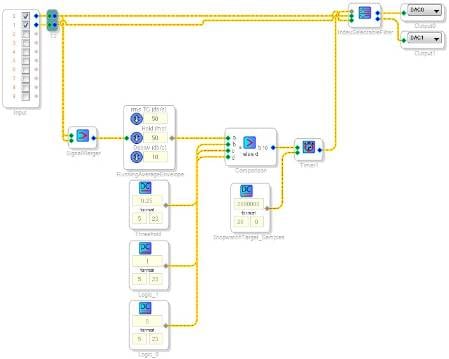
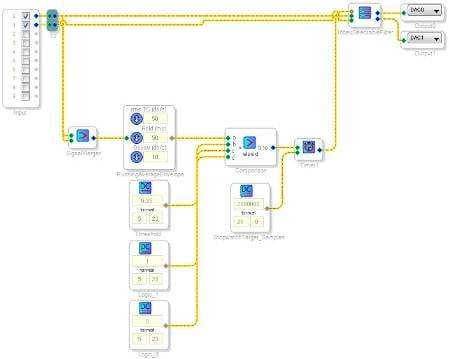
Yes, this is possible. Here's one example of a way to implement this function using a running average, logic cell, a stopwatch, and an index selectable filter cell.
I haven't tested this extensively but this is the basic idea. There are, of course, other ways to solve this problem as well.
Thank you. I'll give that a try.
-Bruce
If the ADAU1450 is used, how should the 32.0 format of the counter be entered?
Integer values are entered exactly the same way in all SigmaDSPs -- the -145x's 32.0 format, like the -1701's 28.0 format, is an integer suitable for integer functions. In the DC Source, set its lower two boxes to "32" and "0," and you're all set.
Please log in to reply.