ADAU1701 have level data feedback to MCU?
Hello, friends,
Nowadays, I use ADAU1701 to design a soundbox.
I use a MCU to control the ADAU1701.
Is there any method to get the input signal ' level, or ouput signal ' level from ADAU1701?
I mean MCU get the data, then to drive some LEDs to indicate the level of volume.
I can find "Level Detector" in the Sigma Studio, but it is directly link into the route, mcu can't get any data from the " Level Detector", it seems.
Also , MCU could get the Limiter level indicate from ADAU1701 ?
Thank you!
Audio Signal Processors
microcontroller
SigmaDSP Audio Processors
adau1701
This thread describes how you can read back a signal level from any point in your design: https://ez.analog.com/message/7669#7669.
There are two versions of the level detectors - Pass Thru and RTA to Output. The pass thru detectors will display the signal levels and pass the input signal to the output pins. This sort of detector is useful for using in-line with your other signal processing. The RTA to Output detector will output the signal levels on the output pins. The actual audio signals cannot be passed from the input to the output using this cell.
Thank you!
I will read it,and try.
I have exactly the same problem as the original writer: I need to get numerical data from the RTA-to-Output block back to my supervisory MCU so I can use it to change system settings. Your "correct answer" does not tell him, or me, how to do this. How do you send a value (in 5:19 format?) to "the pins". What pins? The ADAU1701 only has GPIO (i.e. logic level) pins, and not enough of them to carry the information even if you were not using them as intended.
The link, and other information in the manual shows how to get readings on the PC screen, but my embedded application (and I suppose most embedded applications) will not be running Sigma Studio.
To re-phrase the original question:
What connects to the red pin of the RTA-to-output block so its value becomes accessible?
Where in the system registers do I find the numerical result?
If the ADAU1701 just can't do this, you might please say so clearly.
Hello Nussbaumen,
I think there is a misunderstanding between hardware pins (on the physical package of the device) and software "pins" (the red, blue, and green dots in the SigmaStudio software where you can connect "wires" between cells). The "pins" referred to in Jerad's response are in software, not hardware. He was describing the output pins of the different cells in SigmaStudio.
In order to read back a signal level in an embedded application, you need to use the DSP Readback cell to store it in a memory location, and then read that memory location from your host microcontroller or processor via the I2C/SPI control port.
Here is a thread that describes how to use the DSP Readback cell to monitor signal levels:
https://ez.analog.com/message/7669#7669
Here is a brief description of the DSP Readback cell:
https://wiki.analog.com/resources/tools-software/sigmastudio/toolbox/basicdsp/dspreadback
You can also use the Export System Files command to learn how to access other parameters and values from your host microcontroller. Here's a tutorial describing that:
I realized after I had hit the 'send' button that the internal 'pins' were meant. But I still did not know what the output pin should be connected to.It's too bad that the help system does not make it obvious that the DSPReadback block can be used in this way. I've used it before, to look atinternal values on-screen when using Sigma Studio, but had no idea it wasalso storing the numbers in an accessible location. '
Your help is greatly appreciated.
But there is another issue:
Here is a code snippet from the automatically-generated header file in Sigma Studio. I was not sure what the readback address was with only one readback cell, so I added a second cell, expecting to see two different hardware addresses from which I could read the measurement.
/* Module ReadBack2 - DSP Readback*/
#define MOD_READBACK2_COUNT 2
#define MOD_READBACK2_DEVICE "IC1"
#define MOD_READBACK2_ALG0_VAL1_ADDR 2074
#define MOD_READBACK2_ALG0_VAL1_VALUE SIGMASTUDIOTYPE_5_19_CONVERT(0)
#define MOD_READBACK2_ALG0_VAL1_TYPE SIGMASTUDIOTYPE_5_19
#define MOD_READBACK2_ALG0_VAL0_ADDR 2074
#define MOD_READBACK2_ALG0_VAL0_VALUES SIGMASTUDIOTYPE_SPECIAL(0x0192)
#define MOD_READBACK2_ALG0_VAL0_TYPE SIGMASTUDIOTYPE_SPECIAL
#define MOD_READBACK2_ALG0_VAL0_READBACK_ADDR 0
/* Module ReadBack1 - DSP Readback*/
#define MOD_READBACK1_COUNT 2
#define MOD_READBACK1_DEVICE "IC1"
#define MOD_READBACK1_ALG0_VAL1_ADDR 2074
#define MOD_READBACK1_ALG0_VAL1_VALUE SIGMASTUDIOTYPE_5_19_CONVERT(0)
#define MOD_READBACK1_ALG0_VAL1_TYPE SIGMASTUDIOTYPE_5_19
#define MOD_READBACK1_ALG0_VAL0_ADDR 2074
#define MOD_READBACK1_ALG0_VAL0_VALUES SIGMASTUDIOTYPE_SPECIAL(0x0186)
#define MOD_READBACK1_ALG0_VAL0_TYPE SIGMASTUDIOTYPE_SPECIAL
#define MOD_READBACK1_ALG0_VAL0_READBACK_ADDR 0
As you can see, both readback blocks have the same 'value0' and 'value1' address (2074), and both also say that the readback address (in the last line) is 0.
I'm confused.
Why are there two values from one readback cell?
Which of the two addresses (2074, 0) is the hardware readback address?
Why are the two readback cells both reporting the same addresses?
Incidentally, the formula in the help system for converting the readback as displayed into dBs is wrong. The real conversion is just 96.32959861*readout - 90.0.
You can read this tutorial to see how to use the Capture Window display in SigmaStudio to see the writes and reads associated with hardware readback on the ADAU1701 and AD1940: https://ez.analog.com/docs/DOC-3130
The address 2074 should be the target address for the hardware readback register. The same readback register can be used for reading back the level of any number of signals. Hopefully the tutorial will give you a good idea of how to implement this in your system.
If you're curious, you can find more details about the hardware data capture registers on page 39 of the datasheet.
However, it's not necessary to know these details, since SigmaStudio will do the work for you and display the proper information in the Capture Window.
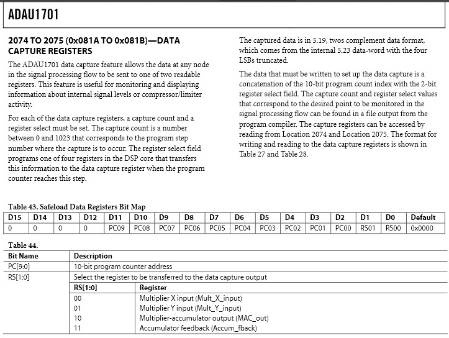
Thanks again Brett. That has resolved all the issues of conflicting names ('traps' for 'PC address', etc.)
FYI, once you know where to look, it's no longer necessary to even use the ReadBack module. The compiler does not complain if the red pins of the RTA-to-output are left unconnected, and it does provide the necessary PC locations and ALU register names for each pin, so they can all be downloaded directly to the MCU as required.
This information ican be found in <project directory>\IC1_<project name>\net_list_out2\trap.dat
Having said that, the 1701 is probably the wrong chip for this project. I'll look now at some of the other devices you mentioned with more conventional memory storage of variables.
Thanks for your reply. I'm glad that helped.
By the way, somewhere in the back of my mind, I had remembered that the RTA-to-Output values values were stored in memory and available in one of the output files, but the computer I was using at the time didn't have SigmaStudio installed so I wasn't able to check... I'm glad that you were able to find the information you needed in the trap.dat file!
I am still pretty confused, though I read all of the above.
It was so easy to read readback cell on 1442.
Now please tell me what I am doing wrong on ADAU1701.
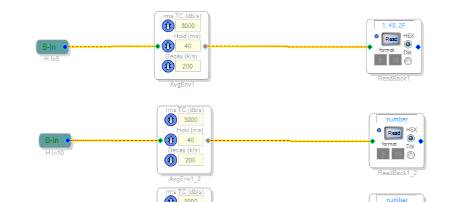
This is what I have
Now, when I read the ReadBack1 in Studio, the capture window shows
In the .params export file I see two entries for ReadBack1 cell (why 2 ?).
The difference is that in a first entry Parameter Data is 0x0B, 0x66,
in a second entry Parameter Data is 0x00,0x00,0x00.
According to the capture window I need to use data from the first entry and not to use address.
So that is what I send:
DSP_CS_LOW;
spi_send_byte(0x01); // we need this, right ?
spi_send_byte(0x0B); // parameter value high
spi_send_byte(0x66); // palameter value low
/* read 3 bytes */
read_buf[0] = spi_send_byte(0xFF);
read_buf[1] = spi_send_byte(0xFF);
read_buf[2] = spi_send_byte(0xFF);
DSP_CS_HIGH;
It doesn't work. SPI bus is tested, it's fine. I also load the program from uC to the DSP.
Is there anything wrong in my routine ?
Also the Read Result line in the capture window shows 1 byte. What is that ?
Thank you,
Gennady


I've tried to write also an address of a cells so it looks like this:
0x01;
cell address high;
cell address low;
parameter value high;
parameter value low;
3 bytes 0xFF
Doesn't help. Only if in a first case I read 0xFFs, now I read all 0x00s.
?
Gennady
I've noticed that tutorial at
https://ez.analog.com/docs/DOC-3130
shows two consecutive 2 byte writes as Read Init when in a similar case I see only one two byte write in a capture window.
Could this be a problem ?
And if the first write sends parameter value for the readback cell, where does data for the second write come from ?
OK.
I skipped the fact that I have to write to the capture register first, then to read from it
It works now.
But I now realize how much I like 1442.
HI genp:
Sorry about the late reply. Yes, you are correct, we learned from making both the 1701 and the 1940 and improved the reading mechanisms. Rest assure, newer parts and parts to come have the same method read method as the 144x.
Miguel
Thank you
good day genp or Brett or anybody,
this is my code to write/read to/from ADAU 1701 in arduino ethernet and the communication is on SPI . what would be goes wrong in my code? what are the significant of parameter data 0x00 and 0x2A of read init? thanks.
#include <SPI.h>
int data[]={0};
void setup() {
SPI.begin();
pinMode(MISO, INPUT);
SPI.setDataMode(SPI_MODE0);
SPI.setBitOrder(MSBFIRST);
digitalWrite(SS, LOW);
digitalWrite(SS, HIGH);
digitalWrite(SS, LOW);
digitalWrite(SS, HIGH);
digitalWrite(SS, LOW);
digitalWrite(SS, HIGH);
Serial.begin(57600);
}
void loop(){
digitalWrite(SS, LOW);
SPI.transfer(0x01);
SPI.transfer(0x08);
SPI.transfer(0x1A);
data[0] = SPI.transfer(0x00);
data[1] = SPI.transfer(0x2A);
digitalWrite(SS, HIGH);
Serial.print(data[0]);
Serial.println(data[1]);
}
Best Regards,
kaeroul
Hello,
Readback uses the data capture register, refer to the ADAU1701 data sheet. The 0x00,0x2a is a concatenation of the 10-bit program count index with the 2-bit register select field. You need to write 0x00,0x2a to the data capture register followed by a read of the data capture register. This is shown in the following code. Note I don't have ADAU1701 with an SPI connection so this code is not tested. Also note, The Arduino is 5V and the ADAU is 3.3V, I don't know if the ADAU1701 is 5V tolerant so you may need level translators.
int data[]={0,0,0};
void setup() {
SPI.begin();
pinMode(MISO, INPUT);
SPI.setDataMode(SPI_MODE0);
SPI.setBitOrder(MSBFIRST);
digitalWrite(SS, LOW);
digitalWrite(SS, HIGH);
digitalWrite(SS, LOW);
digitalWrite(SS, HIGH);
digitalWrite(SS, LOW);
digitalWrite(SS, HIGH);
Serial.begin(57600);
}
void loop(){
//write address to data capture register
digitalWrite(SS, LOW);
SPI.transfer(0x00);
SPI.transfer(0x08);
SPI.transfer(0x1A);
SPI.transfer(0x00);
SPI.transfer(0x2A);
digitalWrite(SS, HIGH);
// read data from data capture register
digitalWrite(SS, HIGH);
SPI.transfer(0x01);
SPI.transfer(0x08);
SPI.transfer(0x1A);
data[0] = SPI.transfer(0x00);
data[1] = SPI.transfer(0x00);
data[2] = SPI.transfer(0x00);
digitalWrite(SS, HIGH);
Serial.print(data[0], HEX);
Serial.print(data[1], HEX);
Serial.println(data[2], HEX);
}
Oops, that should be:
// read data from data capture register
digitalWrite(SS, LOW);
hello bitmechanic genp MigCha and everyone,
thanks bitmechanic for your help and sorry for the late reply.
Just for information, my latest work for I2C, unfortunately I bump into 'pop' and 'click' noise problem when I try to change the parameters of filter's coefficients ( e.g. bandstop filter) even I am using safeload method.
As for now, I get back to SPI mode. I need to try out of SPI mode if its also give the same result. Somehow in the end of my research, i need to use SPI communication mode.
And I am sorry the bad news is I still work out on how to receive data from adau1701 in SPI mode after arduino send command to MOSI line. I've tried bitmechanic's code, but the read program is still fighting to achieve what I want. still not success yet. The result is:
FFFFFF
FFFFFF
FFFFFF
FFFFFF
:
:
which is I believe wrong value that I should read from ADAU1701.
for reference, schematic of circuit and scope's shots were provided below.
please guide me on how should I proceed my work now. Any help and suggestion is very appreciated.
Thanks and Best Regards,
Kal
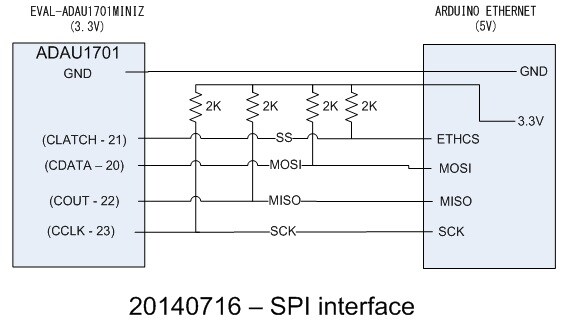
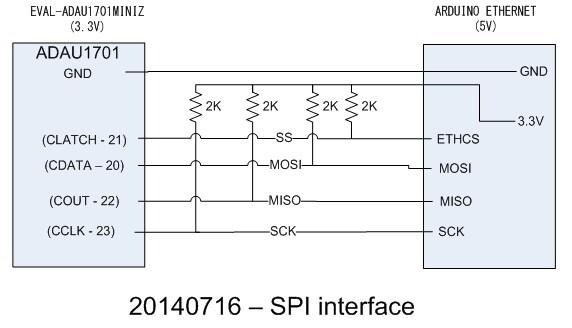
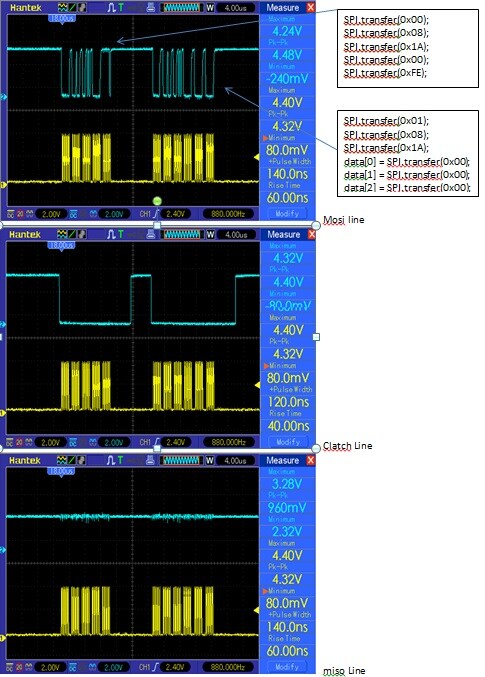
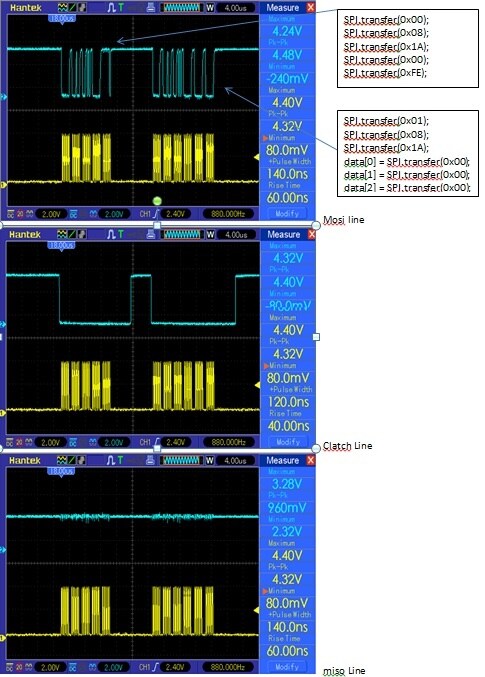
Good day bitmechanic and everyone,
I've already pull out the w5100 ethernet chip on an Arduino Ethernet. I tried the readback and not success yet.
I have an arduino UNO board. I've tried the readback, but results are the same. Both attempts are keeping the MISO line high.
I've also tried using the level translator but the results goes no where as I'd already posted in SPI Communication mode between Arduino Ethernet and EVAL-ADAU1701MINIZ - Arduino Forum
Current modification of EVALADAU1701 board is an extension wires of each those 5 pins (gnd, clatch, cdata, cout, cclk) is added. I am suspecting that I should not use the EVALADAU1701 because https://ez.analog.com/message/9055#9055 has said that it is not design to work with SPI.
In circuitry aspect, what makes evaladau1701 only work with I2C? If somehow I want to make it work for SPI, how should I modify the circuit? Is it enough if I just remove U5 serial_i2c_eeprom?(edit: removed. but still not succeed) If somehow the (I suspect) SDA pin of U5 always stay high that cause the problem, I wonder why is when I am using I2C mode, everything is fine? (edit: my colleague said its due to I2C protocol. So, in SPI mode, the serial_i2c_eeprom is not synchronize) Or if somehow the EVALADAU1701 is totally prohibits any SPI control due to its circuitry, shall I proceed to develop new board for SPI circuit of ADAU1701 as in https://www.analog.com/static/imported-files/data_sheets/ADAU1701.pdf page 51?
Schematics of original evaladau1701miniz board : https://www.analog.com/static/imported-files/eval_boards/EVAL-ADAU1701MINIZ.pdf page 8.
Any help or suggestion would be much appreciated.
Thanks and Best Regards,
Kal
Hello,
On the Arduino Ethernet board, the SPI is also used by the W5100 ethernet chip. So probably the W5100 is keeping the MISO line high. Do you have an Arduino UNO board ? Can you try the readback with UNO ?
For the Arduino Ethernet you should use a different pin for the SS for the ADAU1701 CLATCH.
Good day bitmechanic,
First of all, thanks for your insight!
Your thought was the same as my discussion with my colleague. Somehow I should modify the SELFBOOT pin on EVALADAU1701 to the ground to satisfy "When the SELFBOOT pin is low at power-up, the part defaults to I2C mode but can be put into SPI control mode by pulling the CLATCH/WP pin low three times" [1]. Whereas the SELFBOOT pin at current design of EVALADAU1701 circuit, is actually set to be high and only satisfy "When the SELF-BOOT pin is set high at power-up, the ADAU1701 loads its program, parameters, and register settings from an external EEPROM on startup"[1].
That answer my own question why I can always change back to read from the adau1701 in I2C control properly, eventhough without reset or power down the adau1701 after I configure for the SPI control (with pulling the CLATCH pin three times). It shows that the adau1701 is always in I2C control and never changed to SPI control. As what I understood, once the ADAU1701 has been put into SPI control, it cannot be put back into I2C control until the adau1701 has been reset [2].
Right now, before anything else, I have to find a proper way on how to modify the SELFBOOT pin on EVALADAU1701 circuit, or else I just go on creation of a new board to avoid a risk of breaking the SELFBOOT pin. Only After then I can proceed my work to the next stage.
Thanks and Best Regards,
Kal
reference:
[1] ADAU1701 datasheet page 6 first paragraph
[2] SPI protocol problems 1701 by Simmartin in JeradL comment
Hello,
On the EVAL-ADAU1701 (and Elektor board) the SELFBOOT pin is connected to 3.3V. According to the ADAU1701 datasheet, I think the SELFBOOT must be low to put the ADAU1701 into SPI mode (by toggling the CLATCH/WP pin three times after reset) So, the board would require modification to use SPI mode.
Alhamdulillah,
I manage to work with SPI control. But...
I wonder why the signal at the MISO line is not stable. Unacceptable Inconsistent data output from ADAU1701 and sometimes, when there is a data that comes out from ADAU1701, attenuation is occured on that data's signal.
The attenuation of the signal was really affect the data's value from ADAU1701. Figure below shows the Unacceptable Inconsistent data. (I should get consistent data of 1F,D9,3C)
On the other hand, MOSI, SCK, and CLATCH signals were doing just fine.
I've cut the pull-up resistor for MISO line from figure above (20140716 - SPI interface). I also try to use Bi-directional level converter. Both method are not solve this problem.
Any suggestion to fix this problem?
(the problem is not solved yet: currently i am using Bi-directional level converter (LC04A) except of direct line of MISO signal.)
Thanks!
Kal
reference:
1. SPI Communication mode between Arduino Ethernet and EVAL-ADAU1701MINIZ - Arduino Forum
2. Noise generated by arduino interaction with adau1701


Have a good day Everybody,
I tried these configuration by using try and error method,
a) Power from USBi to program but External Power adapter 5V to evaladau1701 is used for read operation.
b) Slow down the Arduino Uno (master) a bit => by enabling at least SPI.setClockDivider(SPI_CLOCK_DIV8); or SPI.setClockDivider(SPI_CLOCK_DIV16); in the Arduino code.
c) SPI interface: Bi-directional level converter is used except for the MISO line.
d) on/off the writeback circuit by adding switch at transistor pin (collector) and ADDR1/CDATA/WB pin at ADAU1701.
-ON writeback circuit to download sigmastudio program into ADAU1701.
-OFF writeback circuit to enable SPI control.
Alhamdulillah, now the result I got is stable so far (for arduino Uno with crystal 16MHz)
My Question, am I degrade in any way of the performance of the system when I used this clock divider to slow down the master?
(edit: one cycle period will be increase which mean the performance will be degraded in term of speed)
How can I relate the clock divider of Arduino and clock for ADAU1701 so I can match both devices to operate nicely/synchronously?
By default, Arduino Uno Clock is set to SPI.setClockDivider(SPI_CLOCK_DIV4); hence I expect the problem occurs is caused by the adau1701 can’t catch up with Arduino speed.
Could anybody please explain/comment if any?
Thanks and Best Regards,
KaL
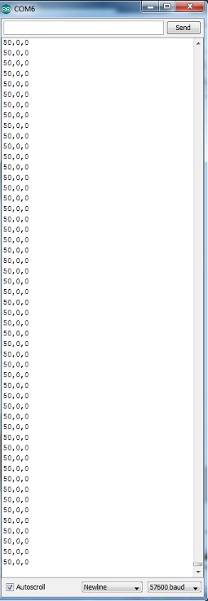
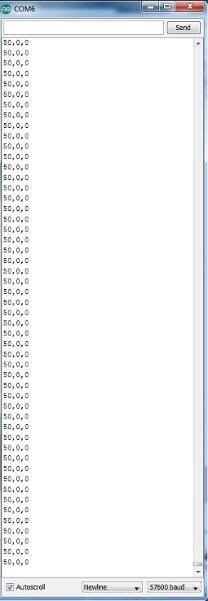
reference modification on my post on 22-Jul-2014 13:00
*reference:
[1] ADAU1701 datasheet page 22 at first paragraph
[2] SPI protocol problems 1701 by Simmartin in JeradL comment
I am trying to read the Displayed level on the output pin of a RTA level detector with a DSP readback and the DSP readback is still reading the audio value and not the "level" value...
Maybe I am using the wrong block? Is it possible to show the blocks (Pass-thru vs RTA to output)?
Hi Vincent:
Please send the audio to an RMS or Peak average block before reading it. The RTA level detector I believe simply passes the audio. There are other types that actually send the averaged audio to the output pin. My recommendation is to use the block that you are using at them moment, find the memory location (in the address map) for the memory where the RMS value is being store and pole on it for frequent instantaneous power values. This is, replicate SigmaStudio functionality on your uC
Regards
Miguel
Hi ,
Can you show me a screenshot of where to find this detector that you are talking about that outputs the averaged audio? I don't seem to be able to find it.
Also can you show me a screenshot of where to find this Address map you are talking about to find the memory location of this detector? I usually take the address I see in the Capture window but for level detectors the address cannot be displayed in the Capture window.
Thanks for your help!
Vincent
Please log in to reply.