First Order Filters - 2 Types?
I needed a simple, first-order bandpass filter bank; several overlapping bands to perform some very gentle EQ. So I cascaded high-pass and low-pass filters for each band using: Filters / First Order / General (1st Order). No problem, everything worked fine. But the circuit, at least on the Schematic, got 'clunky' using four separate boxes for a stereo pair. At the time I hadn't figured out how to do 'Add Algorithm' and 'Grow Algorithm' together to pack four filters into one schematic symbol; I have since figured it out.
But I recalled that there was another first-order filter available under: Filters / Second Order / 2 Ch / General (2nd Order), and then selecting First Order Filters from the pull-down menu in the symbol box. What comes up is easily configured as a band-pass filter, and as a 'stereo pair' the symbol is much more compact than the "real" first-order sections.
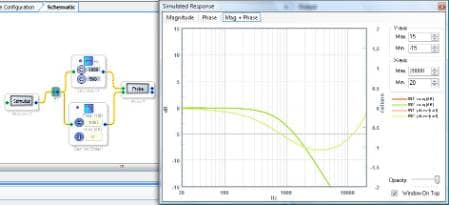
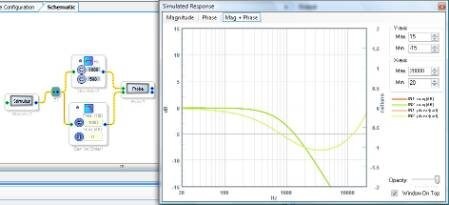
But the results are not the same. If you do a Stimulus/Probe and overlay the plots, the amplitude response of both filter sets is identical, but the phase response is not. The simple first-order goes from +1.5 radians to -1.5 radians, with 0 at the center frequency, just as one would expect. But the first-order filter that's a pull-down from the second-order 'workhorse' goes from -1.75 radians to -4.25 radians, with about -3 radians at the center frequency... a similar spread but skewed. The attached file lets you see this.
Just what is that "First Order" selection under the General 2nd Order filter choice? The Help menu didn't explain it at all. I am assuming that the "real" first-order filters are like classic R/C lashups, but would like to understand the alternative, which one would expect to be the same thing.
I believe there is essentially only one type of first order filter. However, the "First Order Filters" option in the 2nd order filter cell allows you to cascade two first order filters without increasing the number of instructions, and increasing the required coefficients by only 2, not 3. In my understanding, the "First Order Filters" option in the 2nd order filter cell is making use of the architecture in a more efficient way than simply using two separate cascaded first order filter cells.
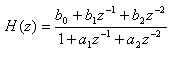
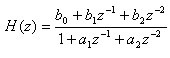
You can see in the help file that the general transfer function for the second order filters is:
It requires 5 coefficients: b0, b1, b2, a1, and a2.
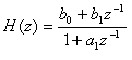
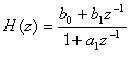
The general transfer function for the first order filters is:
It requires 3 coefficients: b0, b1, and a1. Essentially, b2 and a2 have been set equal to 0, reducing the order by one.
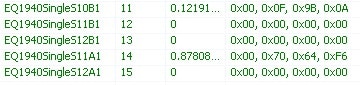
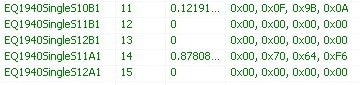
Indeed, by creating the same first-order filter in SigmaStudio using two cells (one first order, one second order), we can see that the second order cell contains the same coefficient values but changes the b2 and a2 coefficients to zero:
First order:
Second order:
When I check the plots for those cells, I'm getting a match. You can see that here:
So, it's pretty clear that adding a single first-order filter into a 2nd order filter cell will get you the same results as the standalone first order cell.
However, when a second first-order filter is added to the second order cell, the coefficient calculations change. You're correct that this is not detailed in the help file. I'm not quite sure how these coefficients are calculated, so I will check with the software team to see if we can make that information available to you. I will also check about the difference in the phase response that you're seeing.


This question has been assumed as answered either offline via email or with a multi-part answer. This question has now been closed out. If you have an inquiry related to this topic please post a new question in the applicable product forum.
Thank you,
EZ Admin
Please log in to reply.