SPDIF on EVAL-ADAU1442EBZ
Hi all,
I can't make the SPDIF input and/or output work on my EVAL-ADAU1442EBZ. I've made the small project described on the "Quick start guide" which works but when I replace the analog inputs and outputs with SPDIF, it doesn't work. I use the coaxial connectors and the switch is at the correct position. Are there more settings to adjust? I think the clock might have to sync on the input, right? Is there more information (or examples) available for the EVAL-ADAU1442EBZ board?
Best regards,
Guy
The S/PDIF receiver on the evaluation board is asynchronous to the ADAU1442, which means ASRCs are required. Because the inputs are routed through an ASRC, you'll need to use the ASRC inputs in SigmaStudio, not the standard serial audio inputs.
The full signal routing for S/PDIF input/output looks like this:
S/PDIF RCA or optical input connector → S/PDIF receiver IC → ADAU1442 S/PDIF input pin → ASRC → SigmaDSP core → ADAU1442 S/PDIF output pin → S/PDIF transmitter IC → S/PDIF RCA or optical output connector
The attached example projects should get you up and running with S/PDIF passthru and loopback.
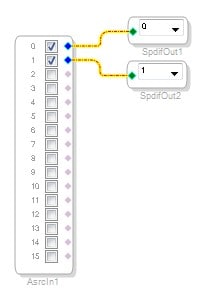
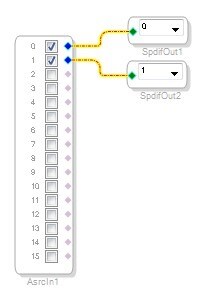
The PassThru project takes the S/PDIF input via the ASRC to the DSP, and then outputs the same signal on the S/PDIF transmitter. You should connect the source (via cable) to the receiver, and connect the sink (via cable) to the transmitter.
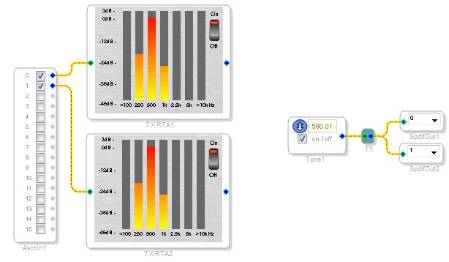
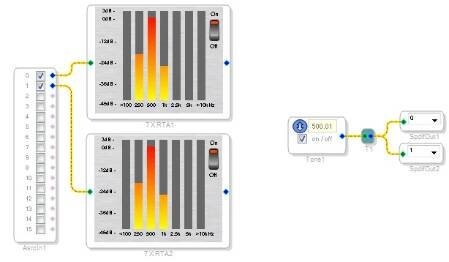
The LoopBack project generates a test tone in the DSP core, outputs it via S/PDIF which loops back to its own S/PDIF input, then passes that signal through the ASRC and into the core, where it appears on the level meters. You need to connect the S/PDIF cable from the Transmitter to the Receiver via a cable in order for this to work.
PassThru:
Loopback:
Routing Matrix Register Settings:
S/PDIF receiver routed to ASRC0.
ASRC0 rate set to DSP core rate.
S/PDIF / ASRC Register Settings:
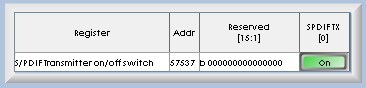
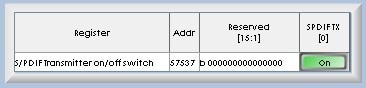
S/PDIF transmitter active:
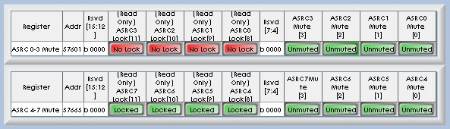
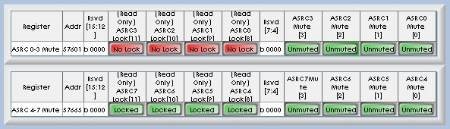
ASRCs unmuted:
If you download those projects to your board, S/PDIF should work as expected.





Ok, thanks for the info Brett.
I was looking at the voltages specs from the data sheet, and as long as my input voltage is not higher than the DAC output capabilities, I should hot see a loss correct?
The DAC can output 0.88 Vrms so as long as my input doesn't exceed that, I can reproduce any signal I put in at the output correct?
Thanks,
Jason
mtbrider, I think you replied to the wrong forum thread. I will respond to your question here: https://ez.analog.com/thread/6624?tstart=0
Hi,
I tried to route audio from analog input 0 and 1 of a 1442 eval board to its SPDIF output and did not succeed in any way.
I also downloaded the "pass thru" example but nothing seems to come out of the SPDIFO RCA port though signal is correctly entering the SPDIFI.
Any help is very appreciated,especially in the form of an example project file!
Thank you in advance
Tom
P.S.: I'm using SigmaStudio 3.5
Tommi,
Try the attached example for Analog (0, 1) input, S/PDIF (0, 1) output.
Hi Brett,
thank you for the example project.
Sadly it doesn't seem to work...
I am testing with the following setup/signal flow:
sine wave @ 1KHz coming out of a TASCAM US-2000 at 14dBu (as reported by an NTI Minilyzer ML1) entering IN0/1 of the 1442 evaluation board.
I just added a level detector to your project, to make sure I connected everything the right way and in fact I see a loud signal entering on channel 1 (...) of the input block.
The spdif out (J2) is connected to the TASCAM US-2000 digital input coaxial plug, digital format is set to spdif.
S1 switch on the Eval 1442 is set to RCA.
I don't see anything entering the digital input of the TASCAM US-2000... where did I go wrong?
Thank you for your precious support
Hi Tommi,
Have you checked the SPDIFO test point on the board to see if a valid signal is there?
Hi Brett,
I checked test point 126 (J23-51) but no signal of any kind was there.
Any suggestion?
Thanks
Tom
Hmm, if you're using the analog input and the S/PDIF output, at least something should show up on the SPDIFO pin. Even if there's no analog signal coming into the ADC input, there will be enough noise that the LSBs should be toggling. Are you sure you have an ADAU1442 or ADAU1445 mounted on your board? If the chip was, say, an ADAU1446, and the program was attempting to route signals through the ASRCs, then that could be the source of the break in the signal chain.
Maybe you can send me your project file and I will try it out on my setup.
Well, actually I don't have a "real" project, I was just trying out our new 1442 evaluation board, so what I did was pull a cord from an analog input to the spdif output.
I just looked at the Hardware Configuration tabs to check if they were set as they are in your project and it seems to me they're exactly the same. Aren't they?
I will try testing again as soon as I can, do you confirm that test point 126 (J23-51) is the right one?
Tom
I think I know what might be happening. Please read this anomaly list, as published on the ADAU144x product webpages: http://www.analog.com/static/imported-files/data_sheets/ADAU1442_1445_1446_Anomaly.pdf
As you can see, the validity bit in the S/PDIF transmitter stream is permanently set to an "invalid" state, which means that some (not all) S/PDIF receivers will reject the transmitted signal. This is probably why your receiver box is not accepting the data.
Unfortunately, this means that you'll probably need to use an external I2S-to-S/PDIF conversion chip if you want to interface the S/PDIF transmitter with the outside world.
This issue has been corrected on new SigmaDSPs currently in design, but I have not received an indication that the ADAU144x family will get a new silicon revision to flip this bit.
The example is perfectly working, thank you.
We will just have to carefully select the transformer circuit in our design to make it work also with the rest of the SPDIF compatible world!
I refer to NTi DL1 as a universal digital audio signal tester and reading "no carrier on input" on its display still keeps my eyebrow high...
Anyway it is important to know that things on the evaluation board are working as they were expected to!
Thank you again for your support... and patience!
I think this is related to the transformer circuit that is connected to the coax S/PDIF output jack. We use the SC937-02 from Scientific Conversion Inc on the evaluation boards. It basically acts like an impedance converter so that the signal going out on the S/PDIF coax connector is matched to the 75 ohm cable you would usually connect there. On the far side of the transformer (i.e. on the connector, the cable, and the receiver), the signal will appear to be a very low-amplitude waveform, with small "upward spikes" for rising edges of the SPDIFO signal and small "downward spikes" for falling edges of the SPDIFO signal. Don't let this fool you - the signal is there. Unless you zoom in, you won't see it. Here's a screenshot.
Fullscreen
26f73e06dd03b463a6f72755979d203d.html
Download
<html><head><title>Jive SBS</title></head>
<body><font face="arial,helvetica,sans-serif">
<b>Error</b><br><font size="-1">
An general error occurred while processing your request.
</font></font></body></html>
I tried a simple test using my evaluation board. I connected the coax S/PDIF output to the coax S/PDIF input in order to create a loop-back. Then, I created a project that used a sine generator going to S/PDIF output zero and a triangle generator going to S/PDIF output one. I routed the S/PDIF receiver signal via the ASRCs to a level detector. I was able to clearly see and change the signal coming in through the S/PDIF receiver, so I knew everything was working fine.
Fullscreen
551d4769ca16d4e0498184fdb871f34f.html
Download
<html><head><title>Jive SBS</title></head>
<body><font face="arial,helvetica,sans-serif">
<b>Error</b><br><font size="-1">
An general error occurred while processing your request.
</font></font></body></html>
Project file is attached.
yes, I connected it both to my Tascam US-2000 and to the NTi Digilizer DL1 with an RCA cable.
I am sending a sine wave out of SPDIFOUT 0 and 1 as well as out of analog outputs 0 and 1.
I see the signal coming out of the analog outputs but not from the SPDIF.
Actually the DL1 says it is receiving "no carrier on input".
Nothing changed in the hardware setup, correct.
You probably won't be seeing a valid signal on the J2 output by checking it with a voltmeter when you don't have a cable attached, because the SPDIFO signal from the SigmaDSP is driving an unloaded transformer (U7). Are you able to connect a cable from J2 to an external S/PDIF receiver?
Yes!
I get it now, loud and clear at testpoint, but... nothing's changed in the project's hardware setup isn't it?
so there must have been an error on our side during the previous tests.
Anyway, nothing is showing up at J2 yet.
Is this a know issue of some kind or do we just have to search the hardware for an interruption?
Thank you thousands for you support, I truly appreciate that
Hmmm. Let's try again. Could you try downloading the attached project to your board? It's just a sine generator connected directly to the S/PDIF outputs.
Hello Brett,
thank you for your attention, I must ask you some further support since things are still not working here.
I verified that the DSP is a 1442 but still I could not get anything out of SPDIFO test point...
Could it depend on some misplaced jumper or switch on the main board?
I just Link-Compile-Downloaded your project and the SPDIFO signal is coming out just fine. I see it on the SPDIFO test point TP126 and also on the J23 header's pin 51.
Please log in to reply.