PUSHBUTTON/Toggle OnOFF
There is an example that uses a Toggle ONOff GPIO conditioner. Cannot find any help in Sigma Studio 3.1 explaining its function. Can you explain or point me to the documentation.
Thanks
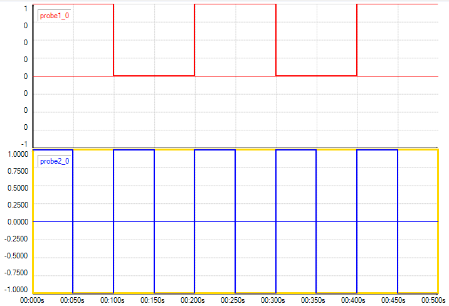
The toggle block will switch its output between 0 and 1 every time the input signal changes from 0 to 1 (but not 1 to 0). In the image below, the bottom square wave is the input to the toggle block (from a square wave generator) and the top signal is the output from the toggle. You can see that every time that the input goes to +1 (as could happen with a momentary button press), the output changes.
We are in the process of updating the SigmaStudio documentation to make sure that there aren't any "orphan" blocks without documentation in the help file. This will be included in a coming release of the tools.
On ADAU1452 : I have tried to use this toggle ON/Off with a Square Wave Source , but it won't work reliable when Signal f0 is higher than 0.5 Hz ( 1 or 2 Hz or higher ) .
Any ideas ?
It works with a square wave , but it doesn't if you use a sine wave with abs(x) , or if you add a constant 1 to the sine wave. So the signal "touches" the zero only once a period. Thats a zero only one sample long.
Is that a bug that the Toggle ON/Off doesn't work with that ?
Hello stmoeller60,
I whipped up this project and tried it.
I looked at the output of the GPIO pin on a scope.
I found I can go all the way up to 3kHz and the output was exactly divided by 2.
What I did find is that above this there seems to be a "jitter" in that the length of time the output stayed low goes between to different times. The length of time it was high did not change. There may indeed be something with this cell that you have run across. It was designed to condition a GPIO input from pushbutton switch. It should not be de-bouncing but it may be. I will think about this more.
Meanwhile, what exactly are you trying to do? There may be a better way to do it.
Dave T


I'm trying to detect Zeros ( inverted = ones ) and to generate a toggle signal 1 and 0 alternating everytime zeros occurs..
It's got nothing to do with GPI/GPO .
It works with the Toggle ON / OFF , but only with slow frequencies.
Input signal : 0 0 0 0 0 1 0 0 0 1 0 0 1 0 0 0
Output : 0 0 0 0 0 1 1 1 1 0 0 0 1 1 1 1
Hi Dave,
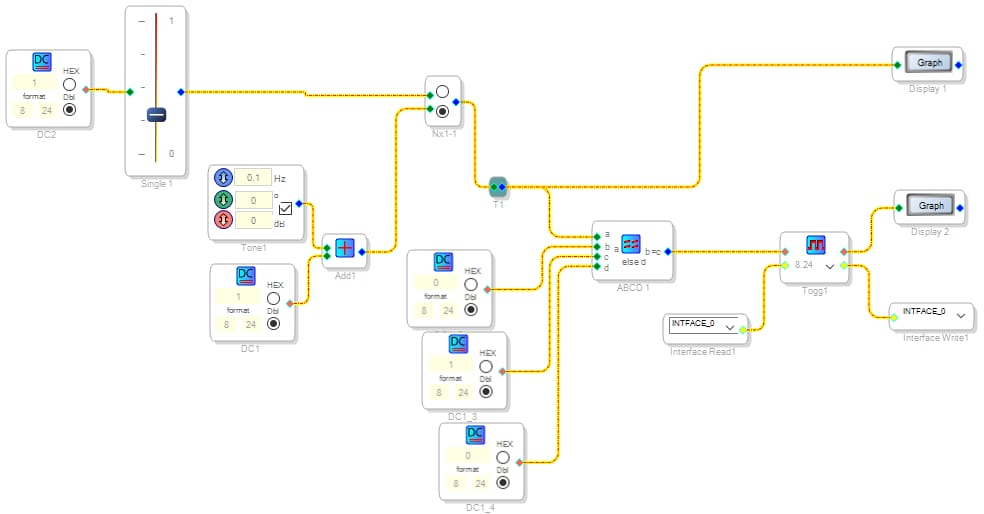
I have attached a project where you can see what I mean.
When you manually slide the vol down to shortly to zero, you can see at display 2 : it toggles between 1 and 0 .
But when you switch to the sine wave it doesnt work.
Cheers
Stephan.

Hello stmoeller60,
I did some more testing and figured out a few things.
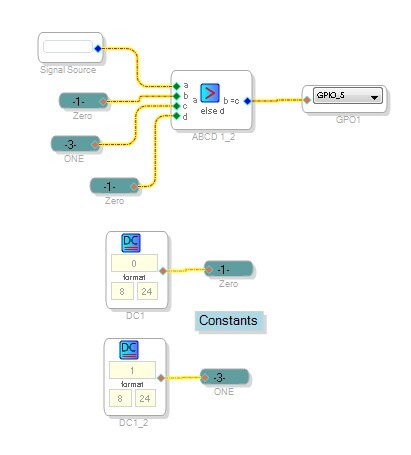
First, the Toggle function works fine with higher frequencies. There must be something with your exact project. But there is a better way to do what you are trying to do. You showed the input signal as being pulses but ultimately the input signal is a sine wave as you stated earlier. So if you want to turn a sine wave into a square wave then this is how you can do it:
I like using an alias for the values Zero and One since they are often used several times in a project so I simply "define" a constant in the program.
So this will work with any wave shape that is sent to it. When the signal is positive the output will be a 1 and when it is less than or equal to zero it will be a zero out of the cell.
In this screenshot I sent it to a GPIO so I could see it on a scope and measure the frequency. It was equal to the incoming frequency.
In case you are still looking to count pulses or do this using pulses I attached a project I did a little while back that counts pulses and calculates the frequency and RPM. This may give you some ideas on how to work with pulses. This project does not do what you are trying to do which is to create a square wave.
Now back to my comment on my previous post about the GPIO output not looking correct once I went above 3kHz, I figured out the issue. This is due to the sampling rate of the project. What I was seeing was the duty cycle periodically being different. The difference was one sample period in time. So when the DSP is trying to generate an arbitrary frequency, it does some math to figure out how many samples it needs to be low and how many it needs to be high. If this calculation is not exactly a whole number of samples then every once in a while it will add or drop and sample to accommodate the fractional part. So that was what I was seeing. When I set the oscillator to a frequency that would evenly divide into the sample rate the square wave output was perfect. So it just goes to show you that sometimes you have to stand back and think about a problem. So there is no problem with the GPIO output and the GPIO Toggle function was dividing down the frequency properly.
So if you are still having problems then please post your project. There must be an explanation to what you are seeing and I am not seeing.
Dave T

Hello Stephan,
Do not use the toggle cell in your project. I will test your project later this afternoon but for now do not use the toggle. It is not needed. You also should not be adding 1 to the oscillator. This would prevent it from ever crossing zero.
Dave T
Hi Dave,
the toggle was the only function block that would give me a toggle signal every time a zero occurs.
The adding of 1 to the sine would produce a zero sample every once a period, wouldnt it ?
Stephan
Hello Stephen,
Can I go back to the question of what are you trying to do?
You have a sine wave input and you want a square wave output. You want it to stay high while it is positive and low while it is negative?
Are you trying to count pulses and so you are generating pulses? In that case I supplied a project that does that.
Are you trying to double the frequency?
The solution I detailed will toggle every time it crosses zero.
Adding one to the signal I think will produce a single pulse at the very bottom of the waveform. However, if the signal is not exactly a full scale 1.24 number then it will not reach zero. If it is slightly higher level then it will cross twice. I don't think this is what you desire but I am not certain.
What are you wanting to do with this signal?
Dave T
Hi Dave,
my idea was to develop a frequency devider :
cos(x/2) = +- sqrt((1+cos(x))/2)
The +- function is the toggle function every time zero occurs it changes the sign.

Hi Miguel,
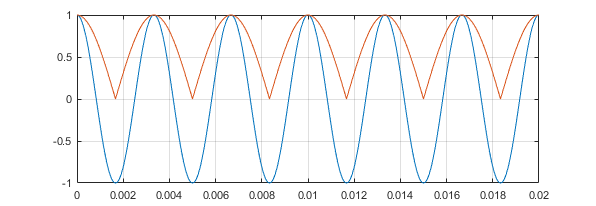
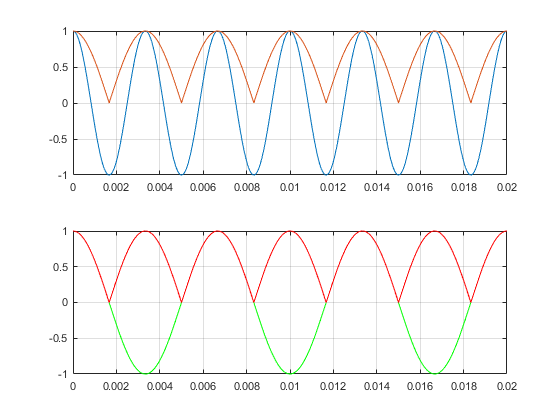
The blue is the input = cos( x ) , and the blue =
+- sqrt((1+cos(x))/2)
Now I'd wanted to use the toggle to realize that I get a invert toggle switch so I get +/-
Not sure if this works :-)
Hi Ken, did you read my post before yours ?
I'm trying to build an octaver that devides the guitar frequency note by 2 . Thats the target behind all of this
( but not with a pitch shifter )
Blue = cos(x)
Red = sqrt((1+cos(x))/2)
Green = cos(x/2)
The thing what would be needed is that the toggle switch reacts on zero samples ( of the red ) to produce a signal that would enable an inverter every time the zero ( of the red ) comes and then invert the red signal , which would give me the green signal which is half of the frequency of the blue signal.

Hi Stephan:
Why not simply take the absolute value of the square root result?
Thanks
Miguel
Do you want to switch the value of the output at zero crossings? At positive slope zero crossings? Your figure seems to show switching the value of the output at -1.
Can you draw a timing diagram of the output overlaid with a sine wave?
Thanks,
Ken
Hello stmoeller,
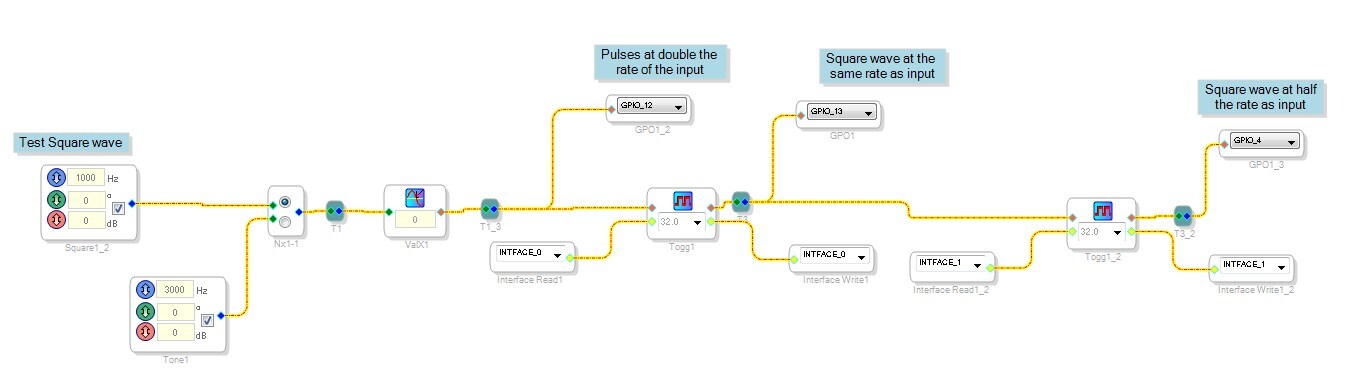
Well, here is a project that takes either a square or sine wave and produces pulses at double the frequency. Then it converts the pulses into a square wave at the original input frequency then divides it again to produce a square wave at half the original input frequency.
I verified this using the GPIO and looking at it on a scope.
Now the trick will be to change this over to a sine wave.
I have other ideas but I will need to work on it when I get a chance.
Dave T
I should also post a screenshot of the project. It is quite simple.
Dave T

This question has been assumed as answered either offline via email or with a multi-part answer. This question has now been closed out. If you have an inquiry related to this topic please post a new question in the applicable product forum.
Thank you,
EZ Admin
Please log in to reply.