Pink Generator and EQ adjustment
I just got the new eval board (ADAU1442) and it was easy to get up and running. I created my first design with two inputs, a 28 channel EQ, three way crossover and six outputs. It runs fine.
I need to add an input for an spl mic (no problem) and connect to a pink generator. I then need to use one of the switches on the extra jumper board to turn on the pink generator and sweep from 20-20K. I will need a graphical display (line or bar) for the results of the pink sweep. I also need to see the EQ so that I can adjust it and then sweep again or keep the pink on and keep adjusting the EQs until I am happy with the response.
Eventually, this will need to be done through a PC GUI, but I just want to get the basic circuit running first.
Suggestions would be greatly appreciated.
Thanks!
PHD12
The idea itself is fairly simple, but the implementation may require an external controller IC that would handle the sequencing of all of this.
It is quite difficult to do a continuous sweep and measurement. I would recommend instead doing a "stepped" sweep and make a measurement at each point.
For a really simple test on the evaluation board, I'd recommend this as a starting point.
Create a simple signal flow with the generator connected through the EQ to the outputs and the inputs connected to a level detector. For more information on implementing level detectors in SigmaDSP, see this post:
Monitoring average and instantaneous signal levels
Set the generator to the frequency range of choice.
Read back the input signal level.
Apply EQ, then repeat the measurement.
Repeat until the level for this band matches your target level.
Repeat this sequence for all bands.
I'm a little unclear what it is that you want to sweep. What do you mean by "pink sweep"? Are you looking to generate a pink noise source and then sweep a bandpass filter on its output, so that it's generating a band-limited pink noise at any one time? If this isn't what you're looking to do, and you want to sweep a pure tone, you can do that with an existing block in SigmaStudio. In the library under Sources > Logarithmic Sweep you can find a few different blocks that will sweep a tone from a starting value to an ending value.
I actually had the same question, but I assumed since a pink noise filter is in use, then the measurements will be made using a bandpass filter. PHD12, what did you have in mind?
The bandlimited pink noise would work well if you're using a graphic EQ to correct it, which generally has band spacing in octaves or fractions of octaves, then you should be measuring equal energy in each octave in order to determine that the overall response is flat.
The sine tone approach would of course give you better accuracy, and might be more useful if you're looking to correct the response with a fully-parametric EQ.
Using the sweep source in SigmaStudio is a good idea - you just have to make sure that your measurements are synchronized with the generator.
Jerad,
Sorry for the delay in reply. I have been figuring out some other items
with the Sigma 3.1.
I misspoke. What I want is to have a pink generator, turn it on with a
GPIO switch and/or from the USB port, then use the 28 band equalizer to
adjust the pink noise for each of the 28 bands to get as flat a
frequency response as possible.
I only see a white noise generator.
I am having trouble with the lack of documentation for the GPIO for the
Sigma 3.1. I sent Ray Woo an email about this, along with a copy of the
project to date. It is working except for the rotary encoder, which I
beleive is just a table issue.
I will attach the project in a .zip file.
Thank you very much!
Patrick Dwyer,
Fidelity Horns, Inc.
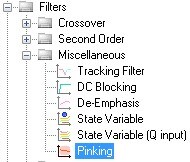
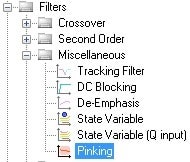
You can create pink noise by simply running white noise through the pinking filter. The pinking filter can be found in the Tree Toolbox here:
Your attached zip file includes the compiler output but it does not actually include the project file. Without the project file, it will difficult for us to provide much support. Can you please post again and attach your project file this time? If you don't want to post your entire signal flow, you can simply post the portion of it that isn't working.
Brett,
I have no documentation about file structures, so I have no idea what
files are created for a particular project. I simply zipped up all 6
files that were in the folder under the project name I used. I have
found one more file that may be what you want, so I am attaching it.
Patrick Dwyer
The .dspproj file is the main SigmaStudio project file. All of the other files generated are either compiler outputs or files that can be used for microcontroller development.
There are a few example projects included in your SigmaStudio installation. By default, you can find these in:
C:\Program Files\Analog Devices Inc\SigmaStudio 3.1\Sample Schematics\ADAU144x\GPIO Examples
There is one example project included there that shows the use of a rotary encoder to control the volume. The SigmaStudio help file also has some examples showing use of a rotary encoder. You can access this by simply pressing F1 while the rotary encoder volume block is highlighted in your project.
Jeradl,
Here is the dspproj file for the project that I sent to you yesterday
afternoon.
Patrick Dwyer
Fidelity Horns, Inc.
This is the same project file you attached to your previous post, correct? Sorry, I'm not clear which of your questions are still open. Can you let us know with what we can still help you? Thanks.
JeradL,
Yes, I only have one project. You asked for the additional file.
Outstanding items remain the same:
1. I cannot make the GPIO rotary encoder work. I believe the problem
is with the table values and/or where the table data is stored, but I
don't have documentation to take me any further than I have gone with
the design, which I believe is complete, but just not working. Is there
a limit to the number of positions in the table for the rotary encoder
-- it didn't seem so from the cell itself?
2. The pink noise generator. I have received some information and I
will use it to get started for now.
3. EQ -- I want to change the 28 channel EQ to +- 12 db, not +-10
db. When I click on the "10" in the cell (increasing scale), I can
change it to 12, but it then changes itself back to 10. Also, I have
found no way to change the "10" at the decreasing scale.
Thank you!
Patrick Dwyer
Fidelity Horns
We will look into the rotary encoder issue. Have you tried the example projects included with SigmaStudio to see how they are working?
There are two ways that you can change the limits of the EQ sliders. You can either click directly on the top and bottom of the scales, which will bring up a text box for you to enter your new value. Type you value into there and press enter, which will save the new value. You can also right-click on the slider, which will bring up a pop-over window where you can set the min, max, and step size of each filter.
Jeradl,
Yes, I tried the sample sample projects and with some luck, I was able
to get the rotary encoder setup that you see in my design (I added a
second channel by growing the algorithm). I just can't get the encoder
to change the volume, so I think the table is not right. I loaded a
table (I tried 12, 20, and 33 positions) with values from the example in
the documentation (its old) and saved it. No luck. Not sure what is
wrong, but I presume it is with the table.
I did what you described with the EQ filters and I couldn't get the
value to stay at 12 after entry and I could only change the upper, not
lower value.
Patrick Dwyer
Jaradl,
I found two of the problems.
1. After searching in vain for the register window for the ADAU1442,
I figured out that the GPIO board has the inputs/outputs designated with
MPO...MP10 instead of GP0...10 Once I realized this, I examined the
plug in board and saw that jumpers had to be set to switch from the
potentiometers to the encoder and then I was able to study the schematic
and found that the encoder was on MP2 & MP3. Once these connections
were made the sound came through just fine. Just ONE PAGE of
documentation would have avoided all of this.
2. Then, with the EQs, I finally realized that, unlike some of the
other cells in the library, you have to hit the enter key to retain the
value just entered. I was then able to adjust all of the EQs in the
circuit to +-12db. Again, A LITTLE documentation would have gone a long
way.
So, I then got the white generator installed with a pink filter. These
are temporarily hooked up through an Nx2 switch to the inputs to the
crossovers. This circuit works fine. Now, what I now need to do is
turn the white generator on from an external switch at the same time as
the output of the pink filters are also switched into the crossovers.
New questions:
A. I could not find any way to modify the white noise cell or the
Nx2 switch so that they could be actuated by an external switch on the
GPIO board. Is there a way to modify these cells to allow for external
switching (a single switch) rather than the on-screen switching?
B. Is there any type of display (bar or line graph) cell that could
show the pink noise by 1/3 to 1/12 octave as it is captured by an
external spl micrphone and brought in through one of the standard
inputs? I will need to be able to turn on the noise generator and then
adjust the equalizer and watch the real world effect. I couldn't find
any examples in any documentation.
Thank you very much. I appreciate your patience as I learn the system.
But better documentation would have taken care of most of these issues.
New project files attached.
Patrick Dwyer,
Fidelity Horns
I'm glad to hear that you were able to work out your problems. I should've made the "press enter" part of my previous post more prominent. There is currently an update in process to our application note describing use of the GPIO functions. The next version will include the schematics and instructions for using the GPIO board. In the meantime, much of that information can be found on page 9 of the ADAU1401 evaluation board user guide.
The white noise on/off switch is not directly-controllable from an external hardware control. In order to control this from a switch, you can implement an externally-controlled switch in SigmaStudio that will switch the signal flow between the white noise block (always left "on" in software) and a zero signal, such as a dc source. We do not support modifications of the blocks in SigmaStudio. See this FAQ for further information about this.
The Level Detector Designer cell in the Level Detectors/Lookup Tables section of the library allows you to build a custom detector block. In here, you can completely customize the filters that you use and the spacing of each of them. Note that each band you use in this cell is using a real filter implemented on the SigmaDSP, so doing a full 1/3 or 1/12 octave band detector will take a lot of filters, and therefore a lot of the ADAU1442's processing power.
Jeradl,
I built a design for the "switching" of the pink noise generator, but I
can't get the external switch on the GPIO board to operate the MUX.
Why? Again, I presume there is something I am missing in
documentation. I am attaching the files.
Thanks!
Patrick Dwyer
Connecting the GPIO directly to the mux will directly connect the value on the pin to the mux. If you're using a push-button, you'll want to toggle between and index of 0 and 1 each time you press the button. This is enabled with a toggle cell. I've copied this cell into your project from the IndexMuxSelect_SinglePushButton_144x.dspproj demo project that you can find in your Sample Schematics folder (C:\Program Files\Analog Devices Inc\SigmaStudio 3.1\Sample Schematics\ADAU144x\GPIO Examples).
I have also reduced the MIPS you're using on the white noise input. Instead of adding a 2nd algorithm to the white noise generator, I've just connected that to a mono (instead of stereo) mux and fanned the output from the mux out to the two inputs of the pinking filter. I also removed your second white noise generator and replaced it with a dc generator set to zero, which uses fewer instructions than a noise generator.
The updated project file is attached here. FYI - you typically only need to provide the .dspproj file if you're sending files. The rest of the generated files are compiler outputs that can be generated from SigmaStudio when the .dspproj file is loaded.
Jeradl,
Thank you for the information and examples on the noise generator and
the switching of the MUX. This would have been easy to figure out with
proper documentation. For some reason I did not get your email until
this morning.
Over the weekend, while I was "waiting" to hear from you, I created the
last function that I will need for an initial product: the input from a
microphone going to a band pass filter/display (project attached, but
with prior noise circuit). This worked just fine the first time, except
that the higher frequencies do not fit into the algorithm for the
filters. I looked at everything I could think of, but I couldn't find a
way to alter the band pass filter to allow for a higher frequency cutoff
(maybe 30Khz rather than the 20khz provided). How can I get in to
modify this?
Okay, the final step will be to start writing a PC GUI that can
substitute for the SigmaStudio EQ display/sliders and the
band pass filter display for the actual product, which of course, cannot
be connected to SigmaStudio. Do you have any examples of code for
establishing initial USB communication with the ADAU1442 and then
sending/receiving data for the EQ and the Band Pass filter/display?
Thank you.
Patrick
The default sample rate of SigmaDSPs is 48 kHz. Therefore, the Nyquist frequency, which represents the highest frequency that can be represented in the system, is Fs/2 = 24 kHz. Any signal above that would alias (or "fold") back into the audio band. Any filter calculation will therefore be limited to a cutoff of slightly less than the Nyquist frequency.
In order to get higher cutoff frequencies for your filters, you'll need to do two things.
Increase the sample rate of your audio converters. In certain SigmaDSPs like the ADAU1701, this is not possible, because the converters will only run at 48 kHz. However, in other SigmaDSP processors like the ADAU1761, or ADI's standalone audio codecs like the AD193x series, it's possible to run the converters at 96 kHz or 192 kHz.
Increase the sample rate of your SigmaDSP, therefore reducing its available processing instructions per sample. An explanation of how to do this is included here: FAQ: How do I change the sample rate of my SigmaStudio system?
With regards to USB communication, there are basically two steps to this process. The first step involves getting the information from SigmaStudio about what needs to be written to the SigmaDSP, and the second step is implementing the USB-to-I2C interface.
For information about figuring out what data needs to be sent to the SigmaDSP, and what addresses need to be written, there is a fair bit of information already on the forum. Please take a look at the following discussions:
FAQ: How can I change parameters on-the-fly in an application without SigmaStudio?
clickless SW Slew - Growable Single Vol Ctrl issue
Calculating Filter Coefficients to Store in a Microcontroller
C.2.Capture Window
C.3.Parameters Window
As far as the USB-to-SigmaDSP interface is concerned, our only direct experience with that is the USB interfaces the come with SigmaDSP evaluation boards. For the USBi, we used a Cypress Semiconductor EZ-USB FX2 (CY7C68XXX) USB microcontroller to interface with the computer's USB port. Since the Cypress already contains a built-in I2C port, it was very easy to simply buffer the data into the Cypress and pass it out on the I2C port to the SigmaDSP. SPI required a bit-bang implementation, which would of course take some more work. Since this is one of the most popular USB controllers in the industry, there is a big community and a lot of support resources like example code. The Cypress EZ-USB evaluation kit and support community should be able to help you get a working GUI up and running.
EZ-USB FX2LP Overview
Keil/ARM Device Database (Cypress Semiconductor EZ-USB FX2 (CY7C68XXX))
BrettG,
Okay, I have the whole system built, running and tested. The only issue
is the sample rate for the "Pass Thru Level Detector". As you saw from
the design I previously sent you (revised design enclosed), I need the
upper band pass filters in this part of the circuit to have a higher
sampling rate as you discussed (Nyquist limit). I am using an
ADAU1442. I can't find a place in the Pass Thru level detector cell
itself to set the sampling rate. Where is it? All I can find is the
"Hardware Configuration" section allowing the sampling rate for the
serial input and serial output registers to be changed.
I am checking out the USB interface references you cited -- thank you.
Patrick Dwyer
You cannot change the sample rate for just a single block in your design; you would have to run your entire project at a higher sample rate. The SigmaDSP doesn't support multi-rate processing. If you increase the sampling rate of your system to 96 kHz to support higher-frequency filters, you will also cut the number of available processing instructions in half. For the ADAU1442, that means that you'll have 1792 available instructions at fs=96 kHz, instead of 3584 at fs=48 kHz.
This FAQ describes how to change the sample rate of your project https://ez.analog.com/docs/DOC-1431
Jeradl or Brent G,
I followed the instructions on changing the sample rate for the
ADAU1442. This fixed the Nyquist issue and it was working quite well.
Indeed, I switched back to 48khz and noticed that, not only did the pass
thru display work correctly (it wasn't down shifted), but that the audio
coming through the EQ was correct. [Basically, with the pass thru
display I was able to see a normally weighted bar graph of the music,
whereas, at 48khz, the music was weighted to the low frequencies.
I then switched back to 96khz, but the pass thru display was "dead" (no
signal). The white noise generator worked and the music input/output,
volume encoder, and toggle switch worked. So I recompiled. Then the
toggle switch on the white noise generator no longer worked. So I
recompiled again. Then the music input.output stopped. One more cold
boot and recompile and there was nothing working, even though there was
no communication error with a Link, compile, and download.
So, it appears my Sigma board has failed. Could changing the sampling
rate cause an IC failure? There are no warnings about this in the
documentation or any warning to change the software and hardware
sampling rates in any particular order.
****, the whole project was done and ready to move to my audio test
bench to run with the tri-amplifier that it is supposed to be the
pre-amp for.
Help!
Patrick
JeradL & BrentG,
I just did a sequenced re-boot and got it working. I had to close
SigmaStudio, turn off the power to the board and unplug the USB board.
I then turned back on the DSP board, plugged back in the USB, and
brought up SigmaStudio and did a new link,compile, dowmload. It came
back up running fine.
Okay for now.
Patrick
PHD12 wrote:
I just did a sequenced re-boot and got it working. I had to close
SigmaStudio, turn off the power to the board and unplug the USB board.
I then turned back on the DSP board, plugged back in the USB, and
brought up SigmaStudio and did a new link,compile, dowmload. It came
back up running fine.
Occasionally there is a hang-up somewhere in the USB communications driver or a time-out in the firmware that can cause a situation like this. I've generally had good luck recovering with this sequence:
Unplug USBi from target board
Unplug USB cable from computer
Reset or power-cycle target board
Re-plug USB cable to computer
Re-plug USBi to target board
In SigmaStudio, delete the connection between the USBi cell and the target IC, then reconnect it
Jeradl or BrentG,
Thank you for your response about compression circuits (i.e., the "soft
clip" cell). It does not appear that you have the necessary cells to
make either a peak or rms compression circuit. Am I mistaken? Also, I
do not find any time delay circuits that I could use to make a time
delay of from .3 to 6 milliseconds between the low, mid, and high range
drivers in a tri-amp arrangement, which is what I commonly use. If you
look at the project, you see that I have a three way crossover for left
and right channels.
Otherwise, my design is complete and I am working on the USB and PC GUI
side of the project.
Thank you.
Patrick Dwyer
Fidelity Horns
The Dynamics Processors section of the SigmaStudio library is full of different processing blocks that you can use as a compressor. You can select blocks whose level detectors are driven either by a peak or an rms level of your input signal. If you look through that part of the library, I'm sure that you'll find what you need.
The delay cell can be found in the Basic DSP section. This block lets you set a delay to a single-sample resolution. If you're running your design at fs=48 kHz, that gives you a resolution of about 21 us, so you can make a 0.3 to 6 ms delay with settings between about 14 and 286 samples.
Jeradl,
Thank you for the prompt and helpful reply. I am new to DSP (always
been a digital engineer), so I have to make sure I fully understand,
then I can design freely.
The DC Input Block -- my understanding of Example 5 under Basic DSP
Examples is that the DC Source will generate a steady voltage output
between ground and VDD (which on my eval board is 3.3 vdc) depending
upon the numeric value entered into the DC input source (upper input
window). The number put into the upper window is the value given to the
28 bit numeric register in the DC source, which register can be
configured as a straight 28 bit integer (o to 134,217,727) or an integer
and decimal combination such as 5 integers and 23 decimal places (range
of -16 through 15.999). So, the value placed into the upper window of
the DC input source cell is the value assigned to the 28 bit register,
however, configured, and that this number will create a voltage output
between 0 and VDD that is proportional to the value in the register.
Assuming this is correct, then there is a constant DC voltage generated
at the output of the DC input source cell in Example 5 of the Basic DSP
Examples equal to: (3013/134217727) x VDD. This voltage is then fed to
the input (orange pin) of the voltage controlled delay cell.
In the example, the voltage controlled delay is set for 5623 samples,
which at a system frequency of 44khz (not specified in the example)
would yield a .1277 millisecond delay as stated. However, I do not find
a clear explanation of the effect that the constant voltage signal from
the DC input source cell has on the number of samples (or amount of
delay) performed (used?) by the so-called voltage controlled delay? In
other words, I don't understand the very obtuse description of what is
happening inside the voltage controlled cell when a voltage is applied
and/or changed over time.
I am sorry about this, but this is the fundamental design concept that I
have not understood with regard to all of the cells that are voltage
controlled and/or controlled by a look up table. Is there someplace
where I can read a more complete explanation of what is going on at the
physical cell level?
Thank you.
Patrick Dwyer
In the sense of the processing happening in the SigmaDSP, it's probably better not to think of the dc signals as a voltage, but rather just a constant number between 0 and the maximum 28-bit value that the parameter RAM can hold. The externally-controlled delay takes an integer input to set the amount of delay applied to the input signal. So, if your block has a maximum delay of 5623 samples, you can control that by setting the dc level to an integer value (28.0 format) between 0 and 5623.
In practice, if you're just controlling the delay with a constant value, then there isn't really a need to use the voltage-controlled delay block. You can just use the standard delay, which gives you the same functionality. The voltage-controlled delay is really just useful when your delay is being controlled by a time-varying signal, like a sine wave.
The forum topic describing number formats might help to clear this up.
Most cells using indecies or control signals in the SigmaDSP use the integer format (in most cases, 28.0).
Audio signals are represented in 5.23 format.
The variable delay cell described in your post uses 28.0 format to represent the number of samples of delay applied. So, if I wanted to apply 10 samples of delay to the signal, I would write 0x00 0x00 0x00 0x0A ("10" 28.0 format) to the appropriate address in parameter RAM. If I wanted 255 samples of delay, I would write 0x00 0x00 0x00 0xFF ("255" in 28.0 format) to that address.
Jeradl,
Thank you -- your explanation makes much more sense. Inside the DSP it
is passing integer values from the DC source (for example) to the delay
cell through a RAM address (28 bits wide). Just to clarify, it appears
from your description of the delay cell that it has a counter (set to
5623 in your example, but it could be any number in the valid range
based upon the system clock frequency), but that the counter will stop
at the value set in the RAM register by the DC source. Is this correct?
Okay, what I really need to do for the end product is to either:
(a) control the delay cell with an external potentiometer or encoder
(such as are on your GPIO board), in which case I need to get one of the
potentiometers (or the encoder) on the GPIO board to set a numeric value
in RAM that the delay cell can read to control the number of samples; or
(b) allow the user to set the amount of delay by typing in the number of
milliseconds needed into a PC GUI, and this value can then be sent over
the USB to a place in non-volatile memory in the DSP or its EEPROM that
puts this value into the RAM address for the respective delay cell upon
bootup. The user has to be able to adjust the amount of delay for each
new location setup.
Your thoughts?
Thank you,
Patrick Dwyer
The max value setting in the delay cell is not a counter. It is just telling the compiler how much data memory to reserve in the compiled files. This allows you to set the delay parameter anywhere up to that maximum number of samples.
This question has been assumed as answered either offline via email or with a multi-part answer. This question has now been closed out. If you have an inquiry related to this topic please post a new question in the applicable product forum.
Thank you,
EZ Admin
Please log in to reply.