adau1445 no audio out?
Hello All,
I'm trying to use an adau1445 with my pcb designed on my own. I can see the BCLK LRCK MCLK on the scope, these are ok. I can reach the DSP over the USBi, I can toggle a LED as well But I can hear no audio, altough I connected a sine source to SerialOut0 in SigmaDsp. I use a Texas codec. If I feed it from another I2S source, it works well.
The strange thing is, that if I check the signal on another I2S source, I can see the zeros and ones on the scope, but if I try to check the SerialOutput pins on adau1445 I can't see anything but 0.5mV p-p noise.
These are my register settings:
SerialOutput2 enabled @48kHz master, all others are disabled
MCLK to DSP core and to SerialOut enabled
Do you have any idea what to do, what to check?
Thanks in advance:
Tamas
Audio Signal Processors
adau1445
SigmaDSP Audio Processors
Hello Tamas,
It will be easier to support your issue if you could attach your project file. If you'd like to keep your audio processing flow confidential, please just create an input-to-output project using your register settings. I'll review your register settings and let you know if I find the source of the problem.
Hello Brett,
thanks, for your answer. Please find attached my dspproj file. It would be really nice if you could help me... I'm feeling myself really bad, because the solution should be so close, but there is a bug, I can't able to see...
Tamas
Hi Tamas,
I discovered several problems with your register settings. I'll try to explain them in order.
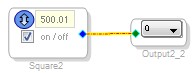
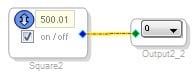
First of all, I noticed that your output channel and output port don't match.
Your DSP Output Channel is 0:
Your Serial Output Port is 1:
Because of the flexibility of the ADAU1445, this is not a problem. You simply have to use the Flexible Audio Routing Matrix (FARM) to send DSP Output Channels 0 and 1 to Serial Output Port 1. So, I checked your FARM configuration, and noticed that you are not outputting data to any of the serial ports. This is the reason why you get no audio output.
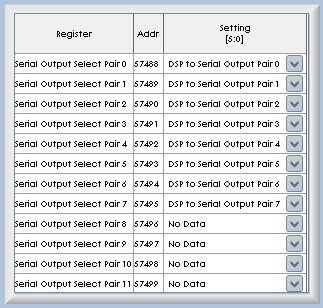
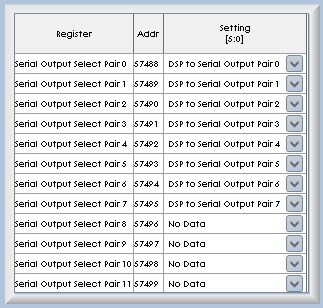
The settings should be changed to this:
This will route DSP to Serial Output Pair 0 (i.e. DSP Output Channels 0 and 1) to Serial Output Select Pair 1 (i.e. Serial Output Port 1).
Another issue with the register settings is that the FARM subsystem is not being clocked. Note that in the project's register settings, the FARM system is disabled:
Please enable it:
Try the attached project file. You should see data output on SDATA_OUT1.


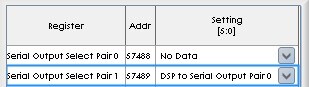




Hello Brett,
thank you for the reply. To be honest, I made this settings because I tought I know what I'm doing...
So... I'd like to use the easyest setup, wich I'll able to use with adau1446 as well.
I've read in some forum post, that it is completely irrelevant wich LRCK/BCK pair I use with any I2S out, when I'm in master mode. The only thing is to take care of, that I'm not allowed enable more than one LRCK/BCK pair. Is that true?
So If I'd like to use the easyest setup, then I should enable LRCK11/BCK11, that is attached to I2Sout2 based on this forum post https://ez.analog.com/message/8813#8813
So If I enable SerialOutput2 in SigmaStudio's Serial I/O section, I can see the clocks are ticking but I can't see anything on SdataOut2(pin no.90)
(and of course I have a signal generator connected to output4 or output5 in the schematic designer. output4-5, because 0-1 is Sdata0, 2-3 is Sdata1 and 4-5 should be Stada2)
Should I eanble any FARM setting in the situation I described above?
Tamas
uhh... I can really see the output is working in the schematic you gave me! Thanks! It is really great, that something works... But I can't see why is it working... Please explain me! These output and clock register settings are so mystic for me...
Tamas
The flexibility of the FARM system can be confusing. Pages 46-52 in the datasheet (Revision B) describe the routing of audio and clocks through the SigmaDSP.
When configuring the output ports, you have to start at the ports and work your way back in towards the core. Here's a step-by-step guide:
1. Serial Output Port Configuration : Configure all of the serial ports as desired, using the corresponding registers (addresses 0xE040 to 0xE049). If all ports are configured in 2-channel (I2S) mode, then the next steps will not be complicated. However, TDM complicates things, as you'll see in step 2. The serial output port configuration registers are shown here:
2. Automatic Output Channel Assignment : Determine what serial output ports will correspond to what FARM outputs (in the actual chip, this is automated by hardware, but you'll need to understand how data is routed). This requires an understanding of the Automatic Output Channel Assignment function, which is described in detail on page 51 (an example is shown in Figure 48).
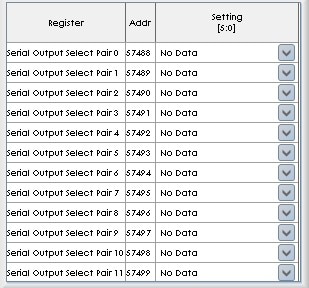
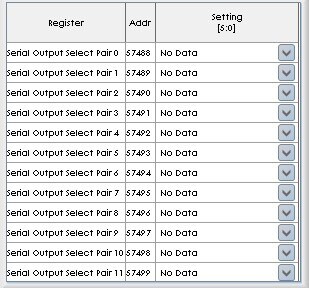
3. FARM Output Side Data Routing : Use the Serial Output Select Pair control register (addresses 0xE090 to 0xE09B, described on page 51 and figure 47), to route the DSP or ASRC output data to the Automatic Output Channel Assingment block. In SigmaStudio, the register appears like this:
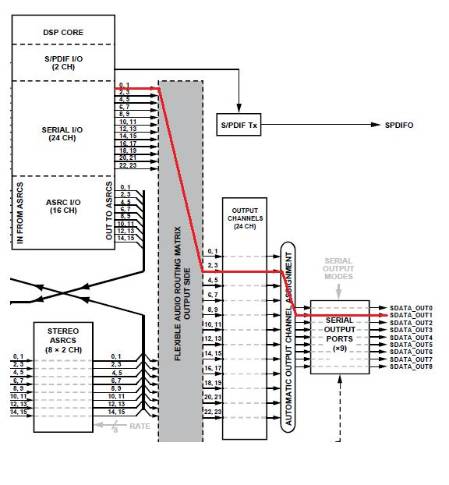
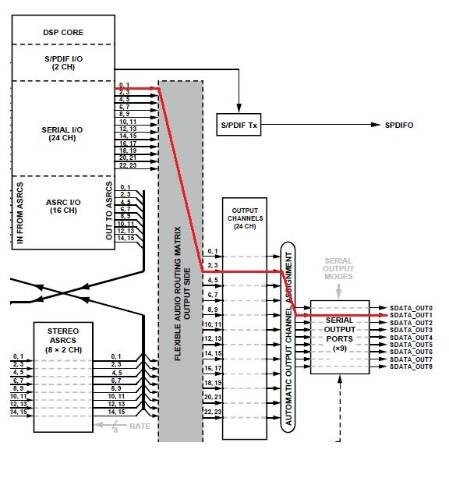
In your case, the routing ended up like this (follow the red line):
Only one clock is required for all serial ports in master mode that have the same settings for sample rate and # of channels.
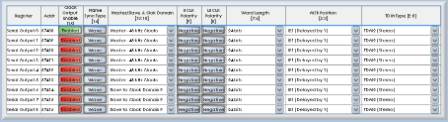
Thank you, for the step-by-step guide.
It was helpful!
Tamas
Please log in to reply.