ADAU1701 Self boot
I just implemented the program to take input from ADC and output it on DAC in SigmaStudio.But program is not working.
We are not using any Evaluation board , we have made all the circuit ourselves .We have used the circuit in application note AN-923(describing how to use ADAU1701 in Self Boot) except for we are using BC857 (instead of ZX5T953), EEPROM AT24C512, and crystal ABL-12.288MHZ-B2 (load capcitance=18pF).Also I have connected RESET and WB to DVDD.
I am attaching all the files generated by SigmaStudio, I am using file Eprom.hex in IC2 folder to burn EEPROM which i generated using
this pos
t.
I am just merely writing program in sigmastudio, i haven't configured any registers in sigmastudio because I think default value of registers will be sufficient to run this program.
Things I observe while testing circuit are
When nothing is connected to connected to ADC, the voltage at ADC inputs and the DAC ouputs is 1.5V.When I vary voltage give to ADC input (with a 100K potentiometer), then also the DAC ouputs remain 1.5V.
I am unable detect whether problem is in hardware or software. Is there anyway I can make sure the hardware is alright, any particular testing method? and if problem is in software can you suggest us any simple test program?
We donot want to use Write Back feature.Where should we connect WB pin to?
Also, what happens if the voltage at the core supply is 1.75V instead 1.8V?
Audio Signal Processors
testing
SigmaDSP Audio Processors
adau1701
self-boot
We are doing this for a college project so we can't afford the USBi interface right now. I am also working on the same project with him.
I tried reading back the EEPROM and I can read it back with a microcontroller, and I have checked byte by byte, so the EEPROM contains the correct data.
Can you suggest, what connections should I make to the Reset pin. Right now I have connected it to 3.3V. I am thinking of the using an RC instead, Can you tell how much should I keep the time constant. Or any other easily designable reset circuit.
Also what should I connect to the WriteBack pin? I don't want to use this Write back feature.
Is there anyway I can make sure that the EEPROM is being read by the processor?
Do you have a USBi board to directly communicate from SigmaStudio to your board? We would highly recommend that you have one of these so that you can do real-time programming and tuning of your design from SigmaStudio. These boards are available to order with part number EVAL-ADUSB2EBZ and are also included with all SigmaDSP evaluation boards.
The dc voltage you see on the ADCs and DACs is correct. These I/Os are dc-biased at 1.5 V. In order to connect these to external signals, the analog I/Os will typically be ac-coupled with capacitors, as you can see on the ADAU1701 evaluation board designs.
1.75 V on DVDD should be okay; it is only about 3% below the nominal 1.8 V value.
Are you able to read the data back out of your EEPROM? It would be helpful to verify that you are actually writing the correct data into the device. It may also be useful to look at your hardware schematic.
Again I would strongly encourage you to get a USBi board so that you can easily debug your design directly from SigmaStudio. The SigmaDSP read/write sequences and EEPROM loading routines in SigmaStudio have been tested to work well with the hardware, and it would be useful for your design to be able to take advantage of this real-time communication.
This previous forum thread discusses different options for connecting the /reset pin of the ADAU1701.
If you are not using writeback, then you can keep the WB pin pulled low. By default, the rising edge of WB will trigger a writeback (for more detail, see page 25 of the ADAU1701 datasheet).
When you power up your system, you should check if there is any communication on the I2C port between the ADAU1701 and the EEPROM. If you see I2C activity, then the ADAU1701 is properly attempting to perform the selfboot sequence.
Also what changes should I made in registers If I want to use ADC and DAC for our program(as I mentioned I think no changes should be made in default values). I don't require any digital IO pins. Can you suggest us any test program? So that if hardware is OK we can easily test circuit. And go ahead to implement the main program.
Your project is already set up to use the ADCs and DACs. Your program simply takes the inputs from pins 0 & 1 of the input block (ADCs) and sends the outputs to DAC0 and DAC1.
Since you have the ability to write to the I2C bus with your microcontroller, it might be useful to test writing a program and register settings directly to the ADAU1701, rather than selfbooting it from the EEPROM. When you click the link-compile-download button in SigmaStudio, you will see the data that the software would write to the hardware over the USBi interface in SigmaStudio's capture window (bottom of the tool). If you copy this data exactly and write it from your microcontroller, then you should see audio passing from ADCs to DACs. This would be a good test to verify that you hardware is properly set up.
Again, it would be helpful for you to post your schematics, so that we can verify if your hardware design is correct to work with the ADAU1701 in a selfboot configuration.
We were able to boot DSP using microcontroller. Program works fine when we directly connect ADC to DAC as shown in our previous program. We were able to listen same sound at DAC output whatever we provided at ADC input without any noise. But when I tested it for adding zero DC volt very high noise get added in DAC output. Also I observe that for every algorithm such as adders, subtractors, t-connections very high noise gets introduced making it impossible to process signal aftwerwards. I am attaching the program files. What will be the possible reasons? We are not using any filters at ADC and DAC. Just Input for ADC is amplified using ckt which is also attached as ckt.jpg.
sudoganesh wrote:
We are not using any filters at ADC and DAC.
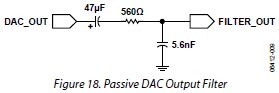
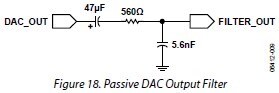
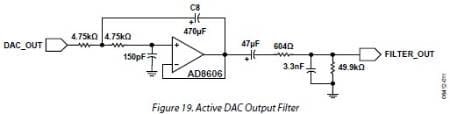
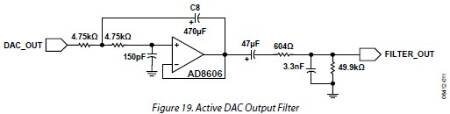
FIrst of all, you should definitely be using a filter on the DAC outputs. This is absolutely necessary to filter out-of-band noise that is introduced during the Delta-Sigma D/A conversion process and to remove any DC offset from the audio output signal. Details about the filters are given on page 19 of the Rev.0 datasheet (Figures 18 and 19). For reference, I've attached our recommended passive and active filters.
The behavior of the DAC outputs will be erratic and noisy without these filters.
I used your project file but I was unable to create any noise on the outputs. However, I expect that the source of the noise is not related to the signal processing in the project file, but rather in the hardware due to the lack of DAC output filters.
This question has been assumed as answered either offline via email or with a multi-part answer. This question has now been closed out. If you have an inquiry related to this topic please post a new question in the applicable product forum.
Thank you,
EZ Admin
Please log in to reply.